

Our verdict: HomeBank is a straightforward free program for tracking household money on one PC. Imports, automatic categories, budgets and reports cover what most households need, but there is no bank sync and no official mobile app.
About HomeBank
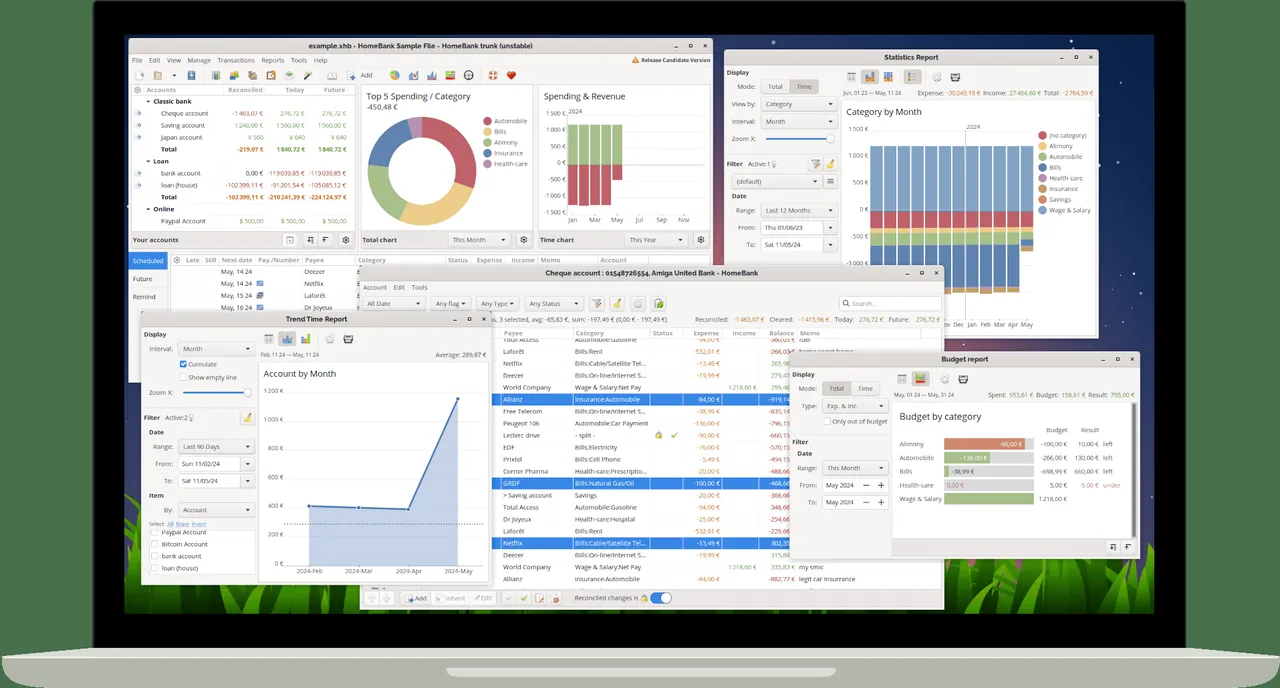
HomeBank is a personal finance manager with almost three decades of development, released under the GNU GPL and translated by its community. You create bank, cash, asset, credit card and liability accounts, enter or import transactions, and HomeBank groups them by category, payee and tag. Imports read QIF, OFX, QFX and CSV files from banks and from programs such as Quicken or Microsoft Money, with duplicate detection.
Scheduled transactions handle recurring bills, split transactions spread an amount over several categories, and rules assign payees and categories automatically. Reports show spending by category or over time, track a monthly or annual budget, forecast cash flow from scheduled transactions and even calculate vehicle costs and fuel consumption. All data is kept in a single XML file that is easy to back up.
What it does well
- Import bank files. Reads QIF, OFX, QFX and CSV, with duplicate detection.
- Scheduled transactions. Turns recurring bills and income into automatic entries.
- Budgets. Set monthly or annual amounts per category and compare with real spending.
- Reports and charts. Bar, line and donut charts by category, payee or period.
- Automatic assignment. Rules fill in payees and categories during entry and import.
Who it is for
Good fit
Households that want to track spending and budgets locally on a Windows PC without a subscription.
Look elsewhere
People who want automatic bank synchronisation, double-entry accounting or a phone app.
Pros and cons
Pros
- Free and open source
- Simple single-file data storage
- Good import options with duplicate detection
- Useful reports, budgets and cash flow forecast
Cons
- No automatic online bank sync
- No official Android or iOS app
- Interface looks dated next to modern budgeting apps
How to install HomeBank
The download button fetches the Windows setup from gethomebank.org; it includes the GTK libraries and also offers a portable edition during installation. Export bank statements as OFX or QIF to import them, and keep a copy of the .xhb data file as a backup.
Questions about HomeBank
Is HomeBank free?
Yes. HomeBank is free and open source under the GNU GPL, with no paid edition.
Can HomeBank import bank statements?
Yes. It imports QIF, OFX, QFX and CSV files and flags duplicate transactions.
Is there a HomeBank app for Android?
No. The developer states that there is no official Android version; apps with that name are not related to the project.


