
Audio · Published
The best free MP3 to MIDI converters for Windows
An MP3 contains sound, while a MIDI file contains notes: pitch, start, length and instrument. Converting one into the other is transcription, and no program does it perfectly. A solo piano or a clean vocal line converts well; a dense rock mix with distorted guitars and drums will always need manual cleanup in a piano roll or score editor.
The tools below take different routes. NeuralNote runs a modern AI model on your PC and separates a full mix by instrument, Sonic Visualiser with the Silvet plugin is a free analysis tool, AnthemScore aims at printable sheet music, and Melodyne and Ableton Live convert audio to MIDI inside professional music software. Online converters exist too, but they upload your song to someone else's server.
Our picks at a glance
| App | Best for | License | Price | Download |
|---|---|---|---|---|
 NeuralNote |
Free conversion of full songs, split by instrument | Open source | Free | Review |
 Sonic Visualiser |
A free, lightweight option for single instruments | Open source | Free | Review |
 AnthemScore |
Turning recordings into sheet music and tabs | Shareware | $29, one-time license (Lite; MIDI export needs Professional, $39) | Review |
 Melodyne |
The most precise note editing on vocals and solo instruments | Free trial | $99, one-time license (Melodyne 5 essential) | Review |
 Ableton Live |
Producers who already work in a DAW | Free trial | $99, one-time license (Live 12 Intro) | Review |
1. NeuralNote — Audio to MIDI Converter
Best for: Free conversion of full songs, split by instrument
- Open source
- Free
- AI tools
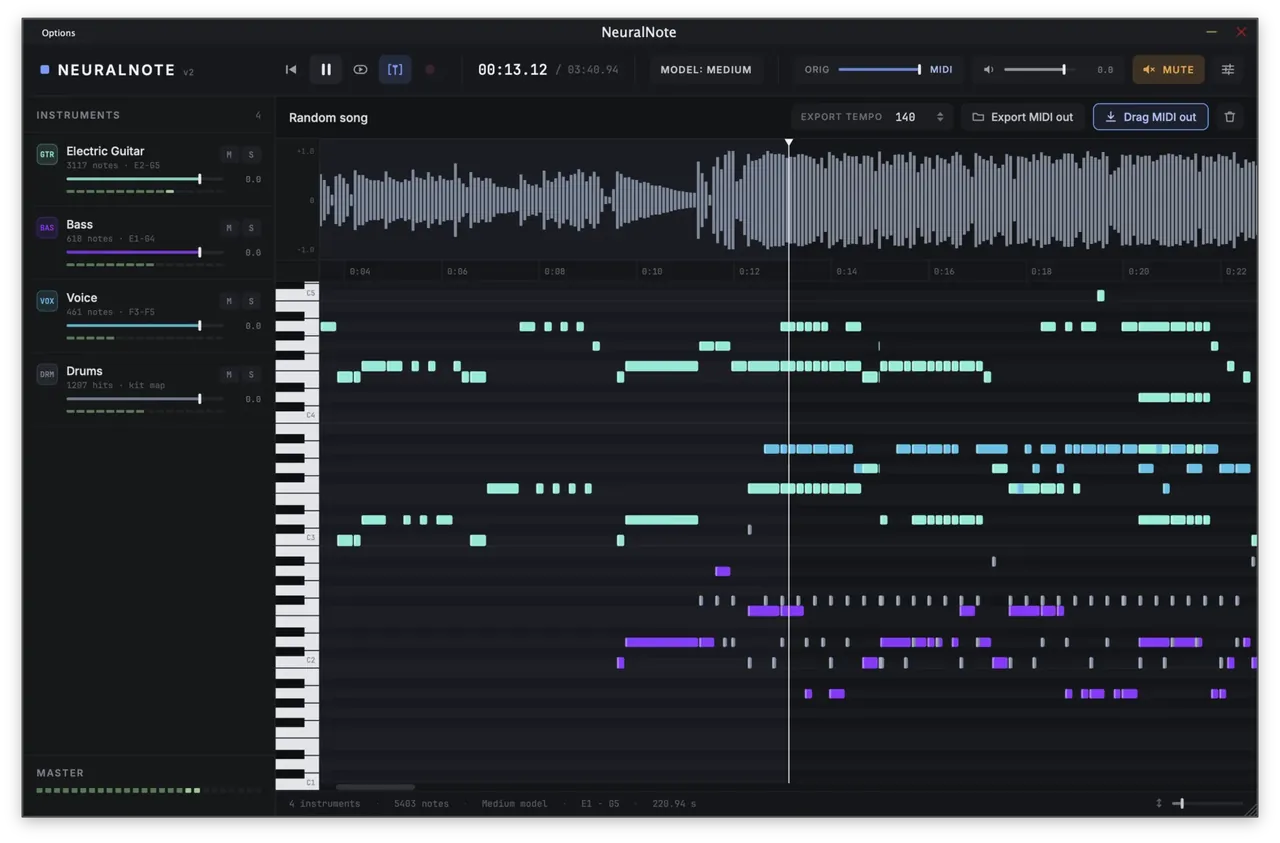

NeuralNote is the strongest free option. Version 2 uses the MuScriptor transcription model from Kyutai and Mirelo, which recognises 35 instrument groups, so a full mix comes out as separate guitar, bass, voice and drum parts instead of one tangle of notes. You drop an MP3 onto the window, pick the instruments or choose Automatic, click Transcribe and then drag the MIDI into your DAW or save it as a file.
It works as a standalone app and as a VST3 plugin, and it runs fully offline once a model is downloaded. The small model is about 210 MB; the large one is about 2.7 GB and needs a GPU to be usable. The app does not detect velocity, tempo or key, and the model weights are licensed for non-commercial use only, which matters if you transcribe for paid work.
Pros
- Free, with open-source code
- Transcribes full mixes by instrument
- Runs fully offline after the model download
Cons
- Model weights are licensed for non-commercial use only
- No velocity, tempo or key detection
- Installer is not code signed; large models need a GPU
2. Sonic Visualiser — Audio Analysis Tool
Best for: A free, lightweight option for single instruments
- Open source
- Free
- Audio
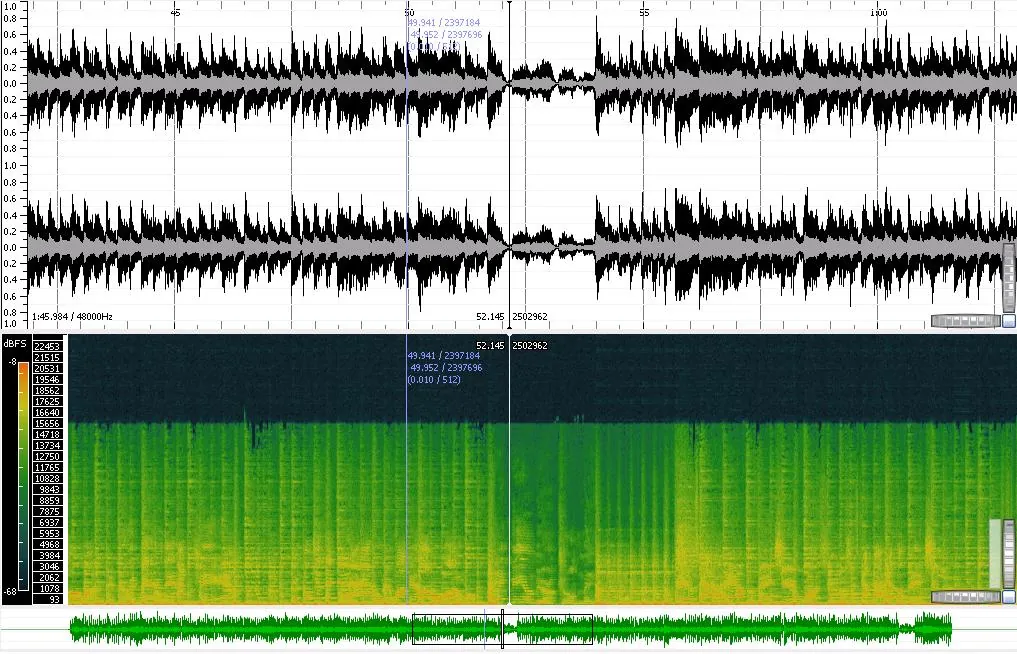

Sonic Visualiser is a free, open-source audio analysis program from Queen Mary University of London. On its own it does not transcribe, but with the free Silvet Vamp plugin installed it gains a Silvet Note Transcription transform that turns polyphonic audio into a note layer. You then export that layer as a MIDI file.
It is the most technical route: you install the plugin by hand and work with layers and transforms instead of a single Transcribe button. Results are best on one instrument, such as a piano recording. Silvet does not separate a full band into parts the way NeuralNote does.
Pros
- Excellent spectrogram views
- Flexible layers and annotations
- Extensible with Vamp plugins
Cons
- No audio editing
- Analysis plugins must be installed separately
- No VST plugin support
3. AnthemScore — Audio to Sheet Music Converter
Best for: Turning recordings into sheet music and tabs
- Shareware
- $29, one-time license (Lite; MIDI export needs Professional, $39)
- Audio
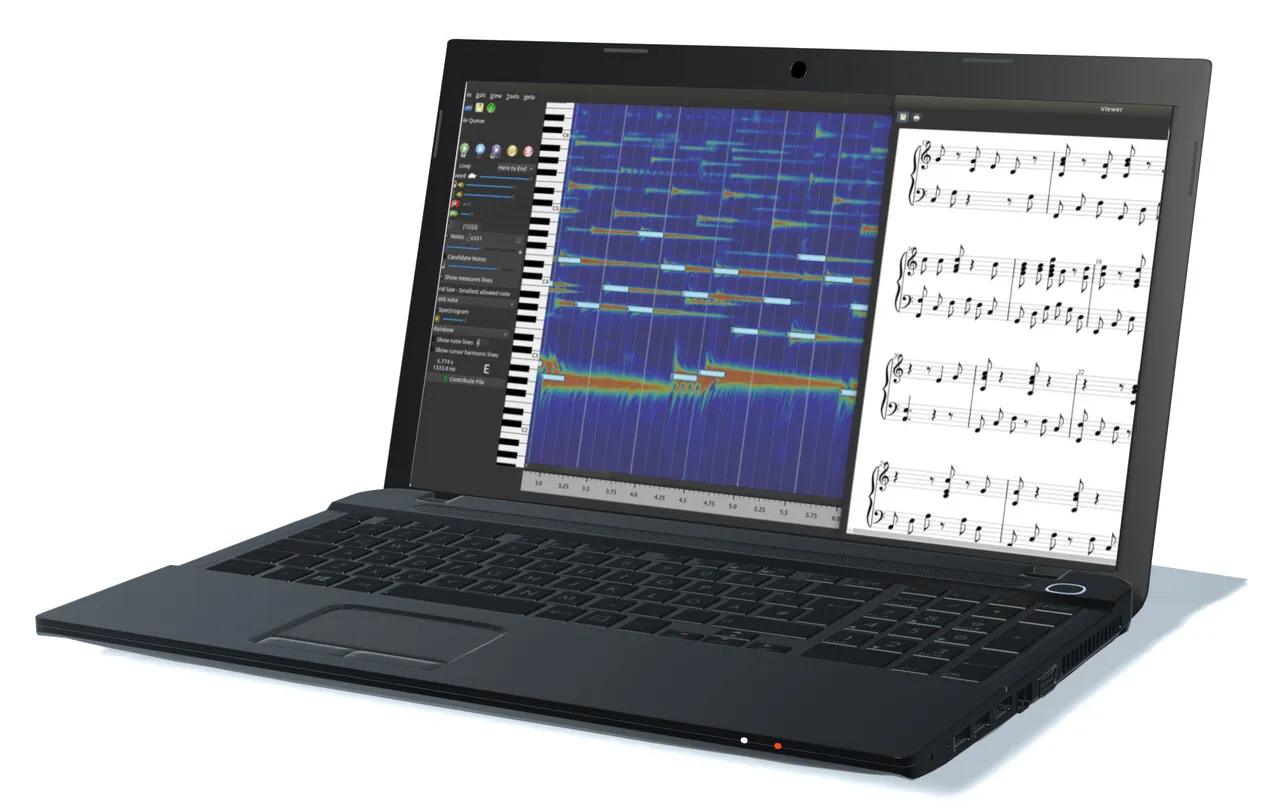
AnthemScore is built for musicians who want notation. It detects notes, beats and instruments, lays them out as sheet music or tablature, and gives you good tools to fix the result: click to add or remove notes, tap downbeats to set measures, change the key per measure and slow playback down without changing pitch.
It is not free. The trial has no time limit but transcribes only the first 30 seconds of each song, up to 100 transcriptions. MIDI and MusicXML export need the Professional edition at $39; the $29 Lite edition saves and prints PDF sheet music only. The licenses are one-time purchases.
Pros
- Sheet music, tabs, MusicXML and MIDI from audio
- Good tools for correcting notes and beats
- One-time license, no subscription
Cons
- Trial transcribes only the first 30 seconds of each song
- MIDI export requires the $39 Professional edition
- Results on dense mixes need manual correction
4. Melodyne — Pitch Correction Editor
Best for: The most precise note editing on vocals and solo instruments
- Free trial
- $99, one-time license (Melodyne 5 essential)
- Audio
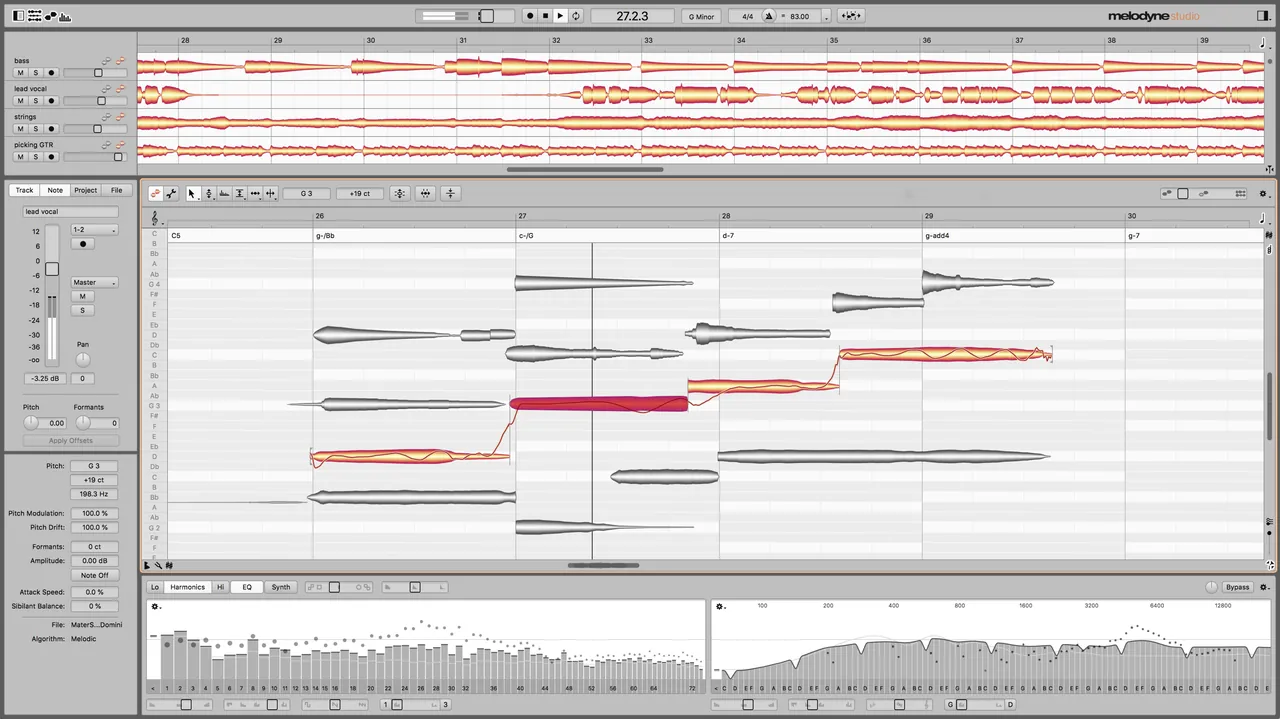
Melodyne detects every note in a recording as an editable blob and can export what it finds as MIDI. In the standalone version you open the audio file, check the detected notes and use File > Export to save a MIDI file. Its strength is accuracy on monophonic material such as vocals, bass or a solo instrument, where you can correct pitch and timing before you export.
Audio-to-MIDI export is available in the assistant, editor and studio editions, not in the cheapest essential edition. The 30-day trial is the full studio edition, so you can test the conversion on your own songs before deciding, but after the trial Melodyne is a paid product.
Pros
- Very natural pitch and timing correction
- Full studio edition for 30 days
- Works inside DAWs via ARA
Cons
- Trial stops after 30 days and runs once per PC
- Internet needed at each launch of the trial
- Essential edition lacks polyphonic editing
5. Ableton Live — Digital Audio Workstation
Best for: Producers who already work in a DAW
- Free trial
- $99, one-time license (Live 12 Intro)
- Audio
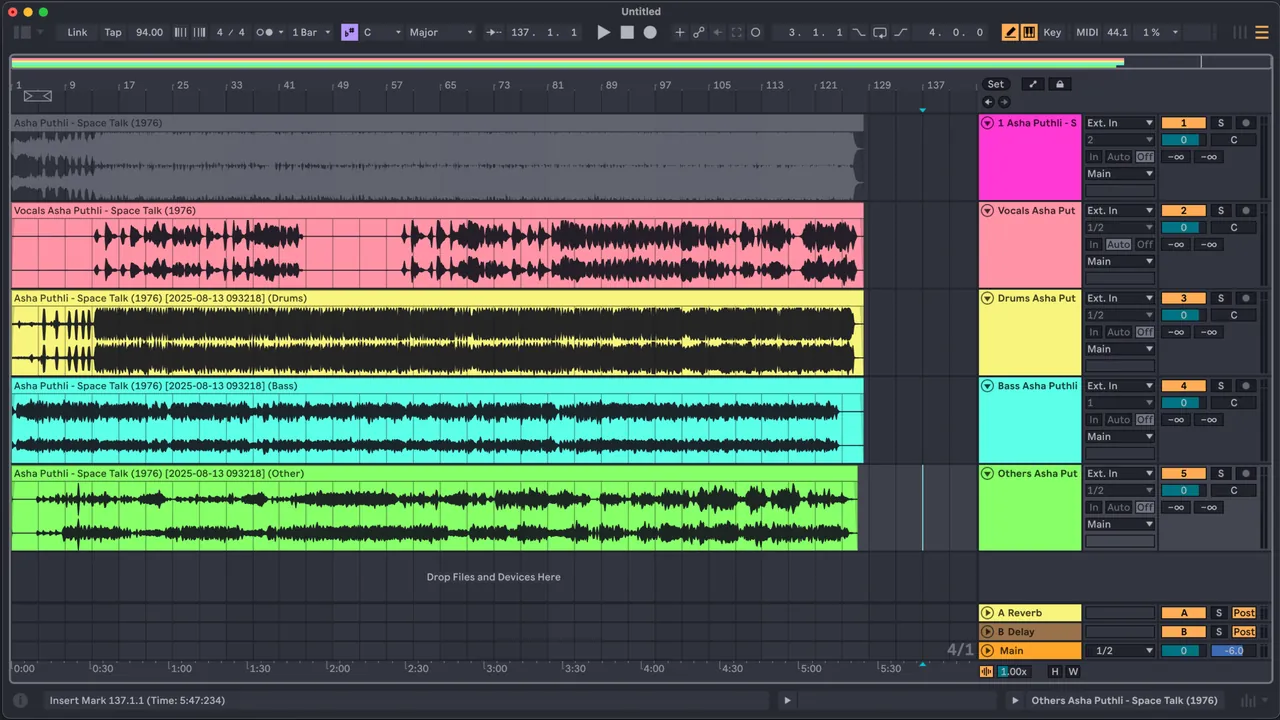
Ableton Live 12 has three built-in commands: Convert Harmony, Convert Melody and Convert Drums to New MIDI Track. You right-click an audio clip, choose the right one, and Live creates a MIDI track with the notes and a matching instrument. It is the fastest route if you want the MIDI inside a project right away.
The conversion is in the Standard and Suite editions, not in Intro. The free 30-day trial is the full Suite, so it works for a one-off job, but buying Live only for MP3 to MIDI is expensive compared with NeuralNote.
Pros
- Full Suite features during the trial
- Unique Session View for ideas and performance
- Excellent audio warping
Cons
- No saving or exporting after 30 days
- Intro edition limited to 16 tracks
- Suite is expensive at $749
How to convert an MP3 to MIDI with NeuralNote
- Download and install NeuralNote from its official site; Windows may show a SmartScreen warning because the installer is not code signed.
- Open the standalone app and download a model when it asks. Start with medium on a PC with a graphics card and small on a CPU-only laptop.
- Drag the MP3 file onto the NeuralNote window.
- Select the instruments you hear in the song, or leave Automatic on. Naming the right instruments usually gives better results.
- Click Transcribe and listen to the preview while it works. Mute or solo instruments to check each part.
- Drag the MIDI onto a track in your DAW or save it as a MIDI file, then fix wrong notes in a piano roll.
What converts well and what does not
Clean recordings with one or two instruments give the best MIDI. Piano, acoustic guitar, bass lines and a solo voice are the easiest cases. Heavy distortion, reverb, dense chords and loud drums confuse every converter, and you will spend time deleting ghost notes and fixing octaves.
If you only need one part of a song, it often helps to separate it first with Ultimate Vocal Remover or iZotope RX and convert the isolated vocal or bass track. To turn the MIDI into a readable score afterwards, open it in MuseScore.
Free or paid?
For most people NeuralNote is enough, as long as the project is not commercial. Sonic Visualiser with Silvet is a free fallback for single instruments. Pay for AnthemScore if the goal is printed sheet music, for Melodyne if you need note-by-note accuracy on vocals or solo lines, and for Ableton Live only if you also want a full music production app.
Frequently asked questions
Can you convert an MP3 to MIDI for free?
Yes. NeuralNote is free and converts full songs into MIDI on your PC, split by instrument. Sonic Visualiser with the free Silvet plugin is another option for single instruments.
What is the most accurate MP3 to MIDI converter?
It depends on the material. NeuralNote handles full mixes best among free tools, while Melodyne gives the most control over individual notes on vocals and solo instruments. No converter is perfect, so expect to correct the result.
Can I convert MP3 to MIDI without uploading the song?
Yes. Every program in this guide runs on your own PC. NeuralNote only goes online to download its model and check for updates.
Does Audacity convert MP3 to MIDI?
No. Audacity edits audio but has no audio-to-MIDI transcription. Use NeuralNote or Sonic Visualiser with Silvet instead.
Can I turn an MP3 into sheet music?
Yes. AnthemScore creates sheet music and tabs directly. You can also convert the song to MIDI with NeuralNote and open the MIDI file in MuseScore to get a score.
ExeDepot does not host installers. Every download button opens the developer's own server or official download page. Prices and licenses come from each developer's site and were checked on .