
Utilities · Published
The best backup software for Windows
There are two kinds of backup, and most people need both. A system image copies the whole disk, including Windows and your programs, so a dead drive or a failed update can be undone by restoring the image. A file backup copies chosen folders, usually on a schedule and with older versions kept, so you can bring back a document you overwrote last week.
The tools below are grouped that way. Some free editions are generous, others hold back features such as cloning the system disk to a new SSD. Two well-known names, Macrium Reflect and Acronis True Image, no longer have free editions at all, so they are listed last with their prices.
Our picks at a glance
| App | Best for | License | Price | Download |
|---|---|---|---|---|
 Veeam Agent for Microsoft Windows FREE |
A free full-system image to a USB drive or NAS | Freeware | Free | Review |
 AOMEI Backupper Standard |
Scheduled system and file backups with many targets | Freeware | Free | Review |
 EaseUS Todo Backup Free |
Encrypted images to a NAS or FTP server | Freeware | Free | Review |
 Rescuezilla |
Imaging or cloning a PC that no longer boots | Open source | Free | Review |
 Duplicati |
Encrypted file backups to your own cloud account | Open source | Free | Review |
 Kopia |
Fast, deduplicated snapshots for technical users | Open source | Free | Review |
 Macrium Reflect Home |
Fast imaging and restores, if you accept a subscription | Free trial | $49.99, per year, 1 PC | Review |
 Acronis True Image |
Backup, cloning and cloud storage from one vendor | Free trial | $49.99, per year, 1 computer (Essentials) | Review |
1. Veeam Agent for Microsoft Windows FREE — Backup Software
Best for: A free full-system image to a USB drive or NAS
- Freeware
- Free
- Utilities

Veeam Agent FREE is built on the same technology as Veeam's business backup products. It backs up the entire computer, single volumes or chosen folders to an external drive, an SMB network share or a Veeam repository, and backs up BitLocker volumes while they are unlocked. The recovery media wizard creates a bootable USB stick, disc or ISO for bare-metal restores, and single files can be restored from any backup.
The free edition allows only one backup job, with no direct backup to object storage or Veeam Cloud Connect. The download needs a free Veeam account, it runs only on 64-bit Windows, and exFAT drives are not supported as backup targets. For several jobs on one PC, AOMEI Backupper is more flexible.
Pros
- Full-system image backups for free
- Bootable recovery media for bare-metal restore
- Backs up to USB drives, NAS or a Veeam server
Cons
- Download requires a Veeam account
- Free edition is limited to one backup job
- 64-bit Windows only; exFAT drives are not supported as backup targets
2. AOMEI Backupper Standard — Backup Software
Best for: Scheduled system and file backups with many targets
- Freeware
- Free
- Utilities

AOMEI Backupper Standard backs up Windows, whole disks, partitions or individual files on a schedule with incremental backups. Targets include internal and external drives, USB sticks, network shares, NAS, cloud drive folders and discs. It also syncs folders on a schedule and creates bootable recovery media.
The free edition is for home use only and clones only data disks: moving the system disk to a new SSD, differential backups, encryption, real-time and two-way sync, cleanup schemes and Universal Restore need the paid Professional or Workstation edition. For a free system disk clone, Rescuezilla can do it from a USB stick.
Pros
- System, disk, partition and file backups for free
- Scheduled and incremental backups
- Wide choice of backup targets
Cons
- System disk cloning, encryption and differential backup need a paid edition
- Free edition is for home use only
- AOMEI cloud backup is only a 15-day trial in the free edition
3. EaseUS Todo Backup Free — Backup Software
Best for: Encrypted images to a NAS or FTP server
- Freeware
- Free
- Utilities

EaseUS Todo Backup Free backs up files, the Windows system, or whole disks and partitions with full, differential and incremental modes, on a daily, weekly or monthly schedule. Backups can be password-protected and saved to local or external drives, NAS, network shares or FTP servers. The free edition includes a 30-day trial of 250 GB of EaseUS cloud storage.
Disk and system cloning, transferring Windows to a different PC and Universal Restore are only in the paid Home edition, and the app regularly prompts you to upgrade. Compared with AOMEI Backupper, it adds free differential backups and encryption.
Pros
- Incremental and differential backups for free
- Scheduled and encrypted backups
- System, disk and file backup in one app
Cons
- Disk cloning, system clone and Universal Restore require the paid Home edition
- Frequent prompts to upgrade inside the app
- Cloud storage is only a 30-day trial
4. Rescuezilla — Disk Imaging Tool
Best for: Imaging or cloning a PC that no longer boots
- Open source
- Free
- Utilities
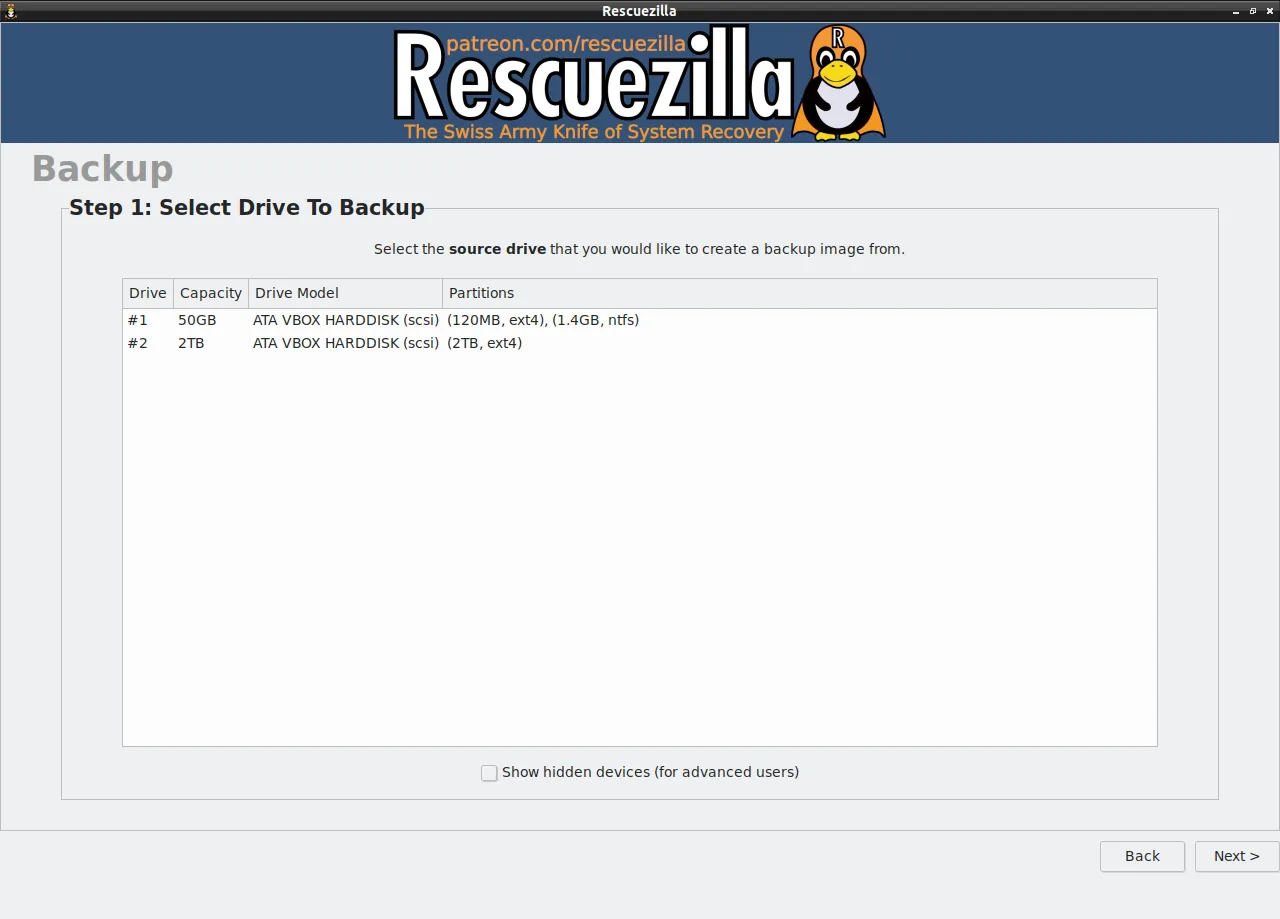

Rescuezilla is not a Windows program but a small live system: you write its ISO to a USB stick, restart the PC from it, and then save a disk image to an external drive, restore one or clone a disk to another, for example when moving to an SSD. Because it runs from memory, it works even when Windows does not start, and it includes a web browser and file recovery tools.
It is fully compatible with Clonezilla images and reads VirtualBox, VMware and QEMU images. It cannot schedule backups from inside Windows and backs up whole disks or partitions rather than folders. You need a separate USB stick and an external drive, and at least 1 GB of RAM.
Pros
- Free and open source
- Simple graphical interface for disk imaging
- Works when Windows does not start
Cons
- Must be booted from USB; no scheduled backups from Windows
- Backs up whole disks or partitions, not individual folders
- Needs a separate USB stick and external drive
5. Duplicati — Backup Software
Best for: Encrypted file backups to your own cloud account
- Open source
- Free
- Utilities
Duplicati backs up folders on a schedule to almost any destination: local and external drives, network shares, FTP and SFTP servers, Amazon S3, Azure, Google Cloud, Backblaze B2, Dropbox, OneDrive, box.com and others. Data is encrypted with AES-256 on your PC before upload, only changed blocks are sent after the first run, and retention rules decide how many versions to keep.
It backs up files, not a full system image. The interface runs in your web browser from a small local server, and upgrades require uninstalling the old version first. The backup client is open source under the MIT License and free.
Pros
- Free and open source
- Huge choice of cloud and local destinations
- Encryption before upload
Cons
- Files only, no full system image
- Interface runs in a web browser
- Upgrades require uninstalling the old version first
6. Kopia — Backup Software
Best for: Fast, deduplicated snapshots for technical users
- Open source
- Free
- Utilities

Kopia saves snapshots of chosen folders into an encrypted repository on a local or network drive, an SFTP or WebDAV server, or cloud storage such as S3, Azure, Backblaze B2 and Google Cloud Storage. Encryption is always on, only changed parts of files are uploaded, and identical or moved files are stored once, so frequent backups stay small. A snapshot can be mounted as a drive to copy single files out.
Like Duplicati, it backs up files rather than a bootable system image. Some advanced features are only in the command line, Google Drive and OneDrive work only through Rclone, which the project calls experimental, and a lost repository password means lost backups.
Pros
- Free and open source
- Client-side encryption is always on
- Fast incremental backups with deduplication
Cons
- Backs up files only, not a bootable system image
- Some advanced features are only in the command line
- A lost repository password means lost backups
7. Macrium Reflect Home — Backup Software
Best for: Fast imaging and restores, if you accept a subscription
- Free trial
- $49.99, per year, 1 PC
- Utilities

Macrium Reflect Home creates disk images and file backups on a schedule, resumes interrupted backups, restores only changed blocks with Rapid Delta Restore, and blocks other programs from changing its backup files with Image Guardian. Macrium publishes its backup formats as open source and supports ARM-based Windows PCs.
The old free edition is gone; Macrium's own FAQ says the only free version is the 30-day trial, started from a Macrium account without a card. Reflect Home costs $49.99 a year for one PC, and when a subscription ends the app falls back to restore-only mode, so existing backups stay restorable.
Pros
- Fast imaging and restores
- Ransomware protection for backup files
- Resumes interrupted backups
Cons
- No free edition any more, only a 30-day trial
- Yearly subscription; after it ends the app is restore-only
- Trial requires a Macrium account
8. Acronis True Image — Backup Software
Best for: Backup, cloning and cloud storage from one vendor
- Free trial
- $49.99, per year, 1 computer (Essentials)
- Utilities
Acronis True Image backs up whole disks, partitions or files with incremental and differential backups, clones the running Windows disk to a new drive, restores to different hardware and builds the Acronis Survival Kit, one external drive that holds both the backup and the recovery tools. Anti-ransomware protection is in every plan.
There is no free edition, only a 30-day trial. The Essentials plan costs from $49.99 a year for one computer; cloud backup, Microsoft 365 backup and real-time anti-malware are reserved for the pricier Advanced and Premium plans. The installer is about 780 MB.
Pros
- Clones the running system disk
- Restores to different hardware
- Rescue drive with backup in one
Cons
- No free edition; yearly subscription after the 30-day trial
- Very large installer, about 780 MB
- Cloud backup and anti-malware cost extra over the base plan
System image or file backup
Choose an imaging tool, Veeam Agent, AOMEI Backupper, EaseUS Todo Backup or Rescuezilla, if you want to get the whole PC back after a disk failure without reinstalling Windows and every program. Choose a file backup tool, Duplicati or Kopia, for documents and photos that change often and should go off-site, encrypted, to cloud storage you control.
A simple plan for a home PC is a weekly system image to an external drive plus a daily encrypted file backup to the cloud. A synced folder in OneDrive or Google Drive is not a backup on its own, because a deletion syncs too.
Moving Windows to a new SSD
Cloning the system disk is the feature free editions most often lock. AOMEI Backupper Standard clones only data disks and EaseUS Todo Backup Free does not clone at all. Rescuezilla clones a whole disk for free from a USB stick, and Acronis True Image can clone the running Windows disk on a paid plan. Partition tools such as MiniTool Partition Wizard are another route.
Test the restore, not only the backup
A backup you have never restored is a guess. After setting up an imaging tool, create its recovery USB stick and check that the PC boots from it and can see the backup drive. For file backups, restore one folder to a different location and open a few files.
Frequently asked questions
What is the best free backup software for Windows?
Veeam Agent FREE for one reliable full-system backup, or AOMEI Backupper Standard if you want several scheduled jobs and many backup targets. For encrypted file backups to the cloud, use Duplicati.
Is Macrium Reflect still free?
No. The free edition was discontinued. Macrium offers a 30-day trial, then Reflect Home costs $49.99 a year per PC; without a license it only restores existing backups.
Does Windows 11 have built-in backup?
Windows Backup syncs folders, settings and apps to OneDrive, and File History can copy files to another drive. Neither replaces a full disk image that restores Windows and programs after a drive failure.
How do I clone my hard drive to an SSD for free?
Boot Rescuezilla from a USB stick and use its disk clone function. The free editions of AOMEI Backupper and EaseUS Todo Backup do not clone the system disk.
What is the difference between incremental and differential backups?
An incremental backup saves what changed since the last backup of any kind. A differential backup saves what changed since the last full backup, so each one grows larger but a restore needs fewer pieces.
Can I back up my PC to Google Drive or OneDrive?
File backups, yes: Duplicati uploads encrypted backups to OneDrive, Dropbox, S3 and others, and Kopia reaches Google Drive and OneDrive through Rclone. Full system images are better kept on an external drive or NAS.
ExeDepot does not host installers. Every download button opens the developer's own server or official download page. Prices and licenses come from each developer's site and were checked on .