

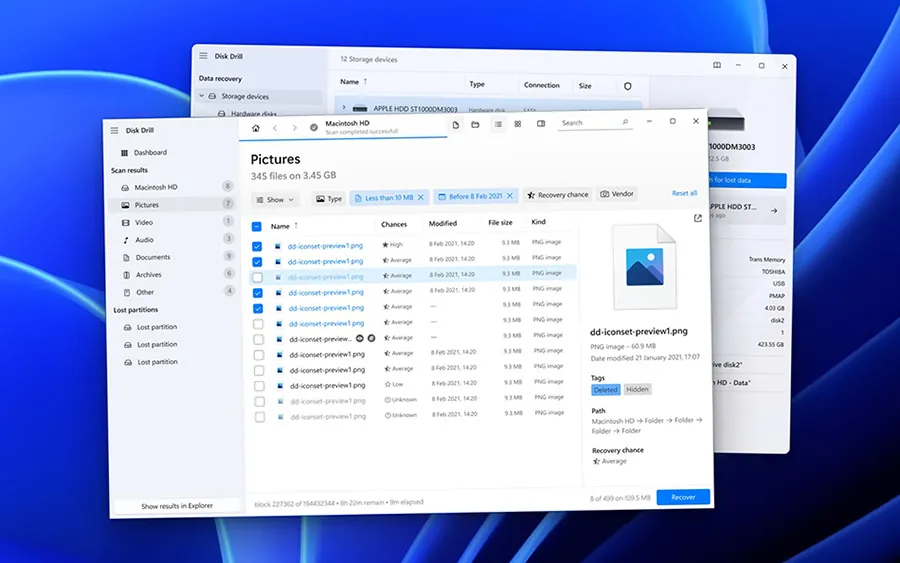
Our verdict: Disk Drill has one of the most modern interfaces among recovery tools, and the free Basic edition shows everything it can find before you pay. It recovers only 100 MB for free, so in practice it is a way to test whether your files are recoverable before buying the PRO license.
About Disk Drill
Disk Drill is developed by CleverFiles. It scans internal and external drives, memory cards, USB sticks, RAID arrays and disk images, groups the found files into pictures, videos, documents and other types, and shows a recovery chance for each file. Its Advanced Camera Recovery module rebuilds fragmented videos from cameras and drones.
The free Basic edition lets you scan and preview without limits and recover up to 100 MB. It also keeps free tools such as Recovery Vault, which protects chosen folders against accidental deletion, and byte-level backups of failing disks. Unlimited recovery needs Disk Drill PRO, which CleverFiles lists at $89 for a one-year subscription for one user on up to three devices; a lifetime license is also offered. No account or card is needed for the free edition.
What it does well
- Quick and deep scan. Searches file system records first, then scans the whole disk for known file signatures.
- Preview and recovery chances. Shows a preview and an estimate of how intact each found file is.
- Advanced Camera Recovery. Rebuilds fragmented video files from cameras, drones and action cams.
- Recovery Vault. Keeps extra metadata for chosen folders so deleted files can be restored in one click.
- Byte-level backups. Copies a failing disk to an image so you can recover from the copy instead.
Who it is for
Good fit
Users who want to check quickly whether lost photos or documents can still be recovered, and are ready to pay for a large recovery.
Look elsewhere
Anyone who needs to recover more than 100 MB without paying; free tools like Recuva or TestDisk have no data cap.
Pros and cons
Pros
- Modern, clear interface
- Unlimited free scanning and preview
- Free data protection and disk backup tools
- Rebuilds fragmented camera videos
Cons
- Free recovery is capped at 100 MB
- PRO costs $89 per year or more for a lifetime license
- Needs at least 4 GB of RAM and 1 GB of disk space
How to install Disk Drill
The button downloads the official Windows installer from CleverFiles. Install it on a different drive from the one you want to recover, and save recovered files to another drive too. The free edition starts without an account; enter a PRO activation code later to unlock unlimited recovery.
Questions about Disk Drill
Is Disk Drill free?
Only partly. The free Basic edition scans and previews without limits and recovers up to 100 MB, with no account or card needed. Unlimited recovery requires Disk Drill PRO, listed at $89 for one year; a lifetime license is also offered.
Can Disk Drill recover files from an SSD?
Sometimes. On SSDs with TRIM, Windows erases deleted blocks soon after deletion, so recovery chances drop quickly.
Does Disk Drill work on Windows 7?
Not the current version. CleverFiles still offers older Disk Drill versions for Windows 7, 8 and XP on its site.


