

Our verdict: FontForge is the only mature free tool for designing complete fonts on Windows. It covers drawing, spacing, kerning, hinting and format conversion, and it can be scripted with Python. The interface is dated and unusual, so expect to spend time with the manual.
About FontForge
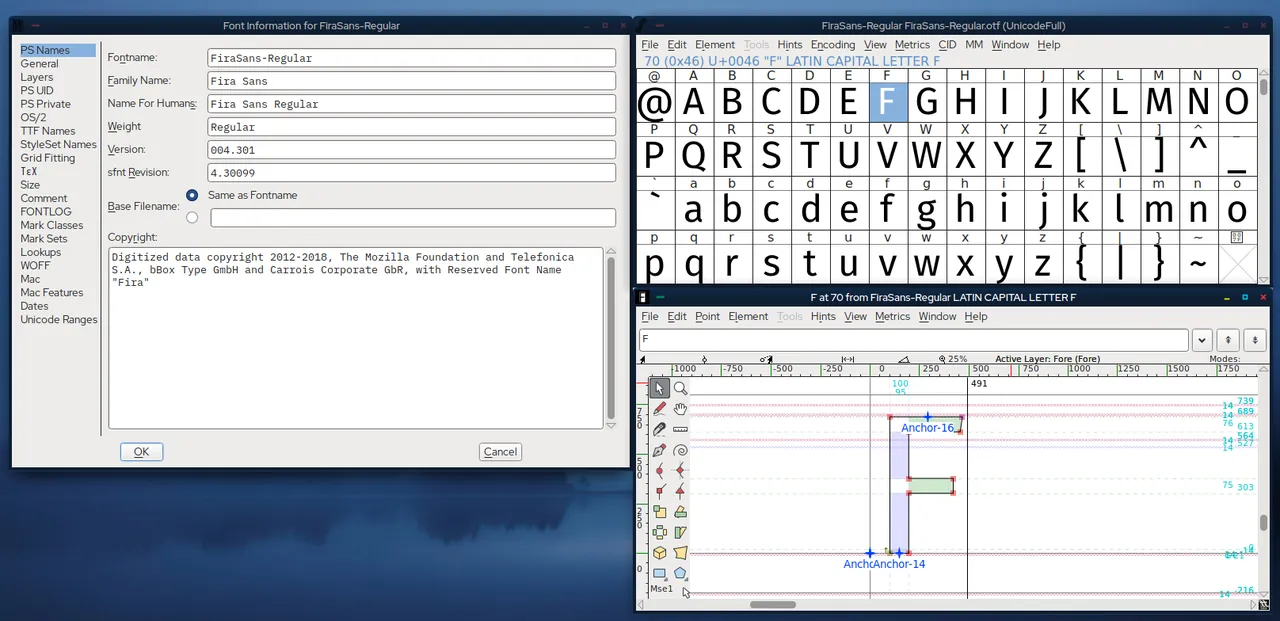
FontForge was started by George Williams and is now maintained by an open source community under the GNU GPL v3 or later. It edits outline fonts at every level, from individual Bézier points in a glyph to font-wide metadata, and it has been used to produce many open fonts.
Beyond drawing, it handles spacing and kerning, OpenType features, hinting and validation of glyphs for common errors. It opens and generates a wide range of formats, so it is also used just to convert fonts. Repetitive work can be automated with Python or FontForge's own scripting language.
What it does well
- Glyph editor. Draw and edit outlines with cubic or quadratic Bézier curves, layers and guides.
- Metrics and kerning. Set side bearings, kerning pairs and kerning classes with a preview.
- OpenType features. Create ligatures, substitutions and positioning lookups.
- Format conversion. Opens and generates OpenType (OTF), TrueType (TTF), WOFF, SVG fonts and more.
- Scripting. Automate tasks with Python or the built-in FontForge script language.
Who it is for
Good fit
Type designers on a budget, students learning type design and developers who need to fix, subset or convert fonts.
Look elsewhere
Designers who want a modern, polished interface; commercial font editors are much easier to learn.
Pros and cons
Pros
- Complete font editing for free
- Reads and writes many font formats
- Python scripting for batch work
- Validation tools catch outline errors
Cons
- Dated, non-standard interface
- Steep learning curve
- Infrequent releases
How to install FontForge
The Windows download page invites you to subscribe to the announcement list; the same 64-bit installer is published on FontForge's official GitHub releases, so no sign-up is needed. Releases are named by date, such as 20251009.
Questions about FontForge
Is FontForge free?
Yes. FontForge is open source under the GNU GPL v3 or later and free for any use. Fonts you create with it are yours to license as you wish.
Can FontForge convert TTF to OTF?
Yes. Open the font and use File > Generate Fonts to export it as OpenType, TrueType, WOFF and other formats.
Does FontForge support scripting?
Yes. It can be scripted with Python or its own legacy scripting language, from the GUI or the command line.


