

Our verdict: fre:ac is a straightforward, ad-free converter and CD ripper. It converts whole folders while keeping their structure and uses all CPU cores for speed. The last stable release dates from 2023, so newer fixes are only in test builds.
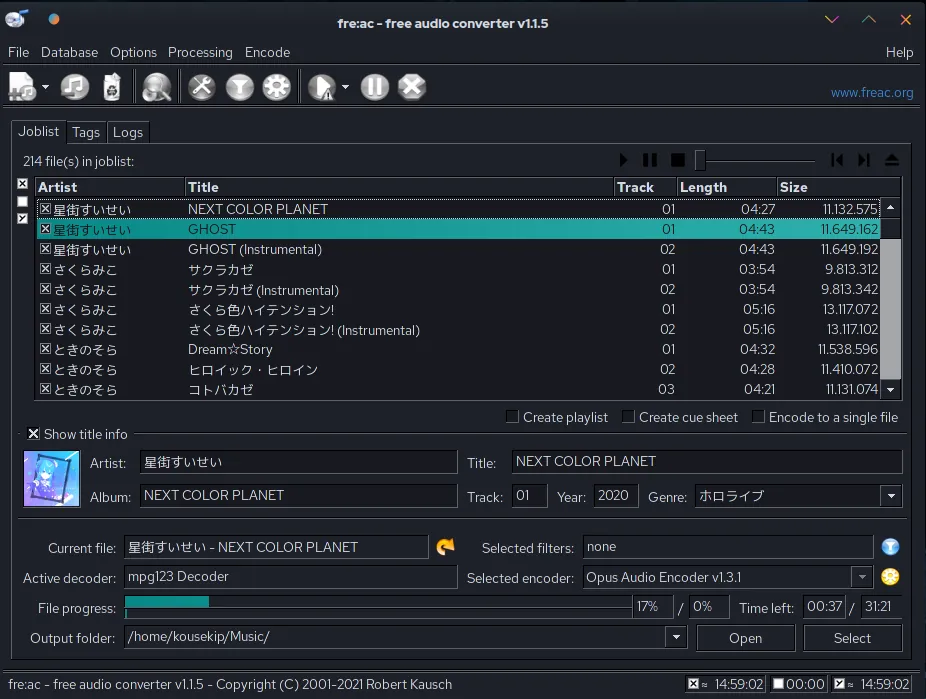
About fre:ac
fre:ac is developed by Robert Kausch and released as open source under the GNU GPL. The project states it comes without adware and relies on donations.
It converts between MP3, M4A/AAC, FLAC, WMA, Opus, Ogg Vorbis, WAV and other formats. The built-in CD ripper looks up track titles in GNUdb and verifies rips with AccurateRip.
What it does well
- Format conversion. Converts freely between MP3, AAC, FLAC, Opus, Vorbis, WMA, WAV and more.
- CD ripper. Rips audio CDs with GNUdb title lookup and AccurateRip verification.
- Multi-core encoders. MP3, AAC and Opus encoders use several CPU cores at once.
- Folder conversion. Converts whole libraries and keeps the folder and file name structure.
- Portable mode. Runs from a USB stick and keeps its settings there.
Who it is for
Good fit
People who need to convert large music folders or rip CDs without ads or limits.
Look elsewhere
People who need an audio editor or want frequent stable updates.
Pros and cons
Pros
- No ads or bundled offers
- Fast multi-core encoding
- Keeps folder structure when converting
- Portable version
Cons
- Last stable release is from 2023
- Interface looks dated
How to install fre:ac
Download the 64-bit installer from freac.org; a portable .zip and a Microsoft Store version are also offered. Pick the output format and folder in the main window before adding files.
Questions about fre:ac
Is fre:ac free?
Yes. It is open source under the GNU GPL with no paid version.
Can fre:ac convert FLAC to MP3?
Yes. Add the files, choose the MP3 encoder and start the conversion.


