

Our verdict: HWiNFO is the most thorough free hardware monitor for Windows. It shows almost every sensor your PC exposes and can log them, alert on them and show them in the tray. The amount of data can be overwhelming, and the free version may not be used commercially beyond a 14-day evaluation.
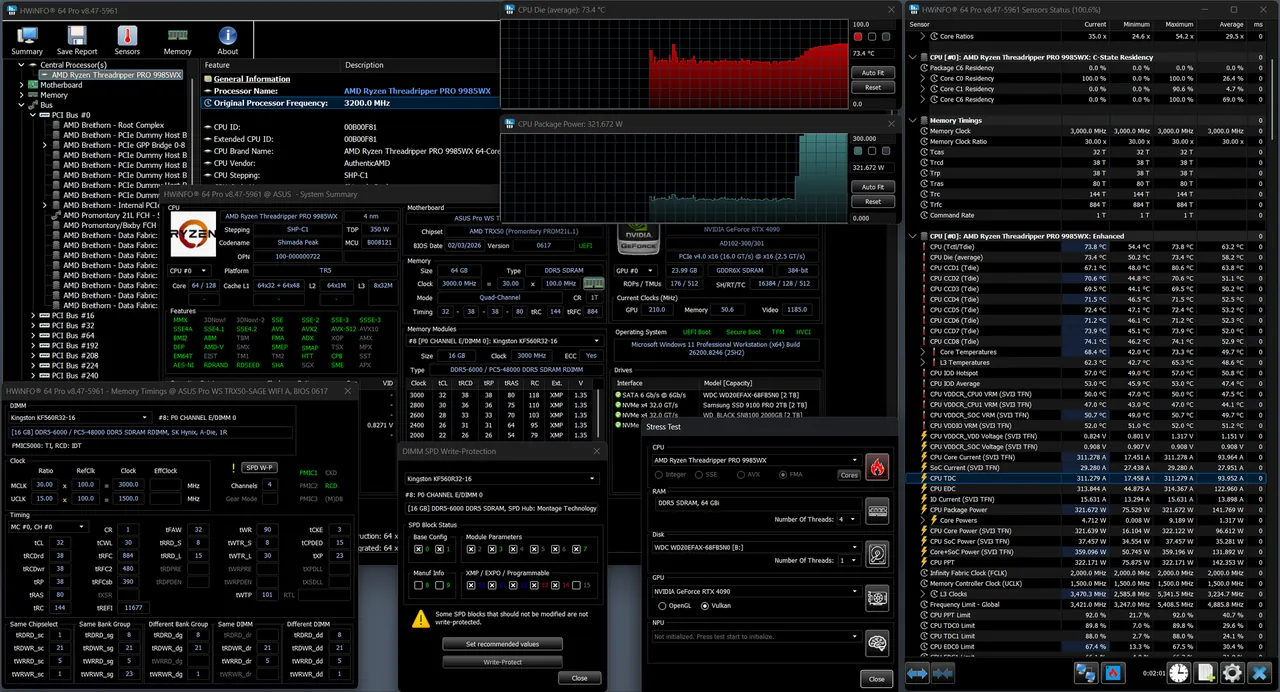
About HWiNFO
HWiNFO is developed by Martin Malík at REALiX in Slovakia and has been around since the DOS era. It starts with a summary of CPU, GPU, motherboard and memory and unfolds into deep detail for every component.
The sensors window lists temperatures, clocks, loads, voltages, power draw and fan speeds for CPUs, GPUs, motherboards and drives. HWiNFO states that it does not collect personal information or send data over the network.
What it does well
- Hardware inventory. Hierarchical view of every component, from CPU microcode to drive models.
- Real-time sensors. Temperatures, voltages, clocks, power and fan speeds with min, max and average values.
- Logging and reports. Exports reports to XML, CSV and HTML and logs sensor values to a file.
- Alerts. Custom alerts on any sensor with actions you define.
- Tray, OSD and add-ons. Shows values in the tray or on-screen and shares data with other tools through shared memory.
Who it is for
Good fit
Checking temperatures under load, diagnosing throttling or crashes, and documenting a PC's hardware.
Look elsewhere
Companies that want free commercial use, or people who just need the CPU model name.
Pros and cons
Pros
- Extremely detailed sensor list
- Logging, alerts and tray icons
- Frequent updates for new hardware
- Installer and portable versions
Cons
- Free version is for non-commercial use only
- Shared memory support for add-ons stops after 12 hours in the free version
- Large amount of data can be confusing for beginners
How to install HWiNFO
On the official download page, choose the Installer for 64-bit Windows; it installs the x64 or ARM64 build automatically. A portable ZIP is also available. On start, choose Sensors-only if you only want the live monitoring window.
Questions about HWiNFO
Is HWiNFO free?
HWiNFO 64 is free for personal and non-commercial use. Commercial use needs a paid HWiNFO Pro license after a 14-day evaluation.
Can HWiNFO show CPU and GPU temperatures?
Yes. Run it in Sensors mode to see temperatures, clocks, power and fan speeds in real time.
Does HWiNFO send data online?
According to the developer, HWiNFO does not collect personal information and does not transmit data over the network.


