

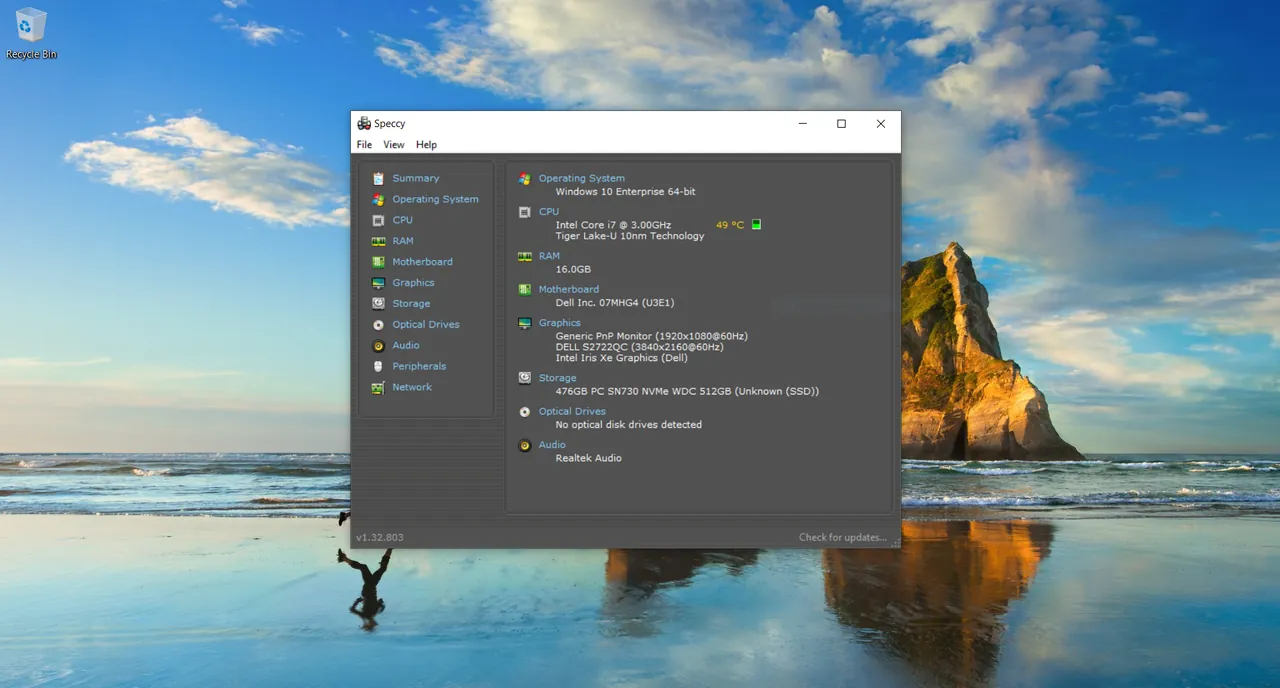
Our verdict: Speccy is the friendliest way to see what is inside a PC: one summary page lists the processor, RAM, motherboard, graphics and storage with their temperatures. It is less detailed than HWiNFO, but for a quick overview it is hard to beat.
About Speccy
Speccy is made by the CCleaner team (formerly Piriform). The Summary tab shows the main components and their temperatures; separate tabs for the operating system, CPU, RAM, motherboard, graphics, storage, optical drives, audio, peripherals and network give the details.
You can save the results as a Speccy snapshot, XML or text file and send it to a friend or tech support, who can open the snapshot in their own copy of Speccy. A paid Professional edition exists alongside the free one.
What it does well
- Summary page. Processor, RAM, motherboard, graphics and storage on one screen.
- Temperatures. Real-time temperatures of the CPU, GPU, motherboard and drives.
- Detailed tabs. Deep information on every hardware category.
- Snapshots. Save results as a snapshot, XML or text file for sharing.
- Small and quick. Scans the system in a few seconds.
Who it is for
Good fit
Home users who want a quick, readable overview of their PC's hardware and temperatures.
Look elsewhere
Enthusiasts who need full sensor logs, voltages and fan curves over time.
Pros and cons
Pros
- Very readable summary page
- Temperatures alongside specs
- Shareable snapshots
- Lightweight
Cons
- Installer and site promote other paid CCleaner products
- Less detail and fewer sensors than HWiNFO
- Closed source
How to install Speccy
Download the free Speccy installer from ccleaner.com. Read every installer screen: CCleaner installers may offer other CCleaner products or partner software, which you can decline. Speccy does not need to run in the background, so close it when you are done.
Questions about Speccy
Is Speccy free?
Yes. The standard edition of Speccy is free. A paid Professional edition is also sold.
Can Speccy show CPU temperature?
Yes. The Summary page shows real-time temperatures for the CPU and other components that have sensors.
How do I share my PC specs from Speccy?
Use File → Publish Snapshot or save the snapshot, XML or text file and send it.


