

Our verdict: Iriun Webcam connects a phone camera to a Windows PC with almost no setup: start the PC server and the phone app, and it links automatically. The free version is fully usable but adds a watermark; removing it, and getting manual camera controls, requires the Pro upgrade in the phone app.
About Iriun Webcam
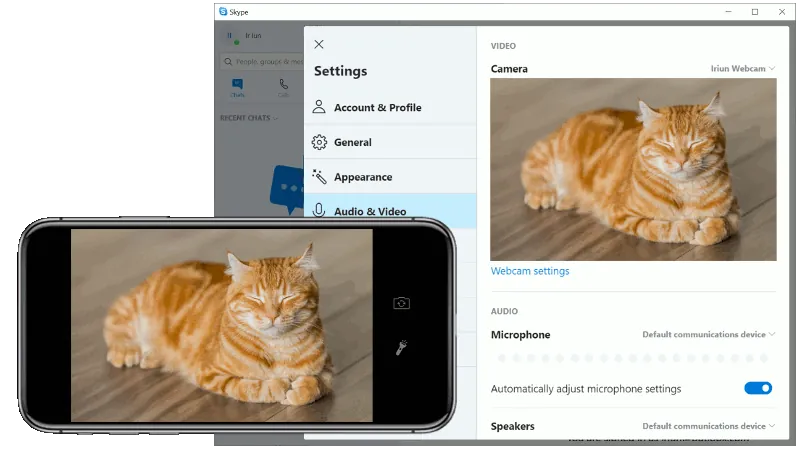
Iriun Webcam is made by Iriun Oy. The Windows package installs a webcam driver and a small server; the Iriun Webcam app on the phone connects to it automatically over Wi-Fi or USB, and the phone appears as a webcam and microphone in Teams, Zoom, OBS and other apps.
The desktop software is free. According to the official Android app listing, the Pro version bought in the phone app removes the watermark and ads, adds manual ISO, exposure and white balance, and lets you control the camera from the desktop. Maximum resolution depends on the phone model.
What it does well
- Automatic connection. The phone finds the PC server on the same Wi-Fi network without pairing codes.
- USB mode. Connects by cable for a more stable picture.
- Works with screen off. The phone screen can be off while it streams.
- Zoom and mirroring. Pinch zoom and mirror options in the phone app.
- Microphone. The phone can also act as the microphone.
Who it is for
Good fit
People who want the quickest way to use a phone as a webcam for video calls.
Look elsewhere
Users who need a clean, watermark-free picture without paying, or detailed image controls on the PC.
Pros and cons
Pros
- Very easy setup
- Wi-Fi and USB connection
- Phone microphone support
- Small download
Cons
- Watermark in the free version
- Manual camera controls need Pro
- Phone app shows ads in the free version
How to install Iriun Webcam
Run the Windows installer from iriun.com, start Iriun Webcam on the PC, then open the Iriun app on your phone on the same network. In your video app choose Iriun Webcam as the camera. Close other camera apps on the phone first.
Questions about Iriun Webcam
Is Iriun Webcam free?
Yes, the Windows software and the basic phone app are free. The free version adds a watermark; the Pro version bought in the phone app removes it and the ads.
Does Iriun work over USB?
Yes. It connects over Wi-Fi or USB.
Which apps can use Iriun Webcam?
Any app that accepts a webcam, such as Teams, Zoom and OBS Studio.


