

Our verdict: O&O ShutUp10++ puts Windows privacy settings that are normally spread across Settings, Group Policy and the registry into one list with on/off switches. Its recommendations make it safe for most users. Windows updates can switch some settings back, and only the paid Premium version restores them automatically.
About O&O ShutUp10++
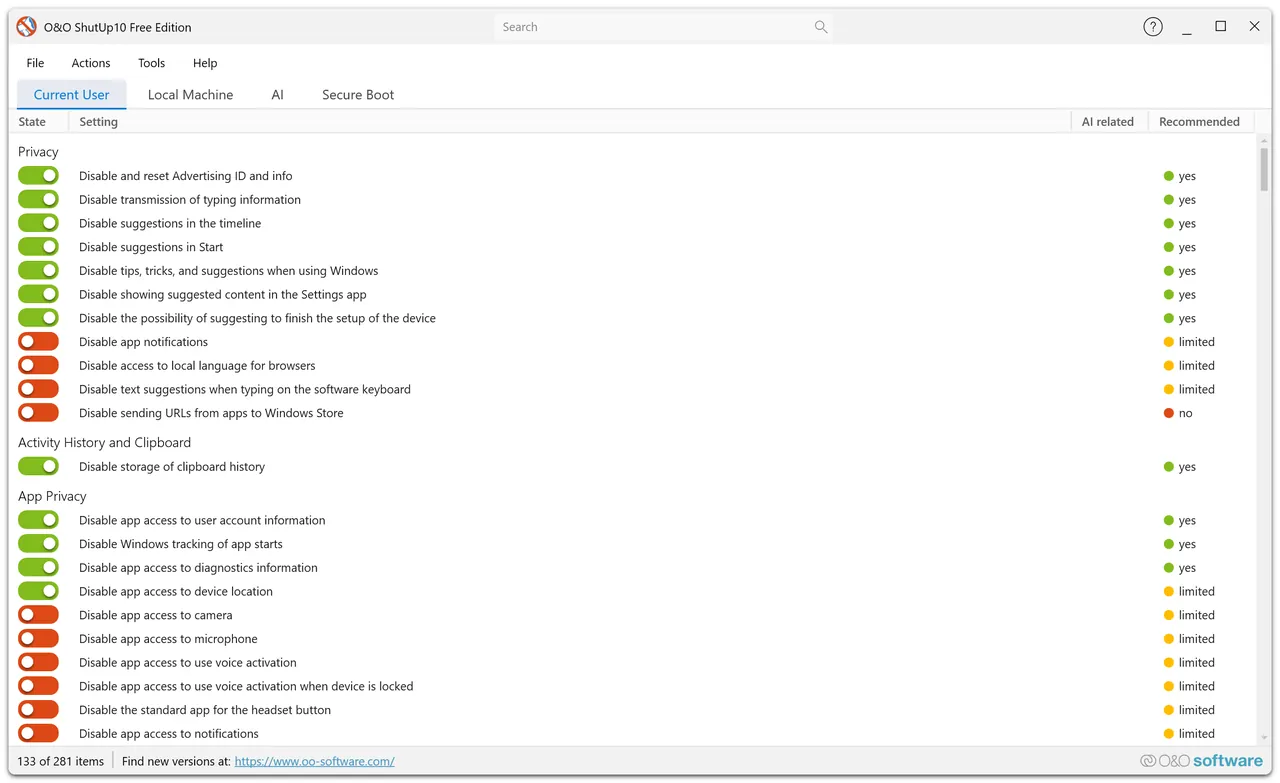
O&O ShutUp10++ is a free program from the German company O&O Software. It needs no installation and runs straight from the downloaded file. Each setting is shown with a short description and a recommendation: green settings are safe to apply, yellow ones are limited recommendations, and red ones can affect Windows features.
Settings are grouped into areas such as telemetry, Microsoft Edge, Windows Copilot and AI features, location services, app privacy and Windows Update. You can apply all recommended settings at once, export your configuration and import it on other PCs. O&O ShutUp10 Premium, a paid version, keeps checking your choices and restores them after Windows updates.
What it does well
- All privacy settings in one list. Switches for telemetry, advertising ID, app permissions, Edge, Copilot and more.
- Recommendations. Color-coded advice shows which settings are safe to change.
- One-click recommended setup. Applies all recommended settings at once.
- Restore point. Offers to create a system restore point before you make changes.
- Export and import. Saves your configuration to a file to reuse on other PCs.
Who it is for
Good fit
Windows 10 and 11 users who want to cut data sent to Microsoft without editing the registry.
Look elsewhere
Users who rely on cloud features like Copilot, Windows Search web results or Edge sync and do not want to check each switch.
Pros and cons
Pros
- Free and portable
- Clear explanations and recommendations for each setting
- Creates a restore point before changes
- Configurations can be exported and reused
Cons
- Windows updates can reset settings; automatic monitoring is only in paid Premium
- Turning off non-recommended settings can break Windows features
- Closed source
How to install O&O ShutUp10++
Download OOSU10.exe and run it as administrator; nothing is installed. Accept the prompt to create a system restore point, then use Actions → Apply only recommended settings instead of switching everything off. Run the tool again after major Windows updates to check that your settings are still applied.
Questions about O&O ShutUp10++
Is O&O ShutUp10++ free?
Yes. The standard version is free and has no time limit. O&O ShutUp10 Premium is an optional paid version that monitors and restores your settings automatically.
Does O&O ShutUp10++ need to be installed?
No. It runs directly from the downloaded file.
Can I undo the changes?
Yes. You can switch settings back in the program, reset to factory settings from the Actions menu or use the restore point it creates.


