

Our verdict: RSS Guard is a capable desktop feed reader for people who want a classic three-pane layout and many sync options. It reads local feeds and syncs with Feedly, Inoreader, FreshRSS, Nextcloud News and Tiny Tiny RSS. The interface is dense and the many options take time to learn.
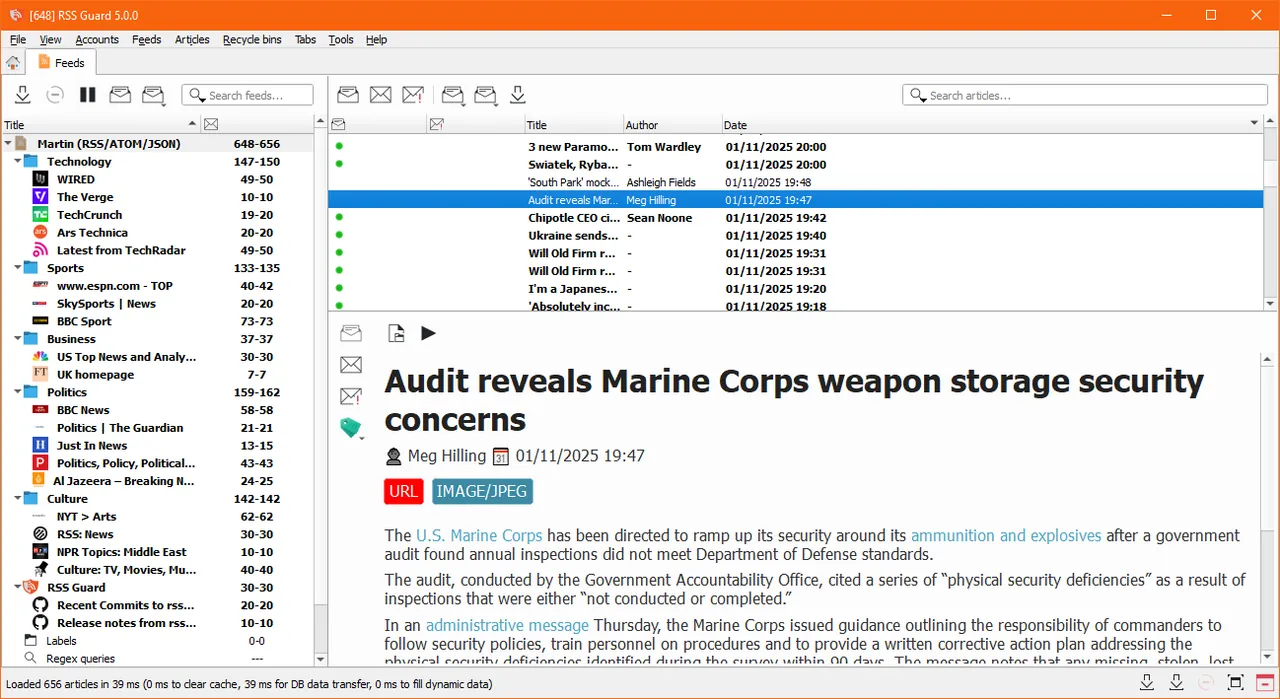
About RSS Guard
RSS Guard is a free, open-source feed reader written in C++ with Qt, developed by Martin Rotter and contributors under the GNU GPL v3. It reads RSS, Atom, JSON Feed, iCalendar and Sitemap sources and runs on Windows, Linux, BSD and macOS. The official downloads are on GitHub; the unrelated rssguard.com site is not the project's.
Besides local feeds, RSS Guard can sync with Feedly, Gmail, Google Reader API services such as Inoreader, FreshRSS, Miniflux and The Old Reader, plus Nextcloud News and Tiny Tiny RSS. A built-in mpv-based player plays podcasts and video. Windows packages come in a web edition with full Qt WebEngine rendering and a lighter text edition without JavaScript.
What it does well
- Many feed formats. Reads RSS, Atom, JSON Feed, iCalendar and Sitemap sources.
- Online service sync. Feedly, Inoreader, FreshRSS, Miniflux, Nextcloud News, Tiny Tiny RSS and more.
- Podcast player. Plays audio and video enclosures with a built-in mpv-based player.
- Labels and queries. Tag articles with labels and save regular-expression searches.
- Gemini and XMPP. Fetches feeds over the Gemini protocol and real-time entries via XMPP.
Who it is for
Good fit
Feed-reading power users who want a desktop app that syncs with their existing RSS service.
Look elsewhere
People who want a minimal, modern-looking reader with almost no settings.
Pros and cons
Pros
- Free and open source
- Syncs with many RSS services
- Built-in podcast and video player
- Portable and installer packages
Cons
- Dense interface with many options
- Unsigned installer triggers SmartScreen warnings
- Choosing between web/text and win7/win10 packages can confuse
How to install RSS Guard
The button downloads the recommended web edition installer for Windows 10 and later from the official GitHub releases. Choose the text edition for a lighter build or the win7 build for older systems on the same page. The installer is not digitally signed, so SmartScreen may warn on first launch. If RSS Guard crashes when opening articles, the docs suggest installing the Visual C++ redistributables or the DirectX tools.
Questions about RSS Guard
Is RSS Guard free?
Yes. RSS Guard is free and open source under the GNU GPL v3, with no paid version.
Which RSS Guard download should I choose?
The developer suggests the web + win10 package on Windows 10 or newer. The text edition is lighter but shows web pages without JavaScript, and win7 builds are for older Windows.
Can RSS Guard sync with Feedly or Inoreader?
Yes. It supports Feedly, Inoreader and other Google Reader API services, Nextcloud News and Tiny Tiny RSS.


