

Our verdict: Simple DNSCrypt makes encrypted DNS on Windows a matter of a few clicks instead of editing dnscrypt-proxy config files. The catch is age: the last stable release came out in April 2020 and bundles an old dnscrypt-proxy, while newer builds exist only as unsigned previews.
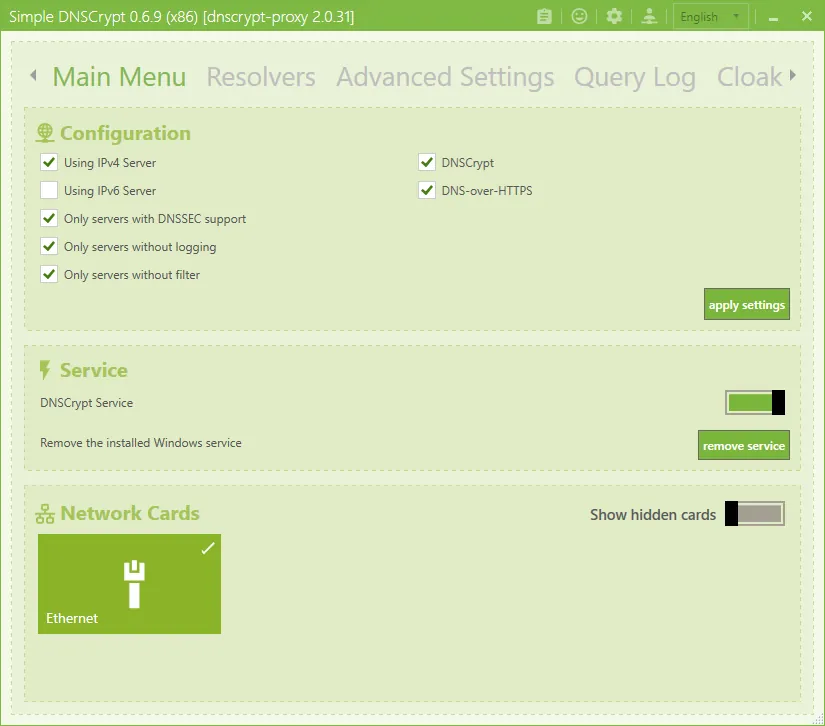
About Simple DNSCrypt
Simple DNSCrypt is a management tool that installs and configures dnscrypt-proxy, an open-source DNS proxy, on Windows. Once enabled for your network adapters, DNS lookups go to encrypted resolvers instead of your provider's plain DNS. The interface lets you pick resolvers, view a query log and block domains with blacklists. It is released under the MIT license and the MSI packages are code-signed.
The latest stable version, 0.7.1, was published in April 2020 and ships dnscrypt-proxy 2.0.42. The project README offers newer CI builds as unsigned, portable preview versions. The installer needs .NET Framework 4.6.1 and the Microsoft Visual C++ 2015-2019 Redistributable.
What it does well
- Encrypted DNS. Routes DNS lookups through dnscrypt-proxy to encrypted resolvers.
- Resolver choice. Pick which public resolvers dnscrypt-proxy may use.
- Domain blacklist. Blocks ads, trackers or other domains with your own lists.
- Query and block logs. Shows which domains were requested and which were blocked.
- Per-adapter setup. Enable encrypted DNS only on the network adapters you choose.
Who it is for
Good fit
Users who want encrypted DNS and simple domain blocking on Windows without editing config files.
Look elsewhere
Anyone who needs an actively maintained tool; Windows 11 and modern browsers also offer built-in encrypted DNS.
Pros and cons
Pros
- Free and open source (MIT)
- Simple setup of dnscrypt-proxy
- Built-in query log and domain blocking
- Signed MSI installers
Cons
- Last stable release is from 2020 with an old dnscrypt-proxy
- Newer builds are only unsigned previews
- Needs .NET Framework and a separate Visual C++ runtime
How to install Simple DNSCrypt
Install the Visual C++ 2015-2019 x64 Redistributable first, then the 64-bit MSI from the official GitHub release. Open Simple DNSCrypt, install the dnscrypt-proxy service from the main menu and enable it for your active network adapter. Choose resolvers before adding blacklists.
Questions about Simple DNSCrypt
Is Simple DNSCrypt free?
Yes. Simple DNSCrypt is open source under the MIT license and free to use.
Is Simple DNSCrypt still maintained?
The last stable release, 0.7.1, is from April 2020. The README links newer preview builds, which are unsigned.
Does Simple DNSCrypt hide my IP address?
No. It encrypts DNS lookups only; websites still see your IP address. Use a VPN for that.


