

Our verdict: simplewall gives you per-app control over network access with a program of less than a megabyte. It uses the filtering engine already built into Windows, so it installs no driver. Its whitelist approach is strict: until you allow an app, it stays offline.
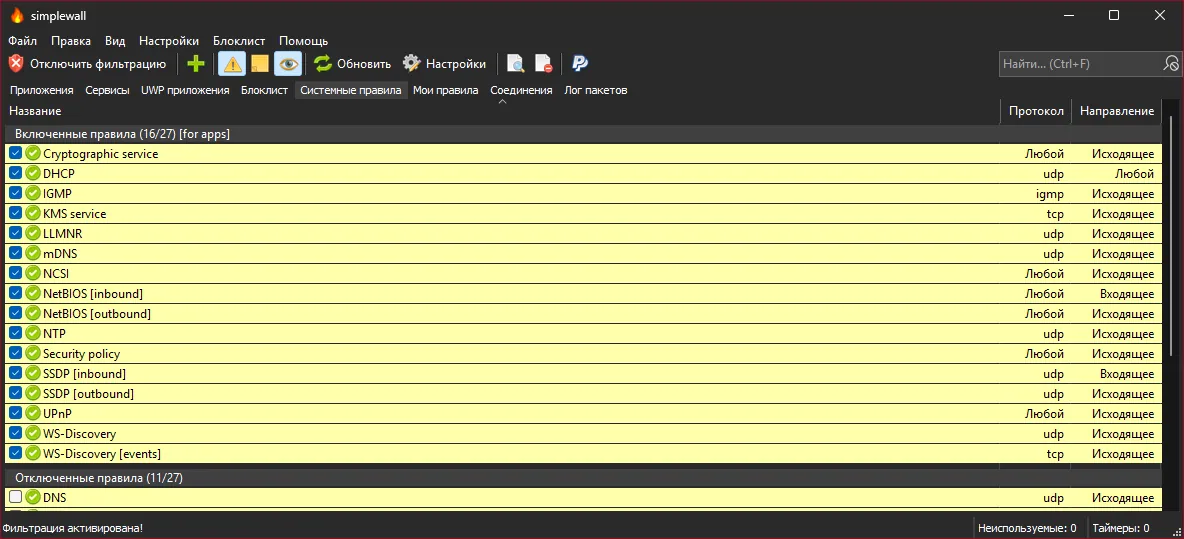
About simplewall
simplewall is a front end for the Windows Filtering Platform (WFP), the same engine that Windows Firewall uses. Instead of running its own network driver, it writes WFP rules, so filtering keeps working even when the simplewall window is closed.
When filtering is on, simplewall blocks connections from apps that are not on your allowed list and can show a notification so you can allow or block an app on the spot. It also includes system rules, blocklists and logging of dropped packets. There is an installer and a portable version; both need administrator rights.
What it does well
- Allow-list filtering. Blocks outgoing connections from every app you have not allowed.
- Connection notifications. Pops up when a blocked app tries to connect, with Allow and Block buttons.
- No extra driver. Uses the Windows Filtering Platform built into Windows.
- Packet logging. Logs dropped and allowed packets to a file for troubleshooting.
- Portable mode. Keeps settings in the program folder when simplewall.ini is placed next to it.
Who it is for
Good fit
Privacy-minded users who want to decide exactly which programs may go online.
Look elsewhere
Beginners who do not want to answer connection prompts or troubleshoot apps that stop working.
Pros and cons
Pros
- Very small and fast
- Open source
- Uses the built-in Windows filtering engine
- Clear per-app allow and block prompts
Cons
- Blocks everything not on the allowed list, which can break updates and apps until you allow them
- Technical interface aimed at experienced users
- Maintained by a single developer
How to install simplewall
Download the setup file from the latest release and run it as administrator. Before clicking Enable filtering, add your browser, Windows Update components and other apps you trust to the allowed list, or they will lose internet access. For a portable copy, use the bin archive and create simplewall.ini in its folder.
Questions about simplewall
Is simplewall free?
Yes. simplewall is free and open source under the GNU GPL v3.
Does simplewall replace Windows Firewall?
No. It manages rules in the Windows Filtering Platform, the engine behind Windows Firewall, and gives you an easier per-app allow list.
Why did my apps lose internet access?
With filtering enabled, simplewall blocks every app that is not on the allowed list. Allow the app in simplewall's main window or from the notification.


