

Our verdict: Sweet Home 3D is the easiest free way to plan a room layout or a whole apartment and see it in 3D. Drawing walls and dragging in furniture takes minutes. The free Windows version includes a small furniture catalog, while the larger catalog comes with the paid store version.
About Sweet Home 3D
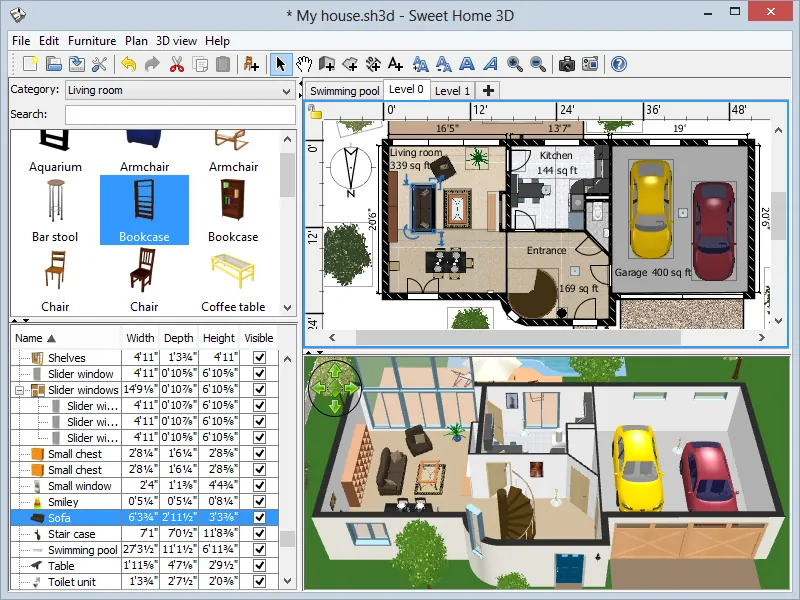
Sweet Home 3D is developed by eTeks and released under the GNU GPL v2. You draw walls in a 2D plan with precise dimensions, drag doors and windows into them and furnish rooms from a searchable catalog, while a 3D view updates at the same time.
The free Windows installer is distributed through SourceForge, bundles its own copy of Java and includes 100 pieces of furniture and 26 textures. A paid Microsoft Store version adds more than 10,000 models. You can also import free model and texture libraries or your own 3D models.
What it does well
- 2D floor plans. Straight, round or sloping walls with dimensions, room areas and labels.
- Live 3D view. Aerial view or a virtual visitor walking through the home.
- Furniture catalog. Drag furniture into rooms and change size, color and texture.
- Photo and video renders. Photorealistic images with lights and sunlight by time and location.
- Import and export. Imports blueprints and 3D models; exports PDF, images, video and 3D files.
Who it is for
Good fit
Homeowners and renters planning a renovation, a move or a new furniture layout.
Look elsewhere
Architects who need construction drawings, BIM data or structural calculations.
Pros and cons
Pros
- Free and open source
- Very quick to learn
- 2D plan and 3D view side by side
- Photo-quality renders
Cons
- Free version has a small default catalog of 100 furniture pieces
- Free installer is hosted on SourceForge, not on the official site
- Mobile apps are paid
How to install Sweet Home 3D
The official download page sends you to SourceForge for the free Windows installer, which includes Java. Choose the free version; the Microsoft Store version is the paid edition. After installing, add extra furniture and texture libraries from the official site if the default catalog is too small.
Questions about Sweet Home 3D
Is Sweet Home 3D free?
Yes. The desktop program is open source under the GPL v2 and free. Paid versions on the Microsoft Store and Mac App Store include a much larger furniture catalog.
Can I add more furniture to Sweet Home 3D?
Yes. You can import free furniture and texture libraries listed on the official site, or your own 3D models in common formats.
Does Sweet Home 3D need Java?
The Windows installer includes its own copy of Java, so you do not need to install it separately.


