

Our verdict: Wavebox suits people who work across many web accounts, such as virtual assistants and agencies, and want them all signed in at once. It supports Chrome extensions, split screen and unread badges. The free Basic plan is small, just two groups with two apps each, so serious use means paying for Pro.
About Wavebox
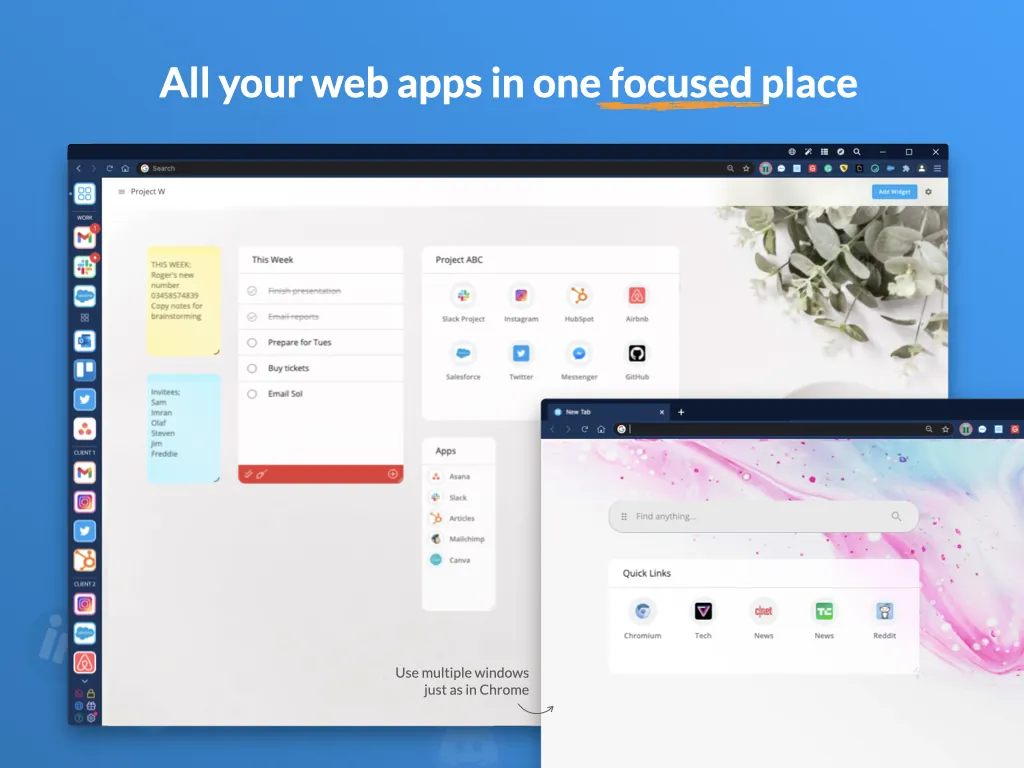
Wavebox is a browser built on Chromium by Bookry Ltd, a UK company. Instead of one long row of tabs, you add web apps such as Gmail, Outlook, Slack, Microsoft Teams or Asana to groups and spaces, each with its own tab strip, and they stay signed in with unread badges and notifications. Chrome Web Store extensions work as in Chrome.
All accounts start with a 7-day Wavebox Pro trial that needs no card. After that you can stay on the free Basic plan, with work and home spaces, two groups of two apps each, one extension and one dashboard. Wavebox Pro costs $8.33 a month billed annually and unlocks unlimited spaces, groups and apps, all extensions and cloud sync. The company says it shows no ads and does not sell user data.
What it does well
- Spaces and groups. Organize web apps and tabs into separate spaces, each group with its own tab strip.
- Multiple accounts. Stay signed in to several accounts of the same service, such as two Gmail or Teams logins.
- Split screen. Show two apps or tabs side by side in resizable panes.
- Unread badges. Badges and desktop notifications for webmail, chat and collaboration apps.
- Chrome extensions. Install extensions from the Chrome Web Store; some are built in.
Who it is for
Good fit
Virtual assistants, agency staff and freelancers who stay signed in to many client accounts.
Look elsewhere
People who just need a free general browser; the free plan is limited to four apps.
Pros and cons
Pros
- Keeps many web accounts signed in at once
- Chrome extensions supported
- Split screen and tab organization
- No card needed for the trial
Cons
- Free plan allows only two groups with two apps each
- Most features need Pro ($8.33/month, billed annually)
- Requires a Wavebox account
How to install Wavebox
The button downloads the latest stable 64-bit Windows installer from Wavebox's download server; MSI and Arm installers are on the download page. On first launch you create a Wavebox account, which starts the 7-day Pro trial without a card. If you do not subscribe, keep the two groups you use most, because Basic allows only two.
Questions about Wavebox
Is Wavebox free?
Partly. After a 7-day Pro trial without a card, you can keep using the free Basic plan with two groups of two apps, one extension and one dashboard. Wavebox Pro costs $8.33 a month, billed annually.
Is Wavebox based on Chrome?
Wavebox is built on Chromium, the open-source base of Google Chrome, and supports extensions from the Chrome Web Store.
Can I use several Gmail accounts in Wavebox?
Yes. Wavebox keeps multiple accounts of the same service signed in at once; on the free plan, for example, two Gmail accounts for work and home.


