
AI tools · Updated
The best AI image and video upscalers for Windows
AI upscalers enlarge images and video with neural networks such as Real-ESRGAN instead of simple resampling, so edges and textures look sharper than with a normal resize. Frame interpolation is the related trick for motion: models such as RIFE generate in-between frames to turn choppy footage into smooth 60 fps video or slow motion.
Most of the tools below are free, open source and run locally on your graphics card, so your photos and videos are not uploaded anywhere. The catch is hardware: most of them need a Vulkan-capable GPU, and long videos can take hours. Keep in mind that AI upscaling invents plausible detail; it can make an old photo look better, but it cannot recover what the camera never captured.
Our picks at a glance
| App | Best for | License | Price | Download |
|---|---|---|---|---|
 Upscayl Upscayl |
One-click photo and artwork upscaling | Open source | Free | Review |
 Video2X Video2X |
Upscaling whole videos for free | Open source | Free | Review |
 Flowframes Flowframes |
Smooth slow motion and higher frame rates | Open source | Free | Review |
 chaiNNer chaiNNer |
Batch pipelines and custom models | Open source | Free | Review |
 Amuse Amuse |
Upscaling inside an AI image and video studio | Open source | Free | Review |
 CyberLink PowerDVD CyberLink PowerDVD |
AI enhancement while you watch | Shareware | $54.99, per year (PowerDVD 365) | Review |
1. Upscayl — AI Image Upscaler
Best for: One-click photo and artwork upscaling
- Open source
- Free
- AI tools
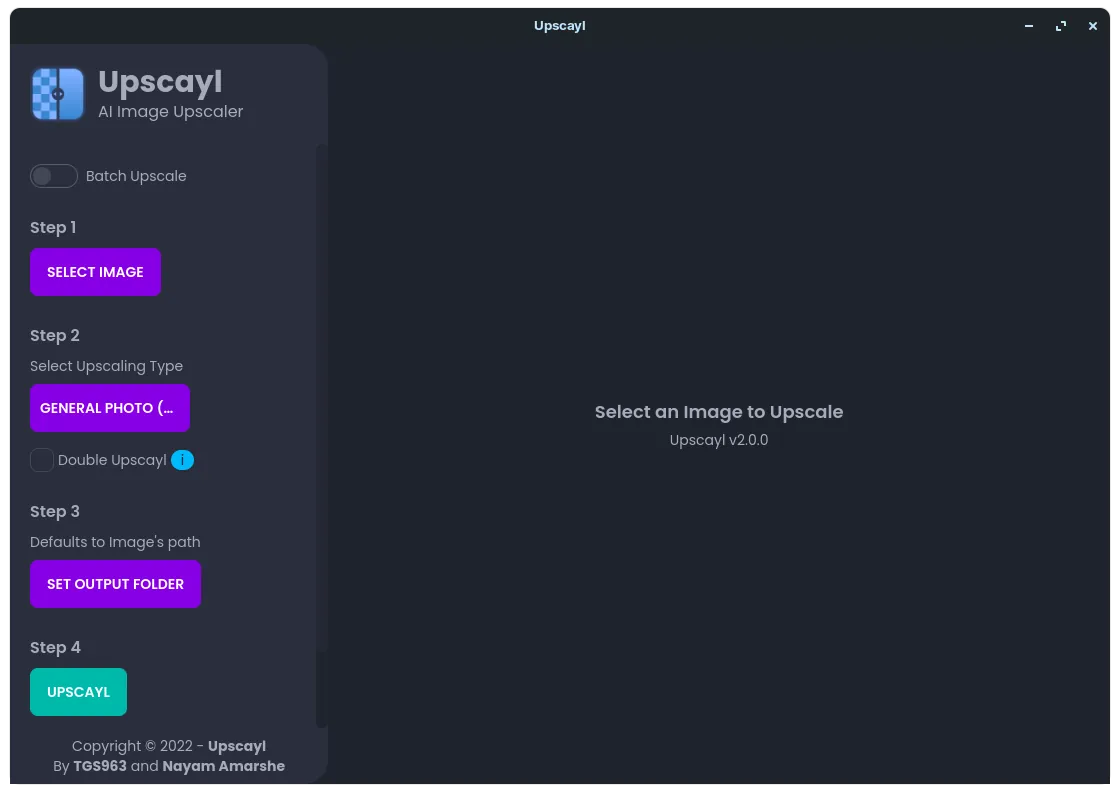

Upscayl is the simplest free image upscaler: pick an image, a model and a scale, and it enlarges it up to 16x with Real-ESRGAN models on your graphics card. Built-in models cover photos, digital art and sharp detail, custom models can be added, Batch Upscayl processes a whole folder and Double Upscayl runs twice for very large output. No account is needed.
It needs a Vulkan-compatible GPU, and the developers note that most integrated GPUs and CPUs will not work. There has been no new desktop release since version 2.15 in December 2024. For repeatable chains with other processing steps, chaiNNer does more.
Pros
- Free and open source
- Runs locally, no upload
- Simple three-step interface
Cons
- Needs a Vulkan-compatible GPU; many integrated GPUs do not work
- AI can invent details that were not in the original
- No new desktop release since version 2.15 in December 2024
2. Video2X — AI Video Upscaler
Best for: Upscaling whole videos for free
- Open source
- Free
- AI tools
Video2X upscales video with Real-ESRGAN, Real-CUGAN and Anime4K v4, and adds frames with RIFE interpolation, all through ncnn and Vulkan on NVIDIA, AMD and Intel GPUs. Version 6 is a C/C++ rewrite with a Qt6 GUI and a proper Windows installer, and it needs no extra disk space during processing beyond the output file.
The precompiled builds require a CPU with AVX2 and a Vulkan GPU, and upscaling long videos still takes hours. It suits anime fans and hobbyists restoring old clips. If you only need smoother motion rather than higher resolution, Flowframes is more specialised.
Pros
- Free and open source
- Several upscaling models plus RIFE interpolation
- Works on NVIDIA, AMD and Intel GPUs
Cons
- Needs a Vulkan GPU and an AVX2 CPU
- Processing long videos takes hours
- No macOS version
3. Flowframes — AI Video Frame Interpolation
Best for: Smooth slow motion and higher frame rates
- Open source
- Free
- Video

Flowframes focuses on frame interpolation: it uses RIFE, plus DAIN and experimental FLAVR and XVFI, to double or quadruple the frame rate. It reads MP4, MKV, WEBM, MOV, GIF and image sequences, keeps the original audio and subtitles, and uses scene detection and de-duplication to avoid artefacts at cuts and in animation. Everything it needs is bundled.
The free build on itch.io lags behind the Patreon version, which gets newer models and faster processing first, and the download page shows a pay-what-you-want prompt. It needs a Vulkan GPU from roughly the last six years and lots of temporary disk space. For resolution upscaling, use Video2X.
Pros
- Smooth results with RIFE
- Works on NVIDIA and AMD GPUs
- Everything bundled, no setup
Cons
- Free build is older than the Patreon version
- Needs a capable GPU and lots of temporary disk space
- Download page is on itch.io with a pay-what-you-want prompt
4. chaiNNer — AI Image Processing App
Best for: Batch pipelines and custom models
- Open source
- Free
- Graphics
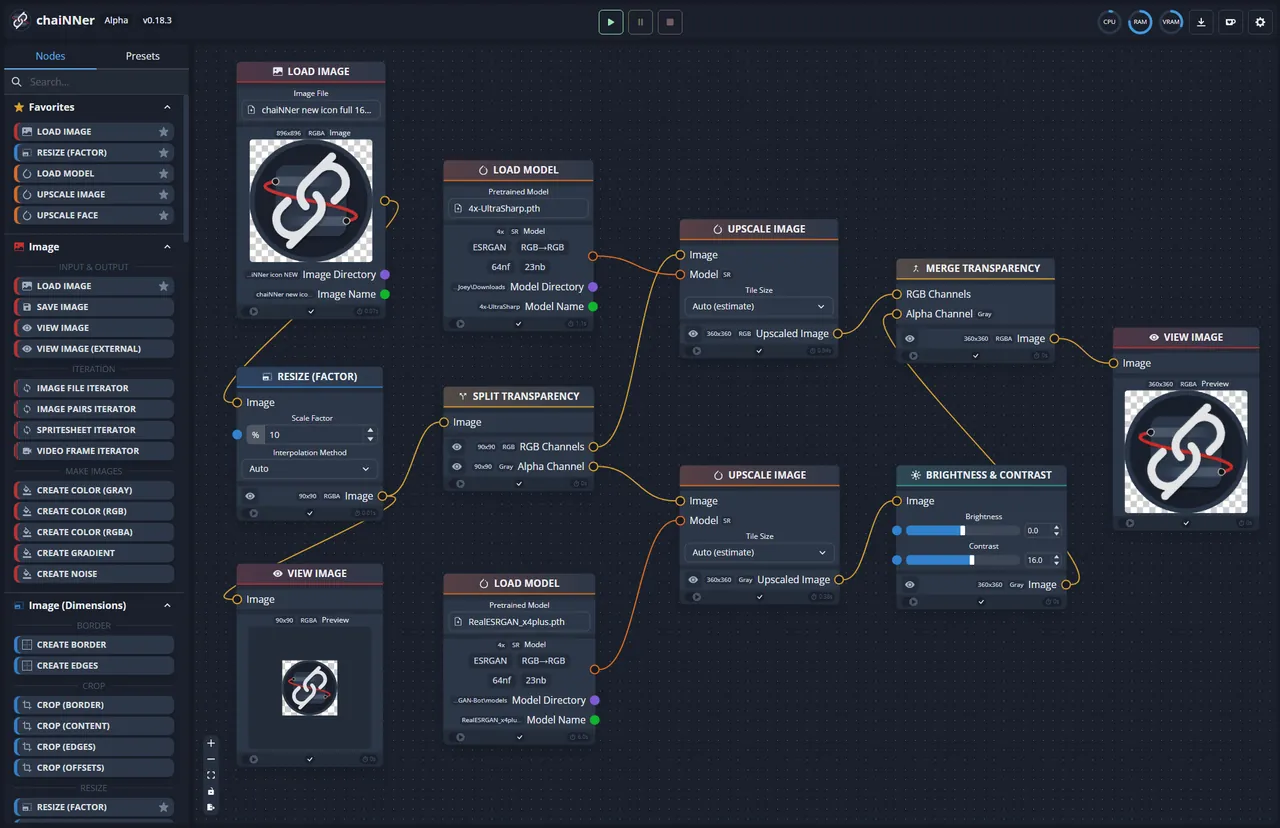

chaiNNer turns upscaling into visual pipelines: you connect nodes such as Load Image, Upscale and Save Image, and apply the chain to whole folders. Models run through PyTorch, NCNN, ONNX or TensorRT; the developers recommend PyTorch or TensorRT on NVIDIA cards and NCNN on AMD. It downloads its own isolated Python, so nothing has to be set up by hand.
No models are included: you download upscaling models separately and load them with the matching nodes. The learning curve is steep, AI frameworks are large downloads, and it is slow without a capable GPU. If you just want a bigger photo, Upscayl is far quicker to learn.
Pros
- Free and open source
- Very flexible node-based pipelines
- Supports several AI frameworks
Cons
- Steep learning curve for beginners
- Large downloads for AI frameworks and models
- Slow without a capable GPU
5. Amuse — Local AI Image Generator
Best for: Upscaling inside an AI image and video studio
- Open source
- Free
- AI tools
Amuse is a native Windows app for local AI image, video and audio generation that also upscales images and video and adds frames for slow motion. It suits people who generate images with models such as FLUX or SDXL and want to enlarge results without switching tools. It runs on NVIDIA through CUDA and on AMD, Intel and NVIDIA cards through Vulkan.
The installer and model downloads are large, and the developer warns that recent builds may not work reliably on AMD hardware. As a pure upscaler it is heavier than Upscayl or Video2X, so pick it only if you also want its generation tools.
Pros
- Free and open source
- Images, video, audio and text in one app
- No Python needed for the StableDiffusion.cpp backend
Cons
- Developer warns of problems on AMD hardware in recent builds
- Windows only
- Large installer and very large model downloads
6. CyberLink PowerDVD — Media Player
Best for: AI enhancement while you watch
- Shareware
- $54.99, per year (PowerDVD 365)
- Video
PowerDVD does not create upscaled files; its TrueTheater feature uses AI to upscale, brighten and smooth video during playback, with Video Super Resolution on supported GPUs. That makes it an option for people who want old DVDs and low-resolution files to look better on a large screen without processing them first.
TrueTheater is a premium feature: the free version keeps playing with no time limit, but premium features unlock only for the first 7 days. PowerDVD 365 costs $54.99 per year, and one-time licenses cost $59.99 to $99.99. It is Windows-only. To produce a permanently upscaled copy, use Video2X.
Pros
- Licensed Blu-ray playback on Windows
- Dolby and DTS audio
- Free version keeps working
Cons
- Premium features lock after 7 days
- Blu-ray needs Ultra or 365
- Windows only
Images or video?
For photos and artwork, start with Upscayl, and move to chaiNNer when you need batch chains or custom models. For video resolution, Video2X is the free local choice; for smoother motion, Flowframes or the RIFE mode of Video2X. Image generators often include an upscaler too: Easy Diffusion has RealESRGAN upscaling and Fooocus has an upscale option for its own images.
What hardware you need
A Vulkan-capable graphics card is the common requirement. Upscayl usually does not work on integrated GPUs or the CPU, Video2X also needs an AVX2 CPU, and Flowframes needs a Vulkan GPU from roughly the last six years. chaiNNer works with NVIDIA and AMD through different backends but is slow without a capable GPU. Video jobs also need disk space, especially in Flowframes.
Free tools vs paid editors
The free open-source tools above cover most needs. Some paid apps include AI upscaling as one feature among many: Vegas Pro lists AI upscaling among its editing tools, DVDFab sells an optional AI upscaling module, and the Pro plan of Lunacy includes an image upscaler. These make sense only if you already use or want the rest of the program.
Frequently asked questions
What is the best free AI image upscaler for Windows?
Upscayl is the easiest: free, open source and local, with several models and batch processing. It needs a Vulkan-compatible GPU. chaiNNer is the more flexible alternative for advanced users.
Can I upscale video with AI for free?
Yes. Video2X is free and open source under the AGPL v3 and upscales video with Real-ESRGAN, Real-CUGAN and Anime4K on your own GPU. Long videos can take hours.
What is frame interpolation?
It generates new frames between existing ones to raise the frame rate or create slow motion. Flowframes and Video2X do this with RIFE models, and Amuse can also add frames for slow motion.
Does Upscayl work without a graphics card?
Usually not. Upscayl needs a Vulkan-compatible GPU, and its developers note that most integrated GPUs and CPUs will not work.
Do AI upscalers upload my images?
Not the local tools in this guide. Upscayl, Video2X, Flowframes and chaiNNer process files on your own PC. Upscayl Cloud is a separate online service.
ExeDepot does not host installers. Every download button opens the developer's own server or official download page. Prices and licenses come from each developer's site and were checked on .