

Our verdict: Easy Diffusion lives up to its name: one installer sets up everything, and the browser interface is friendly to beginners. It still offers ControlNet, custom models, upscaling and face correction for later. It can even run on the CPU or on GPUs with 2 GB of memory, though slowly.
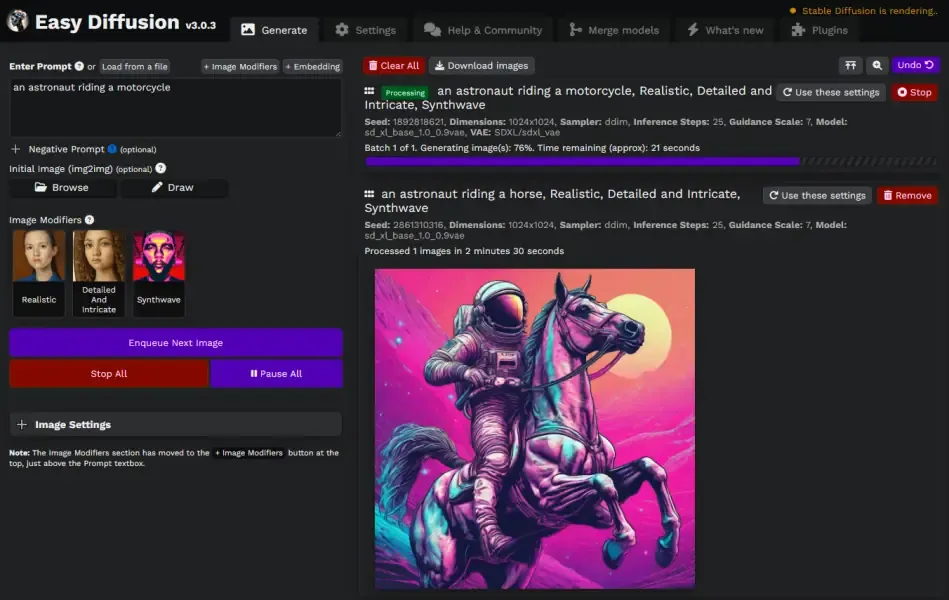
About Easy Diffusion
Easy Diffusion is a free, source-available front end for Stable Diffusion maintained by cmdr2 and contributors. The Windows installer brings its own environment, so no Python or Git is needed, and the interface runs in your browser. Its license is MIT-based but adds use restrictions taken from the CreativeML Open RAIL-M license, such as no unlawful or harmful content.
It supports text-to-image, image-to-image and inpainting, SDXL and SD 2.1 models, ControlNet, custom VAEs, textual inversion embeddings, GFPGAN face correction and RealESRGAN upscaling. The newer v4 engine adds Flux 1 and 2, Z-Image, Lumina and quantized models. The developers list an NVIDIA or AMD GPU with 2 GB of memory, or the CPU, plus 8 GB of RAM and 25 GB of disk.
What it does well
- One-click install. The Windows installer sets up everything without pre-installed software.
- Task queue. Queues many prompts and runs them one after another.
- Live preview. Shows the image while the AI is drawing it.
- ControlNet and models. Supports ControlNet, custom checkpoints, VAEs and embeddings.
- Low memory mode. Creates 512x512 images with under 2 GB of GPU memory, or runs on the CPU.
Who it is for
Good fit
Beginners and owners of older or modest GPUs who want local AI images with minimal setup.
Look elsewhere
Users who need node workflows or the newest video models, and anyone who dislikes browser-based UIs.
Pros and cons
Pros
- Free, no technical setup
- Runs on NVIDIA, AMD or CPU
- Task queue and live preview
- Auto-updater for new features
Cons
- Needs at least 25 GB of disk space
- CPU mode is very slow
- Unsigned installer triggers a SmartScreen warning
How to install Easy Diffusion
The button downloads the Windows installer from GitHub. If SmartScreen blocks it, click More info and Run anyway. On Windows 10 install to a top-level folder such as C:\EasyDiffusion to avoid path-length problems. Start Easy Diffusion from the Start menu; it opens in your browser. To uninstall, delete the EasyDiffusion folder.
Questions about Easy Diffusion
Is Easy Diffusion free?
Yes. Easy Diffusion is free and its source code is public. The license is MIT-based but forbids uses such as illegal, harmful or defamatory content.
Can Easy Diffusion run without a graphics card?
Yes. It has a CPU setting for PCs without a compatible GPU, but generating each image takes much longer than on a graphics card.


