

Our verdict: AnyBurn packs disc burning, ISO editing and bootable USB creation into a tiny, ad-free download. It covers almost everything most people still do with CDs, DVDs and Blu-ray discs. Audio file conversion and installing Windows to a USB drive are reserved for the paid Pro edition.
About AnyBurn
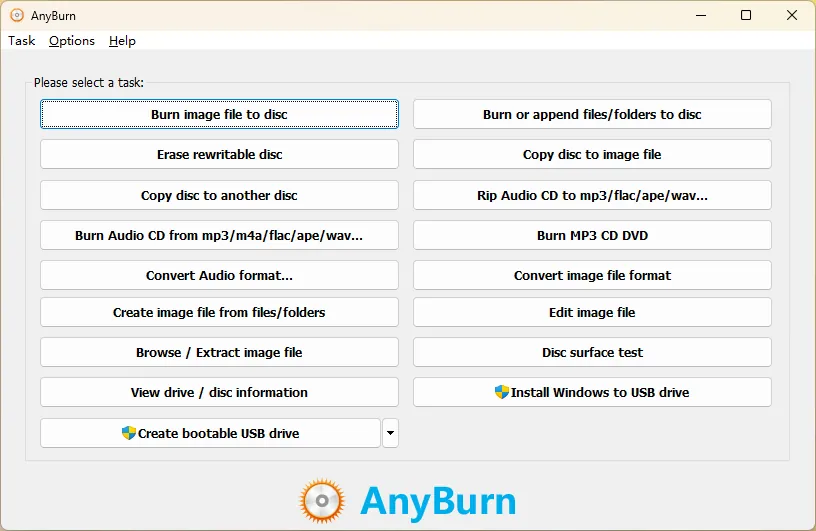
AnyBurn is made by Power Software Ltd. The free edition burns image files and data discs, creates Audio CDs and MP3 discs from MP3, M4A, FLAC, OGG, APE, WMA and WAV files, copies discs, rips Audio CDs, tests disc surfaces and shows drive information. It supports CD, DVD and Blu-ray.
It also creates, edits, browses, extracts and converts ISO and other disc image files, and writes bootable USB drives from ISO images. AnyBurn Free may be used at home and in businesses. AnyBurn Pro, offered as a trial on the same page, adds audio file conversion and installing Windows to a USB drive.
What it does well
- Disc burning. Data, Audio CD and MP3 discs on CD, DVD and Blu-ray.
- Disc images. Create, edit, extract and convert ISO and other image formats.
- Bootable USB. Writes bootable USB drives from ISO files.
- Audio CD ripping. Rips Audio CDs to MP3, FLAC, OGG, APE, WAV or WMA.
- Disc tools. Copy discs, test disc surfaces and view drive information.
Who it is for
Good fit
Anyone who still burns or rips discs or needs a small ISO editor and USB boot tool, including at work.
Look elsewhere
People without an optical drive who only need bootable USB sticks; Rufus or Ventoy are more focused.
Pros and cons
Pros
- Free for home and business use
- Very small download
- Burning, ISO editing and bootable USB in one
- Supports old and new Windows versions
Cons
- Audio conversion and Windows-to-USB need AnyBurn Pro
- Plain, dated interface
- Closed source
How to install AnyBurn
Download AnyBurn Free (the installer contains 64-bit and 32-bit editions) rather than the Pro trial listed next to it. An ARM64 installer and a portable ZIP are also on the download page.
Questions about AnyBurn
Is AnyBurn free?
Yes. AnyBurn Free is free for personal and business use. AnyBurn Pro is a paid edition with a few extra features.
Can AnyBurn make a bootable USB drive?
Yes. The free edition can create a bootable USB drive from an ISO file.
What does AnyBurn Pro add?
Audio file format conversion and installing Windows to a USB drive.


