

Our verdict: Rufus is the quickest way to make a bootable USB stick for installing Windows or Linux. It is a single 2 MB program with no installation, and it can download Windows ISOs for you. It erases the drive and holds one image at a time; for several ISOs on one stick, use Ventoy.
About Rufus
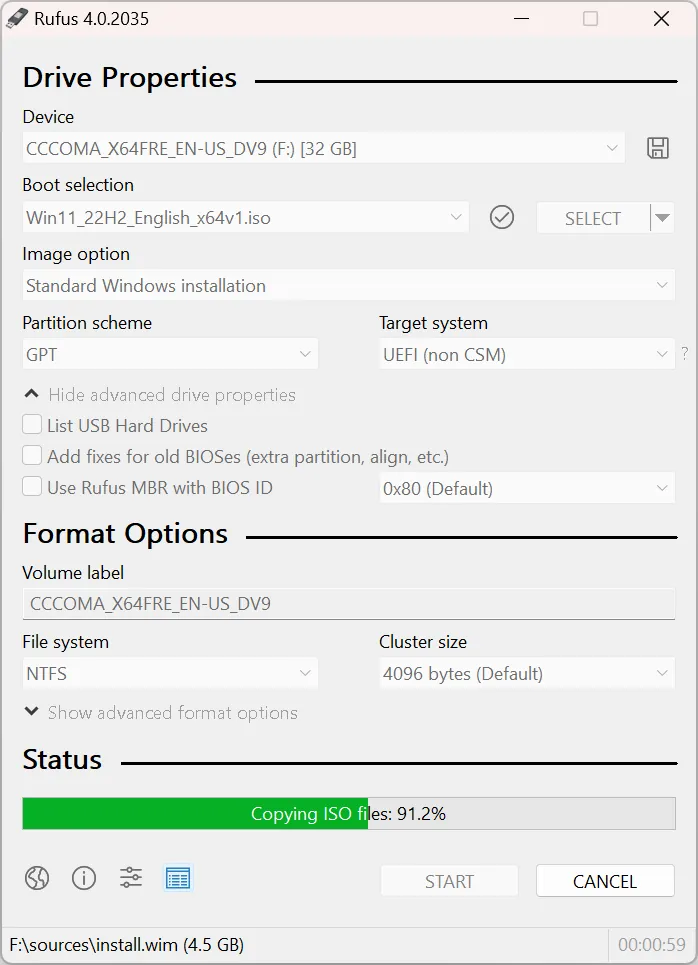
Rufus is written by Pete Batard and published under the GPL v3 or later; the executable is signed by Akeo Consulting. It creates USB installation media from bootable ISOs for Windows, Linux and UEFI tools, and can also make DOS boot drives for flashing BIOS or firmware.
When you write a Windows 11 image, Rufus offers Windows User Experience options, such as removing the TPM and Secure Boot requirements or skipping the online Microsoft account during setup. Options vary with the Windows version, and Rufus documents changes in its FAQ. It can also create Windows To Go drives and save a USB drive as a VHD image.
What it does well
- ISO to USB. Writes Windows, Linux and other bootable ISO images to a USB drive in a few clicks.
- Windows ISO download. The Select button switches to Download to fetch official Windows ISO images inside the app.
- Windows setup options. Can remove some Windows 11 hardware checks and the online account requirement during setup.
- Windows To Go. Creates a USB drive that runs a full Windows installation.
- No installation. A single signed executable of about 2 MB that runs straight after download.
Who it is for
Good fit
Anyone reinstalling Windows, trying a Linux distribution or preparing a recovery stick.
Look elsewhere
People who want several ISOs on one USB drive, and Mac or Linux users, since Rufus only runs on Windows.
Pros and cons
Pros
- Single small executable, no installation
- Downloads Windows ISOs itself
- Options to relax Windows 11 setup requirements
- Open source
Cons
- Erases the USB drive and holds one image at a time
- Runs only on Windows
How to install Rufus
Download the standard x64 file from rufus.ie and run it; there is nothing to install. A portable build that keeps its settings in an INI file is listed next to it. Rufus erases the selected USB drive, so double-check the Device field before you click Start.
Questions about Rufus
Is Rufus free?
Yes. It is open source under the GPL v3 and has no paid version.
Can Rufus bypass Windows 11 requirements?
For Windows 11 images it offers options to remove the TPM, Secure Boot and online Microsoft account requirements during setup.
Will Rufus delete my USB files?
Yes. Creating a bootable drive formats the USB stick, so copy anything important off it first.


