

Our verdict: Auslogics Disk Defrag gives HDD owners more control than the Windows optimiser: single files and folders, free-space consolidation, schedules and a cluster map. It is pointless on SSDs, which it detects and skips, and the app promotes its paid Pro edition and other Auslogics tools.
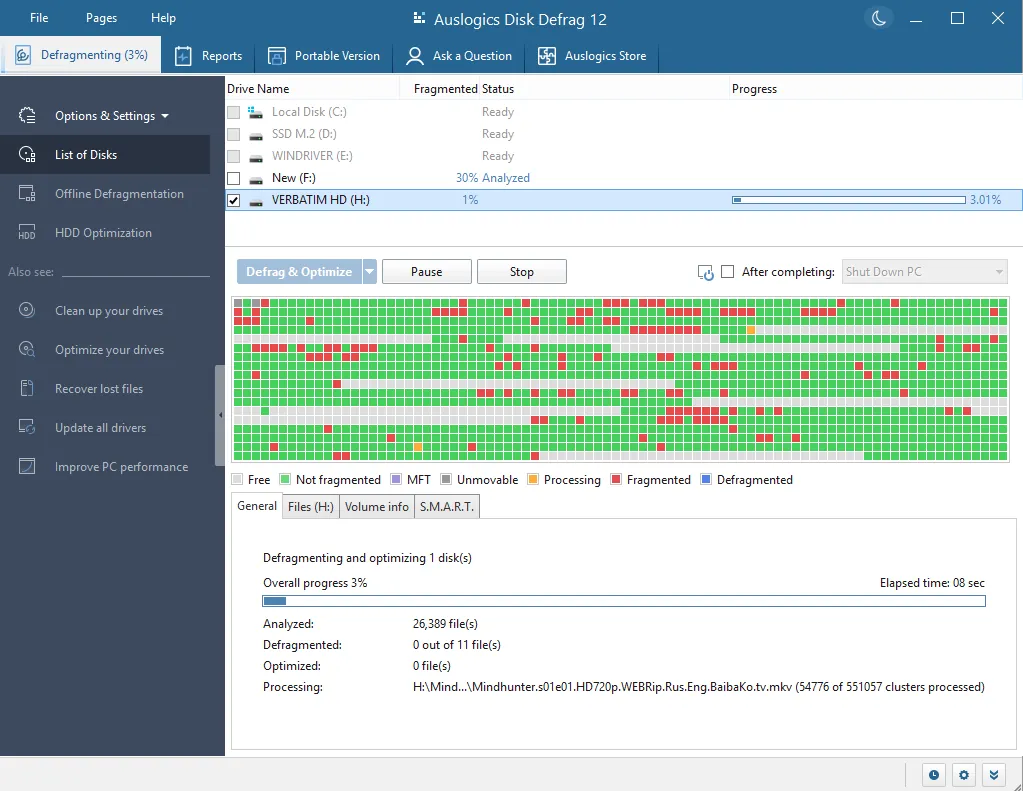
About Auslogics Disk Defrag
Auslogics Disk Defrag is a defragmenter made specifically for hard disk drives. It analyses drives, shows fragmentation on a cluster map, and puts fragmented files back together. It can also consolidate free space so new files are less likely to fragment.
The free edition is free for home and commercial use. It can defragment single files or folders, run scheduled defrags only when needed, and create a portable copy for a USB drive. SSDs are detected and not defragmented; Auslogics sells a separate SSD Optimizer for those. Pro and Ultimate editions add more options.
What it does well
- HDD defragmentation. Reassembles fragmented files on hard disk drives.
- Free-space consolidation. Merges scattered free space into contiguous blocks.
- File and folder defrag. Defragments only selected files, such as a game folder.
- Scheduler. Checks fragmentation at set times and defrags only when needed.
- Portable mode. Creates a portable version to run from a USB drive.
Who it is for
Good fit
PCs with mechanical hard drives, especially older computers and large game libraries.
Look elsewhere
Computers with only SSDs, which do not need defragmentation.
Pros and cons
Pros
- Free for home and business use
- Free-space consolidation and scheduling
- Detects SSDs and leaves them alone
- Portable mode
Cons
- Upsells the Pro edition and other Auslogics products
- Only useful for HDDs
- Windows' built-in optimiser already covers the basics
How to install Auslogics Disk Defrag
The button downloads the official installer from auslogics.com. Read each setup screen and untick any extra Auslogics products or offers you do not want. The program will remind you about the paid Pro edition.
Questions about Auslogics Disk Defrag
Is Auslogics Disk Defrag free?
Yes. Auslogics says the free edition is free for home and commercial use. Pro and Ultimate are paid upgrades.
Should I defragment an SSD?
No. Disk Defrag detects SSDs and does not defragment them.
How often should I defragment?
Auslogics suggests weekly for very active users and monthly or less for light users; the scheduler can decide automatically.


