

Our verdict: Material Maker is the best free answer to Substance Designer for game textures. Its node graph and community library make tileable PBR materials quick to build. Large graphs can feel slow, and the 3D painting tool is still experimental.
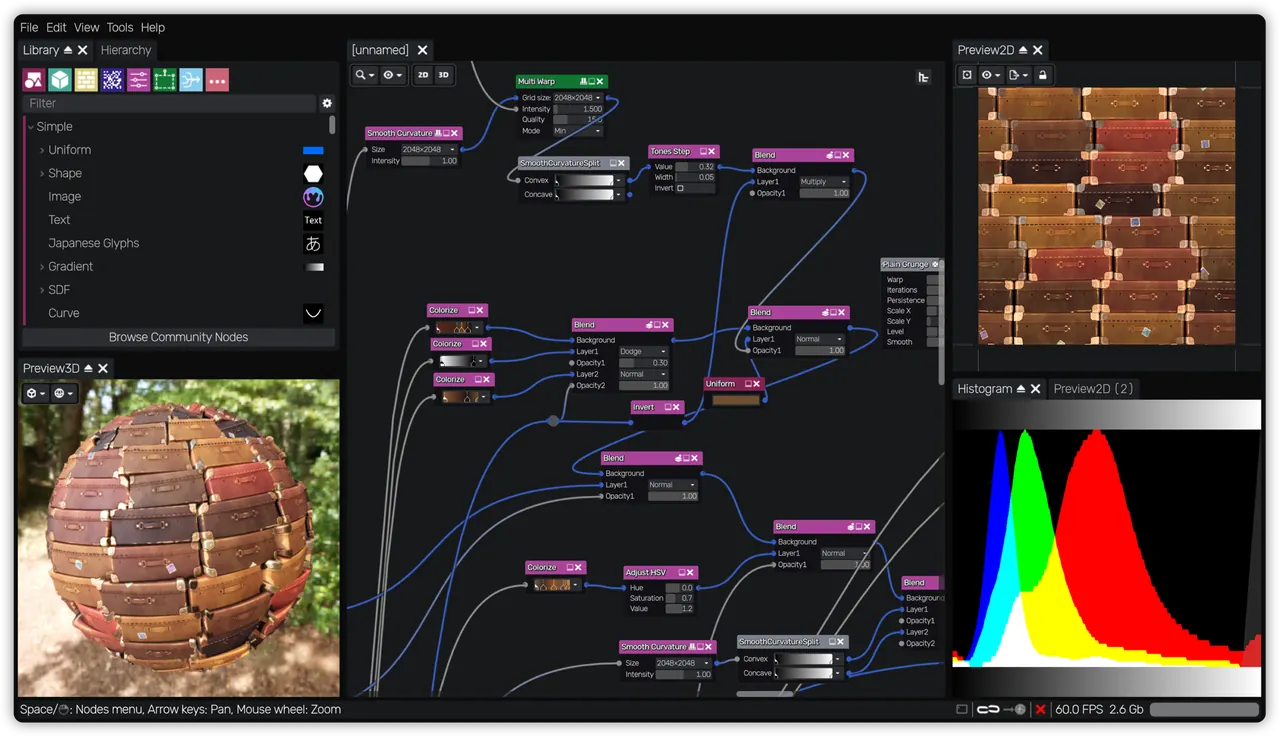
About Material Maker
Material Maker is created by Rodolphe Suescun and contributors under the MIT license and is built on the Godot game engine. Official builds are published on itch.io and GitHub, and it is also available on Steam.
You connect nodes that generate and transform textures: noise, patterns, shapes, blends and filters. The result is a full PBR material with color, roughness, metallic, normal and height maps that can be exported for Godot, Unity and Unreal. New nodes can be made by grouping existing ones or by writing GLSL.
What it does well
- Node graph. More than 200 nodes for generating and transforming textures.
- Custom nodes. Group nodes or describe new ones in GLSL shader code.
- Game engine export. Exports PBR materials for Godot, Unity and Unreal Engine.
- Community library. Hundreds of shared materials, nodes, brushes and environments.
- Texture painting. Experimental tool for painting 3D models with procedural brushes.
Who it is for
Good fit
Indie game developers and 3D artists who need tileable PBR textures.
Look elsewhere
Users looking for a photo-based texture tool or a mature 3D painting app.
Pros and cons
Pros
- Free and open source
- Large node and material library
- Exports to major game engines
- Custom nodes in GLSL
Cons
- Painting tool is experimental
- Complex graphs can slow down
- Portable zip only, no installer
How to install Material Maker
The Windows build is a zip archive: extract it to a folder and run the executable. A GPU with up-to-date drivers matters, because all textures are generated on the graphics card. Start from a material in the built-in library to learn how the nodes connect.
Questions about Material Maker
Is Material Maker free?
Yes. It is open source under the MIT license. Buying it on Steam or donating on itch.io supports the developer.
Does Material Maker work with Blender?
Yes. Exported texture maps can be used in Blender materials like any other image textures.


