

Our verdict: Pencil2D is a simple, focused starting point for traditional frame-by-frame animation. It opens fast and keeps the interface minimal so you can concentrate on drawing. Larger productions will miss the rigging and advanced tools of bigger programs.
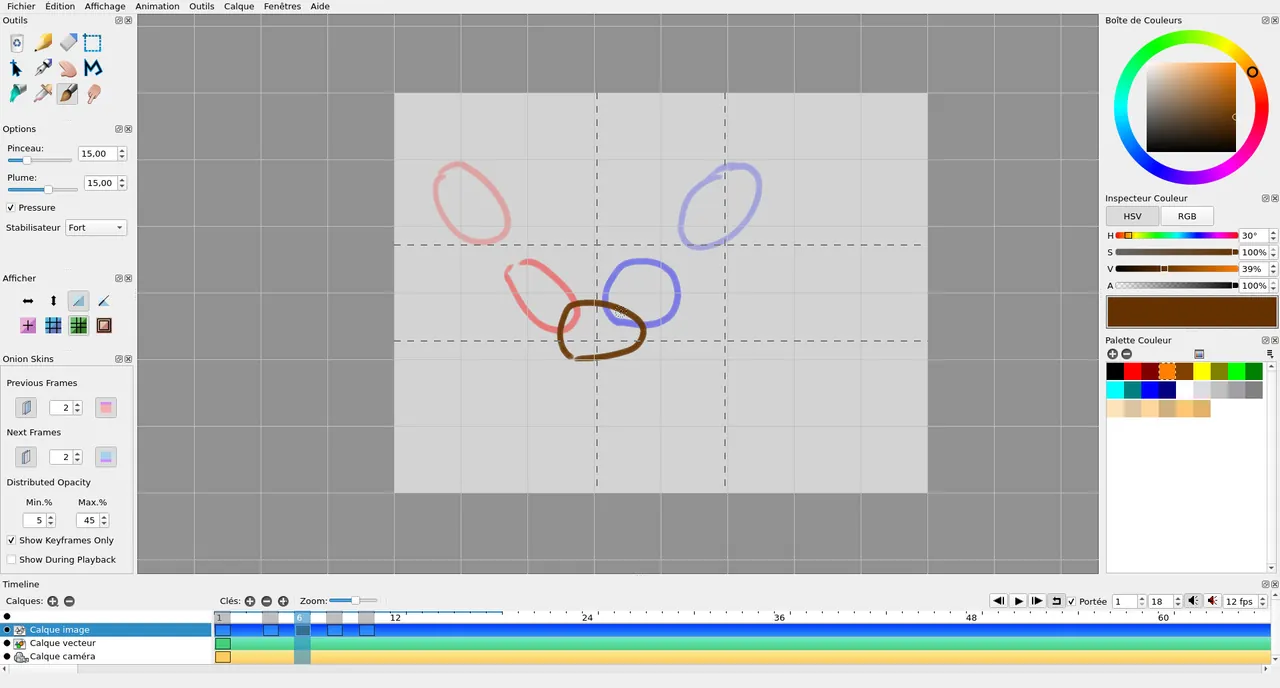
About Pencil2D
Pencil2D is an open-source animation program under the GPLv2 and free to use, even commercially. It is designed to be lightweight and easy, with a timeline, drawing tools and little else in the way.
You can switch between raster and vector layers to sketch, ink and paint, add camera and sound layers, and use onion skinning to see neighboring frames. Finished animations export as video, GIF or image sequences.
What it does well
- Raster and vector layers. Sketch on bitmap layers and ink on vector layers in one project.
- Onion skin. Shows previous and next frames while you draw.
- Camera layer. Pan and zoom the view across a scene.
- Sound layer. Add audio to time animation to dialogue or music.
- Export. Saves animations as video, animated GIF or image sequences.
Who it is for
Good fit
Beginners, students and hobbyists learning frame-by-frame 2D animation.
Look elsewhere
Studios needing bone rigging, tweening or advanced compositing.
Pros and cons
Pros
- Free and open source, even for commercial use
- Minimal, easy interface
- Raster and vector in one app
- Small and fast
Cons
- No installer on Windows; you must unpack a ZIP
- No bone rigging or automatic tweening
How to install Pencil2D
Windows builds come as a ZIP archive, not an installer. Right-click the downloaded file, choose Extract All, then run pencil2d.exe from the extracted folder; running it from inside the ZIP causes missing DLL errors. If MSVCP140.dll is reported missing, run the included vc_redist.x64.exe.
Questions about Pencil2D
Is Pencil2D free?
Yes. It is open source under the GPLv2 and free to use, including commercially.
Why does Pencil2D say Qt5Widgets.dll was not found?
The program was started from inside the ZIP file. Extract the whole archive first, then run pencil2d.exe from the extracted folder.
Can Pencil2D export to MP4 or GIF?
Yes. Animations can be exported as video files, animated GIFs or image sequences.


