

Our verdict: Transmission is a small, ad-free torrent client that does the basics well. It is best known on macOS and Linux, and the Windows version uses a plain Qt interface. If you want built-in search or many advanced options, qBittorrent offers more.
About Transmission
Transmission has been developed as open source since 2005. It is the default torrent client in several Linux distributions and focuses on low memory use and simple settings rather than a long list of options.
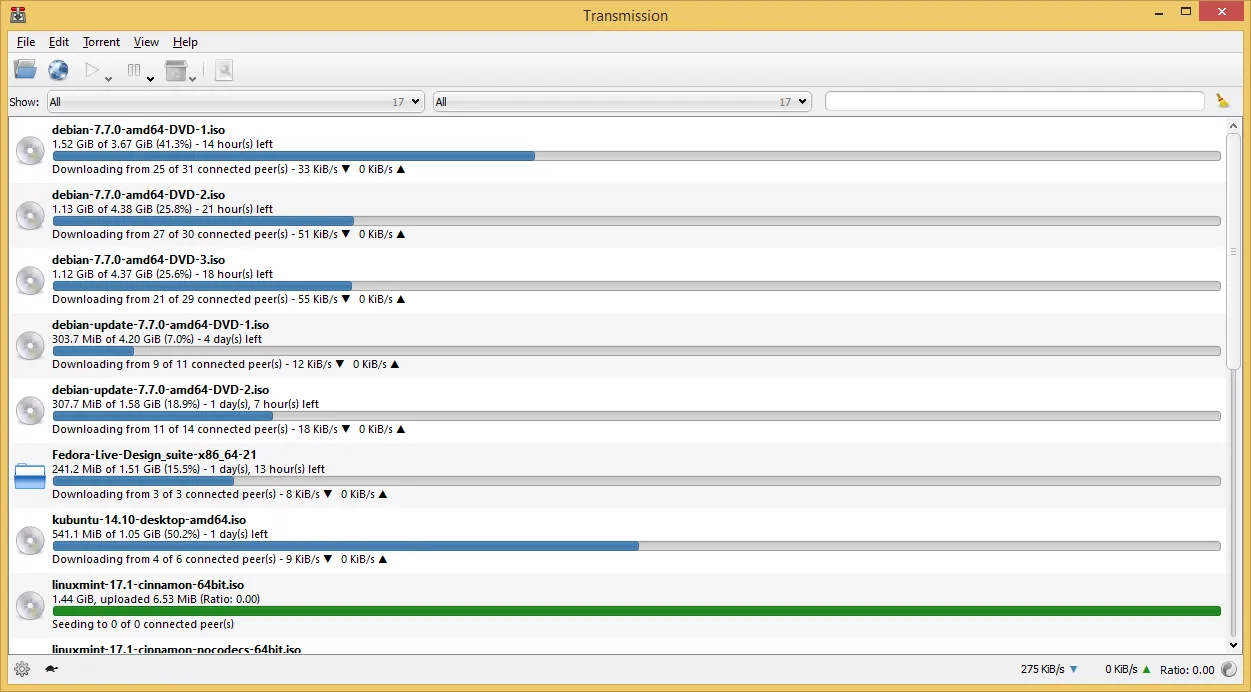
The Windows build uses a Qt interface. Transmission supports magnet links, encryption, DHT, peer exchange, per-torrent speed limits and file selection. A built-in web interface lets you manage downloads from another device on your network.
What it does well
- Magnet links and DHT. Starts downloads from magnet links and finds peers without a tracker.
- Web interface. Manage torrents from a browser on another device.
- Selective download. Pick which files inside a torrent to download.
- Speed limits and schedule. Alternative speed limits that switch on at set times.
- Low resource use. Uses little memory, which suits older PCs and home servers.
Who it is for
Good fit
People who want a small, ad-free torrent client with only the settings they need.
Look elsewhere
Users who want a built-in torrent search, RSS rules or very detailed per-torrent controls.
Pros and cons
Pros
- No ads or bundled software
- Light on memory
- Built-in web interface
- Simple settings
Cons
- No built-in torrent search
- Windows version gets less attention than macOS and Linux
How to install Transmission
Install the x64 MSI. The qt5 builds on the same page are for older systems; most Windows 10 and 11 PCs should use the standard x64 file. In Preferences, set the download folder and check that the listening port is open.
Questions about Transmission
Is Transmission free?
Yes. It is open source under the GNU GPL and has no ads or paid version.
Can I control Transmission remotely?
Yes. Turn on remote access in Preferences and open the web interface from a browser on another device.
Which Transmission installer do I need?
On 64-bit Windows 10 or 11 use the standard x64 MSI; the qt5 builds are for older systems.


