EarTrumpet — Free Volume Control

By File-New-Project · Audio
  • Open source
  • Free
  • Audio
4.4 / 5 · 2,544 ratings on Microsoft Store
Download EarTrumpet Official site: eartrumpet.app Link checked October 19, 2026

Our verdict: EarTrumpet is what the Windows volume flyout should have been. Every app gets its own slider in the tray, and you can move an app to another output device in two clicks. It only controls volume and routing, not sound quality.
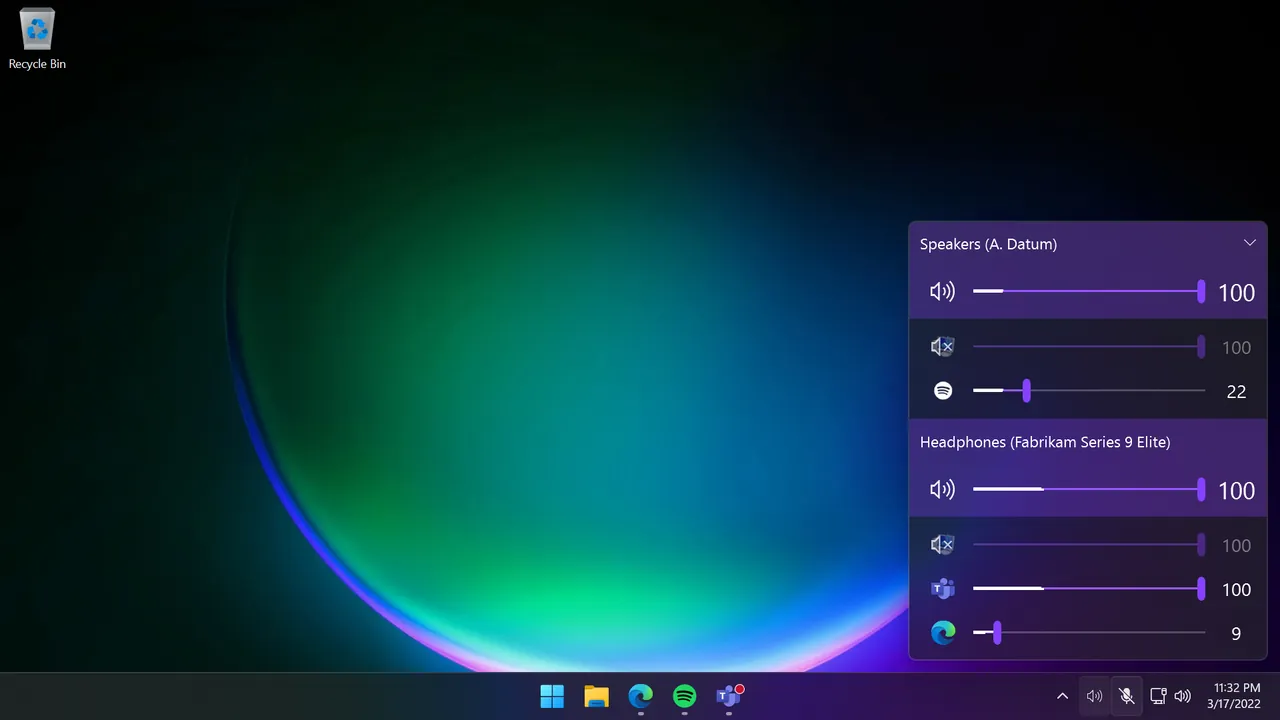
EarTrumpet volume flyout on the Windows 11 taskbar with separate sliders for each app and output device
EarTrumpet volume flyout on the Windows 11 taskbar with separate sliders for each app and output device · Screenshot: EarTrumpet contributors, MIT, from the official repository

About EarTrumpet

EarTrumpet is an open-source tray app developed on GitHub by File-New-Project. Its license is MIT, except for a few named companies that are excluded from it.

It adds a tray icon that shows all playback devices and every app making sound, each with its own volume slider. Right-clicking an app lets you send it to a different output device.

What it does well

  • Per-app volume. Each app that plays sound gets its own slider in the tray flyout.
  • Multiple devices. Shows all playback devices and their volumes at once.
  • Move apps between outputs. Send a browser to headphones while a game stays on speakers.
  • Default device switching. Change the default output device from the tray menu.
  • Native look. Follows the Windows design, light and dark themes.

Who it is for

Good fit

Anyone who regularly adjusts app volumes or switches between headphones and speakers.

Look elsewhere

People who need an equalizer or audio mixing; use Equalizer APO or Voicemeeter for that.

Pros and cons

Pros

  • Per-app volume in one click
  • Easy output switching per app
  • Free and open source

Cons

  • Main download is through the Microsoft Store
  • No equalizer or audio effects

How to install EarTrumpet

Install EarTrumpet from the Microsoft Store link on eartrumpet.app; that is the main distribution channel. After installing, drag its icon from the hidden tray area onto the taskbar, and optionally hide the original Windows volume icon in taskbar settings.

Questions about EarTrumpet

Is EarTrumpet free?

Yes. It is open source and free from the Microsoft Store.

Can EarTrumpet send one app to headphones and another to speakers?

Yes. Right-click an app in the flyout and choose its output device.

Download EarTrumpet from eartrumpet.app ExeDepot does not host this file. The link opens the developer's download page.

Alternatives to EarTrumpet

  • SoundSwitch Audio Device Switcher

    Tray app that switches playback and recording devices with global hotkeys, rules and profiles.

    Antoine Aflalo · Open source · soundswitch.aaflalo.me
  • Equalizer APO System-Wide Equalizer

    System-wide parametric and graphic equalizer for every app that plays sound through Windows.

    Jonas Thedering · Open source · sourceforge.net/projects/equalizerapo
  • FxSound Sound Enhancer and Equalizer

    System-wide sound enhancer with an equalizer, bass and volume boost, effects and presets.

    FxSound · Open source · fxsound.com
  • Peace Equalizer Equalizer APO Interface

    Friendly interface for Equalizer APO with up to 31 bands, effects, AutoEQ and one-click presets.

    Peter Verbeek · Open source · sourceforge.net/projects/peace-equalizer-apo-extension

Similar to EarTrumpet All audio apps

  • Voicemeeter Virtual Audio Mixer

    Virtual audio mixer that routes and mixes microphones, apps and outputs on Windows.

    VB-Audio Software · Freeware · vb-audio.com
  • Virtual Audio Cable Virtual Audio Driver

    Driver that creates virtual audio devices to route sound between apps; trial with voice reminders, free Lite.

    Eugene Muzychenko · Shareware · vac.muzychenko.net
  • VB-CABLE Virtual Audio Cable

    Virtual audio cable driver that sends the sound of one app into another as a microphone input.

    VB-Audio Software · Freeware · vb-audio.com
  • ASIO4ALL Universal ASIO Driver

    Universal low-latency ASIO driver for built-in and USB sound devices without their own ASIO driver.

    Michael Tippach · Freeware · asio4all.org