FxSound — Free Sound Enhancer and Equalizer

By FxSound · Audio
  • Open source
  • Free
  • Audio
4.4 / 5 · 1,596 ratings on Microsoft Store
Download FxSound Direct download from github.com Official download page Link checked October 19, 2026

Our verdict: FxSound is the easiest way to make quiet laptop speakers or cheap headphones sound louder and fuller. Presets and a simple equalizer give quick results without technical setup. Precise users will find it less flexible than Equalizer APO, and it is Windows only.
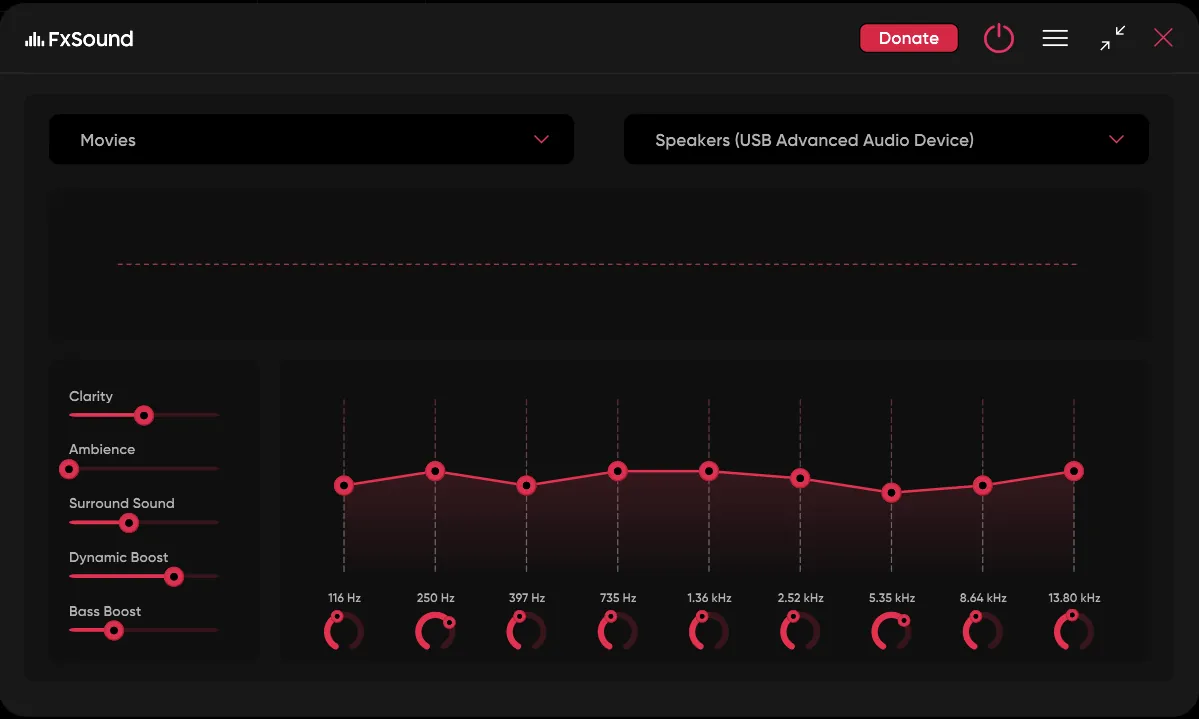
FxSound main window with the Movies preset, five effect sliders and a 9-band equalizer
FxSound main window with the Movies preset, five effect sliders and a 9-band equalizer · Screenshot: Shree swaksha, GNU GPL v3, via Wikimedia Commons

About FxSound

FxSound was sold for over 20 years, earlier under the name DFX Audio Enhancer. It became free in 2022 and open source in 2023, and the developers say it is now supported entirely by user contributions.

It runs in the background and processes all system audio, adjusting timbre, volume, spatial balance and dynamics. You choose a preset, or adjust the equalizer and effects yourself. FxSound says its volume boost is controlled to avoid harmful peaking and distortion.

What it does well

  • System-wide processing. Enhances the sound of every app that plays through Windows.
  • Equalizer and effects. A 9-band equalizer plus Clarity, Ambience, Surround Sound, Dynamic Boost and Bass Boost sliders.
  • Volume and bass boost. Raises loudness and low end with peak control to limit distortion.
  • Presets. Ready-made settings for common uses such as music, games and voice.
  • Audio routing. Choose which playback device receives the processed sound.

Who it is for

Good fit

Laptop users with quiet speakers, people with budget headphones, and transcriptionists who need clearer voices.

Look elsewhere

Audiophiles who want measured parametric correction, and macOS or Linux users.

Pros and cons

Pros

  • Very easy to use
  • Noticeable boost on weak speakers
  • Free and open source
  • Presets for common uses

Cons

  • Less precise than Equalizer APO
  • Windows only
  • Processing colors the sound, which is wrong for audio work

How to install FxSound

Download the installer from fxsound.com; it is served from FxSound's official GitHub releases, and an ARM64 build is listed separately. After installing, pick your headphones or speakers as the output in FxSound, then try a preset before touching the equalizer. Turn FxSound off when recording or mixing audio so it does not color the result.

Questions about FxSound

Is FxSound free?

Yes. FxSound became free in 2022 and open source under the GNU AGPL v3 in 2023. Contributions are optional.

Is FxSound the same as DFX Audio Enhancer?

Yes. FxSound is the current name of the product previously sold as DFX Audio Enhancer.

Download FxSound from fxsound.com ExeDepot does not host this file. The download starts from the developer's server, github.com. Other versions are on the official download page.

Alternatives to FxSound

  • Equalizer APO System-Wide Equalizer

    System-wide parametric and graphic equalizer for every app that plays sound through Windows.

    Jonas Thedering · Open source · sourceforge.net/projects/equalizerapo
  • Peace Equalizer Equalizer APO Interface

    Friendly interface for Equalizer APO with up to 31 bands, effects, AutoEQ and one-click presets.

    Peter Verbeek · Open source · sourceforge.net/projects/peace-equalizer-apo-extension
  • Voicemeeter Virtual Audio Mixer

    Virtual audio mixer that routes and mixes microphones, apps and outputs on Windows.

    VB-Audio Software · Freeware · vb-audio.com
  • Virtual Audio Cable Virtual Audio Driver

    Driver that creates virtual audio devices to route sound between apps; trial with voice reminders, free Lite.

    Eugene Muzychenko · Shareware · vac.muzychenko.net

Similar to FxSound All audio apps

  • VB-CABLE Virtual Audio Cable

    Virtual audio cable driver that sends the sound of one app into another as a microphone input.

    VB-Audio Software · Freeware · vb-audio.com
  • ASIO4ALL Universal ASIO Driver

    Universal low-latency ASIO driver for built-in and USB sound devices without their own ASIO driver.

    Michael Tippach · Freeware · asio4all.org
  • SonoBus Network Audio Streaming App

    Peer-to-peer, low-latency audio streaming for remote jamming, sessions and podcasts.

    Sonosaurus (Jesse Chappell) · Open source · sonobus.net
  • SoundSwitch Audio Device Switcher

    Tray app that switches playback and recording devices with global hotkeys, rules and profiles.

    Antoine Aflalo · Open source · soundswitch.aaflalo.me