

Our verdict: SoundSwitch does one job well: it moves Windows between your speakers and headset, or between microphones, with a single key press. Profiles and per-app rules cover more complex setups. It does not mix or process audio, so it complements rather than replaces tools like Voicemeeter.
About SoundSwitch
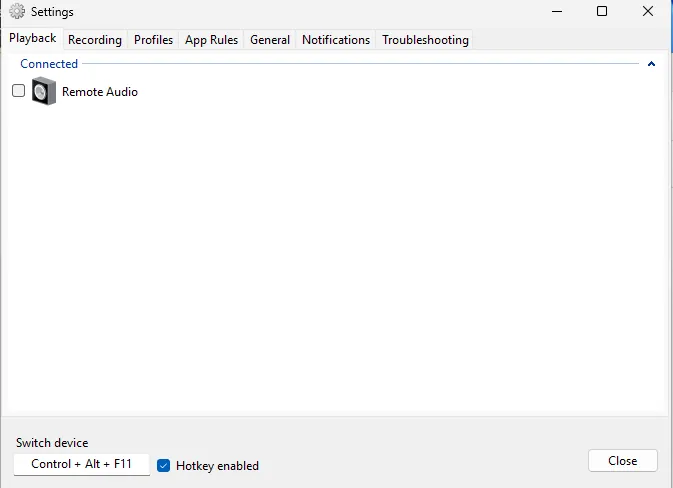
SoundSwitch is an open source Windows app maintained by Antoine Aflalo. It sits in the system tray and changes the default playback or recording device when you press a global hotkey, cycling through the devices you ticked in its settings.
Profiles save a complete audio configuration that you can recall in one click. Per-app rules switch devices automatically when a chosen program starts or gains focus. Each switch can show a toast or banner notification or play a sound, so you know which device is active.
What it does well
- Global hotkeys. Ctrl+Alt+F11 cycles playback devices and Ctrl+Alt+F7 cycles recording devices by default.
- Microphone mute. Ctrl+Alt+M toggles the microphone mute from anywhere.
- Profiles. Save and recall complete audio device setups in one click.
- Per-app rules. Switch devices automatically when an application starts or gains focus.
- Notifications. Toast, banner or sound notifications show which device is now active.
Who it is for
Good fit
Gamers and remote workers who switch between speakers and a headset several times a day, and streamers.
Look elsewhere
People who need to route or mix audio between apps; use Voicemeeter or VB-Cable for that.
Pros and cons
Pros
- Switches devices with one key
- Profiles and per-app rules
- Microphone mute hotkey
- Lightweight tray app
Cons
- Windows only
- Does not mix or route audio
How to install SoundSwitch
Download the installer from soundswitch.aaflalo.me; it is published on the project's GitHub releases. After installing, right-click the tray icon, open Settings, and tick the devices you want to cycle through on the Playback and Recording tabs. Change the default hotkeys if they clash with a game.
Questions about SoundSwitch
Is SoundSwitch free?
Yes. It is open source under the GNU GPL v3 with no paid edition.
What are the default SoundSwitch hotkeys?
Ctrl+Alt+F11 cycles playback devices, Ctrl+Alt+F7 cycles recording devices, and Ctrl+Alt+M toggles microphone mute.


