

Our verdict: Virtual Audio Cable is a long-standing, precise tool for sending audio from one program into another, for example from a DAW into OBS or a voice chat. It is a driver with no tray clutter and no network access. The trial is fully functional but a voice starts nagging after 30 minutes, and the free Lite edition is limited to one cable at 48 kHz, 16-bit.
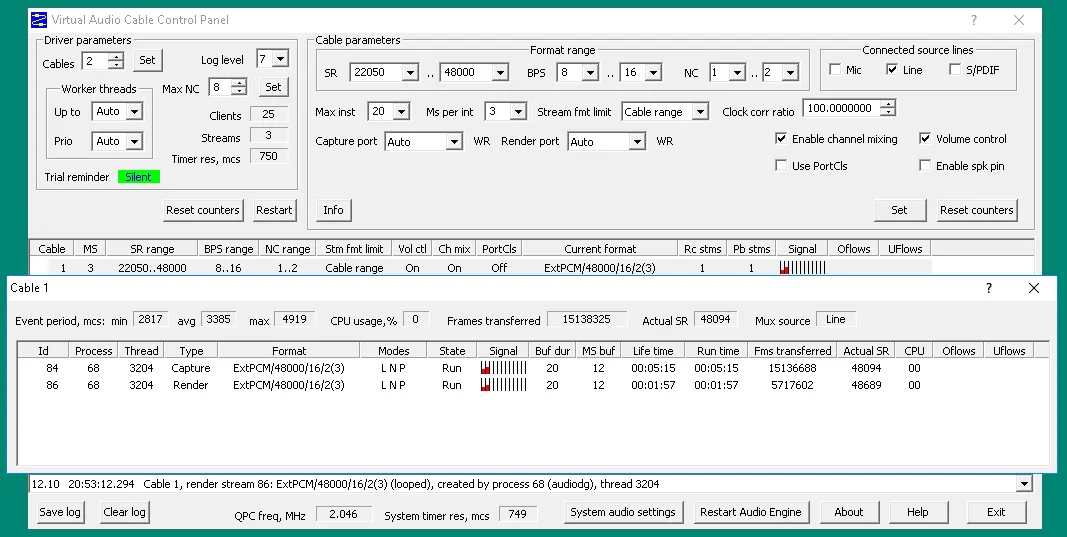
About Virtual Audio Cable
Virtual Audio Cable (VAC) is developed by Eugene Muzychenko; other products using the same name are unrelated. It installs a driver that creates virtual audio devices. Whatever one app plays into a cable's output, another app can record from its input. Several apps can share a cable, so their sounds are mixed, and the transfer is bit-perfect when no format conversion or volume control is involved. The included Audio Repeater apps copy audio from one device to another.
The trial is the full version, but after 30 minutes a female voice reminds you that it is a trial. The free Lite version is for private home use only and offers one cable, up to 48 kHz, 16-bit stereo and one client. A full home license costs $30 and a business license $50, both one-time and perpetual; no account is needed to try it.
What it does well
- Virtual cables. Up to 256 virtual audio devices, each looping its playback side into its recording side.
- Mixing and sharing. Several apps can play into or record from the same cable at once.
- High-resolution audio. Up to 384 kHz, 32-bit and 32 channels per cable in the full version.
- Audio Repeater. Bundled apps that route audio from any device or cable to another one.
- Channel and format control. Channel remapping, stream format limits and microphone or S/PDIF type lines.
Who it is for
Good fit
Streamers, podcasters, ham radio operators and developers who need to route audio between Windows apps.
Look elsewhere
Users who want a free unlimited audio router or a mixer with a graphical interface.
Pros and cons
Pros
- Bit-perfect, low-latency audio routing
- Very configurable cables and formats
- No ads or network access
- Cheap one-time license
Cons
- Trial repeats a voice reminder after 30 minutes
- Free Lite version is home-only and limited to one cable
- Technical setup through a control panel and audio settings
How to install Virtual Audio Cable
The button downloads the official trial installer (self-installing EXE) from the developer's server. Installing a driver needs administrator rights. If recording devices don't appear on Windows 10 or 11, allow microphone access in Settings > Privacy > Microphone. To switch to the full version later, uninstall the trial and install the full package.
Questions about Virtual Audio Cable
Is Virtual Audio Cable free?
Partly. The full trial is free but a voice reminder starts after 30 minutes. The free Lite version is for home use only, with one cable at up to 48 kHz and 16-bit. A full home license costs $30 one-time, business $50.
Is this the same as VB-Audio Virtual Cable?
No. Virtual Audio Cable by Eugene Muzychenko is a different product from VB-Audio's VB-CABLE, which has its own site and license.
Does Virtual Audio Cable reduce sound quality?
No, when no format conversion or volume control is involved; then the transfer is bit-perfect.


