mRemoteNG — Free Remote Connection Manager

By mRemoteNG contributors · Internet
  • Open source
  • Free
  • Internet
Download mRemoteNG Direct download from github.com Official download page Link checked October 19, 2026

Our verdict: mRemoteNG is a long-standing free tool for admins who juggle many servers: every RDP, VNC or SSH session opens as a tab, organised in a connection tree. It works well, but the last stable release dates from 2019 and newer builds are only pre-releases.
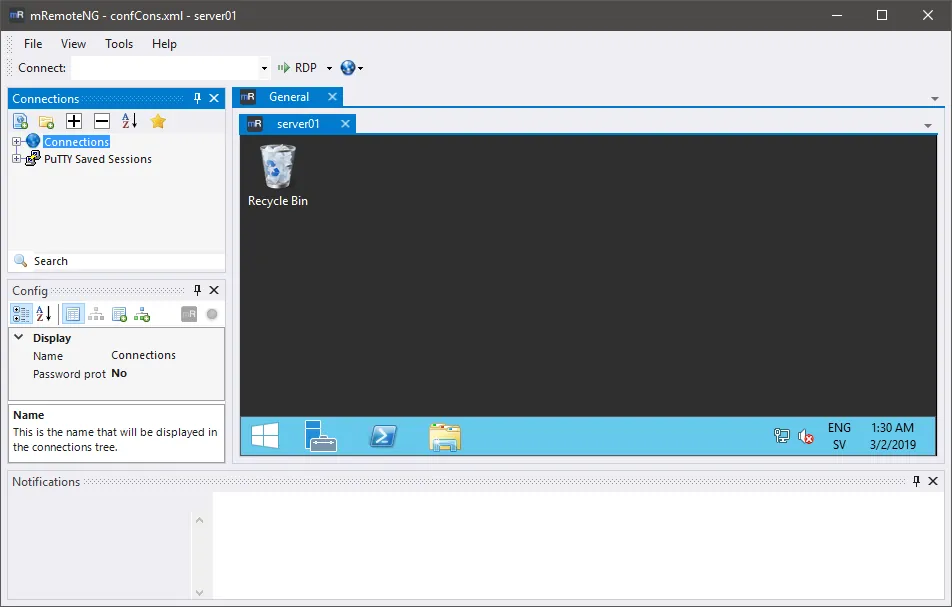
mRemoteNG with a connection tree and an RDP session to a Windows server open in a tab
mRemoteNG with a connection tree and an RDP session to a Windows server open in a tab · Screenshot: mRemoteNG contributors, GPL-2.0, from the official repository

About mRemoteNG

mRemoteNG (Multi-Remote Next Generation) is an open-source, tabbed remote connections manager for Windows. It continues the older mRemote project and keeps all your connections in a tree with folders, inherited settings and saved credentials.

It supports RDP, VNC, SSH, Telnet, rlogin, raw sockets and HTTP/HTTPS, using PuTTY for SSH and Telnet. Connections can be imported from Remote Desktop Connection Manager files and Active Directory. The current stable version, 1.76.20, was released in April 2019; development continues in pre-release builds.

What it does well

  • Tabbed sessions. Opens each remote session as a tab in one window.
  • Many protocols. RDP, VNC, SSH, Telnet, rlogin, raw socket and HTTP/HTTPS.
  • Connection tree. Folders with inherited settings keep hundreds of hosts organised.
  • Imports. Reads Remote Desktop Connection Manager files and Active Directory.
  • Portable version. A ZIP build runs from a folder or USB drive.

Who it is for

Good fit

Administrators and homelab users who connect to many Windows and Linux machines.

Look elsewhere

Users who want frequent stable updates or a cross-platform client.

Pros and cons

Pros

  • Free and open source
  • Many protocols in one tabbed window
  • Handles large connection lists well
  • Portable version available

Cons

  • Last stable release is from 2019
  • Windows only
  • Interface looks dated

How to install mRemoteNG

The button downloads the MSI installer of the latest stable release from GitHub; a portable ZIP is on the same page. Set a master password for the connection file under the options so saved credentials are protected.

Questions about mRemoteNG

Is mRemoteNG free?

Yes. mRemoteNG is open source under the GNU GPL v2.

Why is the stable version so old?

Version 1.76.20 from 2019 is still the latest stable release; newer 1.77 and 1.78 builds are published as pre-releases.

Does mRemoteNG support SSH?

Yes. It uses PuTTY for SSH, Telnet and rlogin sessions.

Download mRemoteNG from github.com/mRemoteNG ExeDepot does not host this file. The download starts from the developer's server, github.com. Other versions are on the official download page.

Alternatives to mRemoteNG

  • Remote Desktop Manager Free Remote Connection Manager

    Connection and password manager for RDP, SSH, VNC and more; the Free edition covers solo use.

    Devolutions Inc. · Freeware · devolutions.net
  • MobaXterm Home Edition SSH Client

    All-in-one remote toolbox for Windows: tabbed SSH, X server, RDP, VNC and SFTP. Free Home Edition.

    Mobatek · Freeware · mobatek.net
  • PuTTY SSH Client

    Classic SSH and Telnet client for Windows, with serial connections, key tools and saved sessions.

    Simon Tatham and the PuTTY team · Open source · chiark.greenend.org.uk/~sgtatham
  • Termius SSH Client

    Modern cross-platform SSH and SFTP client with a host vault; free Starter plan, paid sync.

    Termius Corporation · Freeware · termius.com

Similar to mRemoteNG All internet apps

  • Bitvise SSH Client SSH and SFTP Client

    Free Windows SSH client with a graphical SFTP browser, terminal and powerful port forwarding.

    Bitvise Limited · Freeware · bitvise.com
  • Xshell SSH Client

    Tabbed SSH, Telnet and RDP client with a session manager; free for home and school use.

    NetSarang Computer, Inc. · Freeware · netsarang.com
  • Warp AI Terminal

    Open-source modern terminal with built-in AI coding agents; free plan, paid agent usage.

    Warp (Denver Technologies, Inc.) · Open source · warp.dev
  • Windows Terminal Terminal App

    Microsoft's tabbed terminal for PowerShell, Command Prompt and WSL, with panes and themes.

    Microsoft · Open source · github.com/microsoft