

Our verdict: Windows Terminal is the modern replacement for the old console window. It puts PowerShell, Command Prompt, WSL distributions and SSH sessions into tabs and split panes, with proper Unicode and fast rendering. It is a terminal, not a shell, so it works alongside the tools you already use.
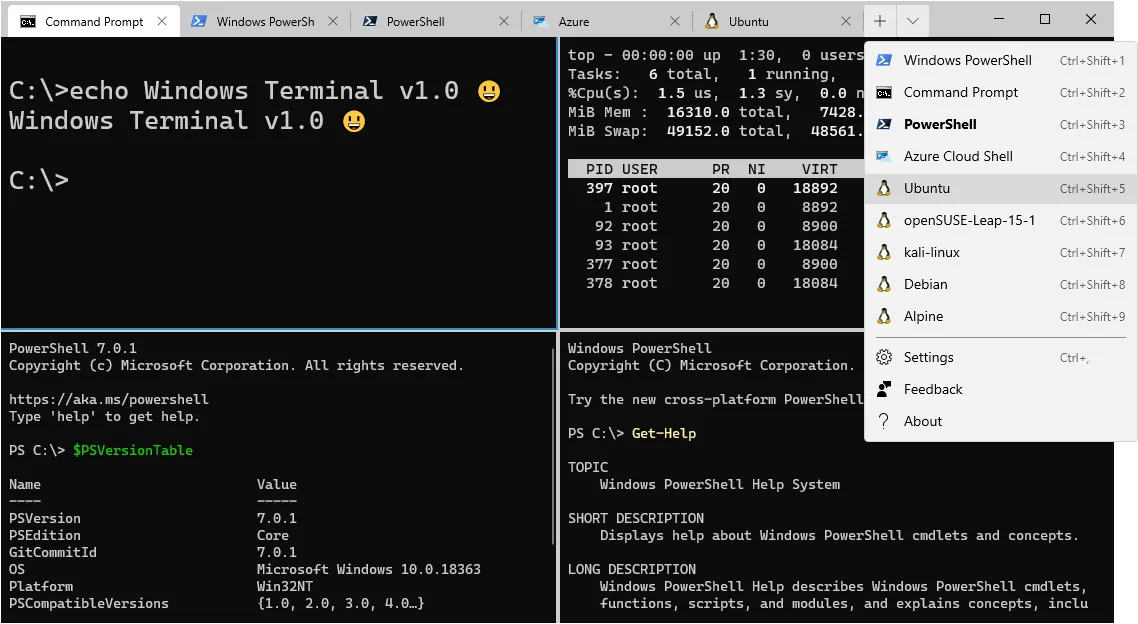
About Windows Terminal
Windows Terminal is developed by Microsoft as open source in the same GitHub repository as conhost, the classic Windows console host. It is a host application: shells such as PowerShell, cmd or bash in WSL run inside it.
It creates profiles automatically for installed WSL distributions and PowerShell versions. Settings can be changed in a graphical editor or in a JSON file, and you can make Windows Terminal the default terminal for all command-line apps.
What it does well
- Tabs and panes. Run several shells side by side and drag tabs between windows.
- Profiles. Separate settings for PowerShell, Command Prompt, each WSL distribution and Azure Cloud Shell.
- GPU text rendering. Fast rendering with full Unicode and UTF-8 support, including emoji.
- Themes and backgrounds. Color schemes, fonts, transparency and background images per profile.
- Command palette and actions. Searchable commands and fully customizable keyboard shortcuts.
Who it is for
Good fit
Developers, admins and WSL users who spend time on the command line.
Look elsewhere
People who never open a command prompt, or who need an SSH client with saved sessions and file transfer.
Pros and cons
Pros
- Tabs, panes and tab tear-out
- Automatic WSL and PowerShell profiles
- Fast GPU rendering with full Unicode
- Open source under the MIT License
Cons
- Manual installs from GitHub may not update automatically, and ZIP builds never do
- Settings are spread across a large settings UI and JSON file
How to install Windows Terminal
Microsoft recommends the Microsoft Store version, which updates itself. The direct download is the .msixbundle from the official GitHub release; double-click it to install. The project README warns that manual installs may not update automatically, and older Windows 10 builds may need the VC++ Desktop Framework Package.
Questions about Windows Terminal
Is Windows Terminal the same as PowerShell?
No. PowerShell is a shell; Windows Terminal is the window that hosts it, along with Command Prompt, WSL and other shells.
How do I make Windows Terminal the default?
Open Settings → Startup and choose Windows Terminal as the default terminal application. This works on Windows 11 and updated Windows 10 22H2.
Is there a portable version?
Yes. Each GitHub release has ZIP builds; create a file named .portable next to WindowsTerminal.exe to keep settings in that folder.


