

Our verdict: Nmap is the standard tool for finding what is on a network and which ports are open. The Windows installer adds the Zenmap GUI, but real power is on the command line, and the learning curve is steep. Only scan networks you own or have permission to test.
About Nmap
Nmap (Network Mapper) is a network discovery and security auditing tool started by Gordon Lyon. It finds live hosts, scans TCP and UDP ports, detects service versions and guesses the operating system, and the Nmap Scripting Engine runs scripts for further checks. It is used by network administrators and security testers.
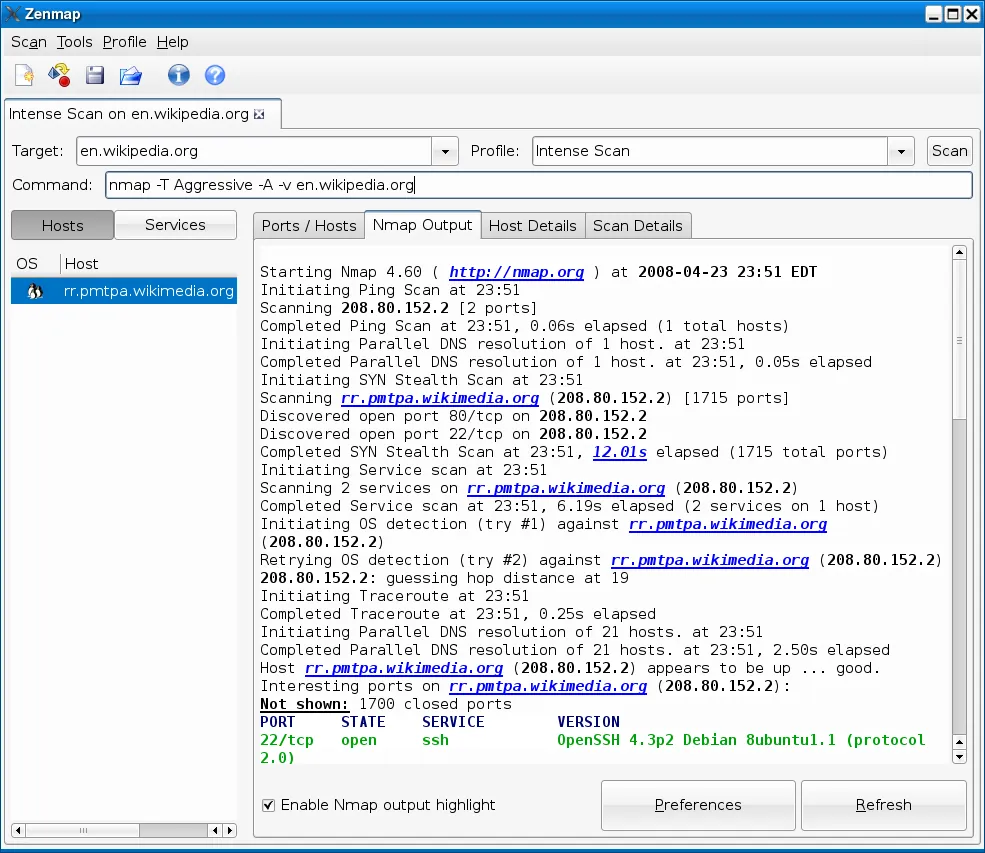
On Windows, Nmap comes as a self-installer that includes its dependencies and the Zenmap GUI, which saves scan profiles and shows results as host lists and a network map. The source code is public under the Nmap Public Source License, which is free for end users but places conditions on companies that redistribute Nmap in their own products.
What it does well
- Host discovery. Finds which devices on a network or address range are online.
- Port scanning. Checks TCP and UDP ports with many scan techniques.
- Service and OS detection. Identifies running services, their versions and the likely operating system.
- Nmap Scripting Engine. Runs scripts for extra checks, such as vulnerability detection.
- Zenmap GUI. Graphical front end with saved profiles and a topology view.
Who it is for
Good fit
Network administrators and security learners who need detailed scans of their own networks.
Look elsewhere
Users who just want a list of devices on home Wi-Fi; simpler IP scanners do that with less effort.
Pros and cons
Pros
- Free, with public source code
- Very detailed port, service and OS detection
- Scripting engine for advanced checks
- Zenmap GUI included on Windows
Cons
- Steep learning curve; most options are command-line flags
- Scanning networks without permission can break rules or laws
- License is not a standard OSI license
How to install Nmap
Run the official self-installer; it includes the dependencies Nmap needs on Windows and the Zenmap GUI. Some antivirus programs flag scanning tools, so download only from nmap.org. Start Zenmap and try the Quick scan profile on your own network first.
Questions about Nmap
Is Nmap free?
Yes. Nmap is free to download and use. Its Nmap Public Source License adds conditions only for companies that redistribute it in their products.
Does Nmap have a graphical interface?
Yes. The Windows installer includes Zenmap, the official GUI for Nmap.
Is it legal to use Nmap?
Scanning your own network is normal practice. Scanning networks you do not own or have permission to test can violate terms of service or laws.


