

Our verdict: TrafficMonitor puts live upload and download speed, CPU and memory usage right on the taskbar, which Windows itself does not offer. It is tiny, portable and highly customizable with skins and plugins. The interface and wiki come from a Chinese developer, and the English documentation is thin.
About TrafficMonitor
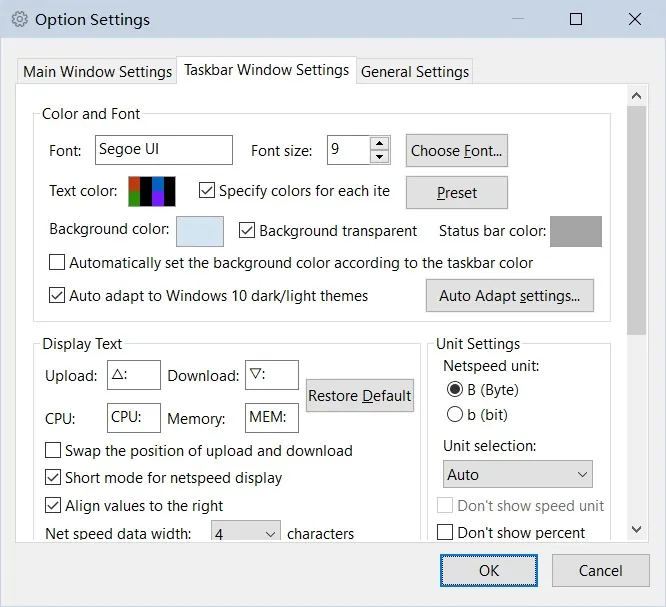
TrafficMonitor is an open-source monitoring tool by zhongyang219. It shows the current network speed and CPU and RAM usage in a small floating window, or embedded directly in the Windows taskbar. You choose which values appear, change the look with skins, and view historical traffic statistics and details of the active network connection. If several network adapters exist, it can pick one automatically or let you choose.
Two editions exist. The Lite edition, which the developer recommends unless you need temperatures, also shows GPU and disk usage and runs without administrator rights. The standard edition adds CPU, GPU, disk and motherboard temperatures and requires administrator rights, but its temperature code is no longer maintained; temperatures are moving to a separate Hardware Monitor plugin. It needs the Microsoft Visual C++ runtime.
What it does well
- Taskbar display. Shows network speed, CPU and RAM usage inside the Windows taskbar.
- Floating window. A small always-visible window with the same readings.
- Skins. Changeable and customizable skins for the floating window.
- Traffic history. Keeps historical statistics of network traffic.
- Plugins. Extends the display with plugins, such as the Hardware Monitor plugin.
Who it is for
Good fit
Users who want to see network speed and system load at a glance on the taskbar.
Look elsewhere
Users who need per-app bandwidth control or a firewall; GlassWire or NetLimiter fit that better.
Pros and cons
Pros
- Free and open source
- Network speed directly on the taskbar
- Portable and lightweight
- Skins and plugins
Cons
- Documentation and wiki mostly in Chinese
- Temperature monitoring in the standard edition is no longer maintained
- May need the Visual C++ runtime installed separately
How to install TrafficMonitor
The button downloads the official 64-bit Lite ZIP from GitHub. Extract it to a permanent folder and run TrafficMonitor.exe; there is no installer. Right-click the floating window and choose Show Taskbar Window to embed it in the taskbar. If it reports a missing MSVC DLL, install the Microsoft Visual C++ Redistributable.
Questions about TrafficMonitor
Is TrafficMonitor free?
Yes. TrafficMonitor is open source under the Anti 996 License, a permissive license with an extra labor-law condition, and has no paid edition.
What is the difference between the standard and Lite editions?
The standard edition adds hardware temperature monitoring and needs administrator rights. The Lite edition lacks temperatures but runs without administrator rights; the developer recommends it for most users.
Can TrafficMonitor show temperatures?
The standard edition can, but that code is no longer maintained. The developer recommends the separate Hardware Monitor plugin instead.


