

Our verdict: Wireshark is the standard tool for seeing what actually travels over a network. It decodes thousands of protocols and lets you filter down to a single conversation. It is a tool for people who understand networking, not a simple bandwidth monitor.
About Wireshark
Wireshark is open-source software under the GNU GPL, maintained by a large community and supported by the Wireshark Foundation. On Windows it captures traffic through the Npcap driver, which the installer offers to install.
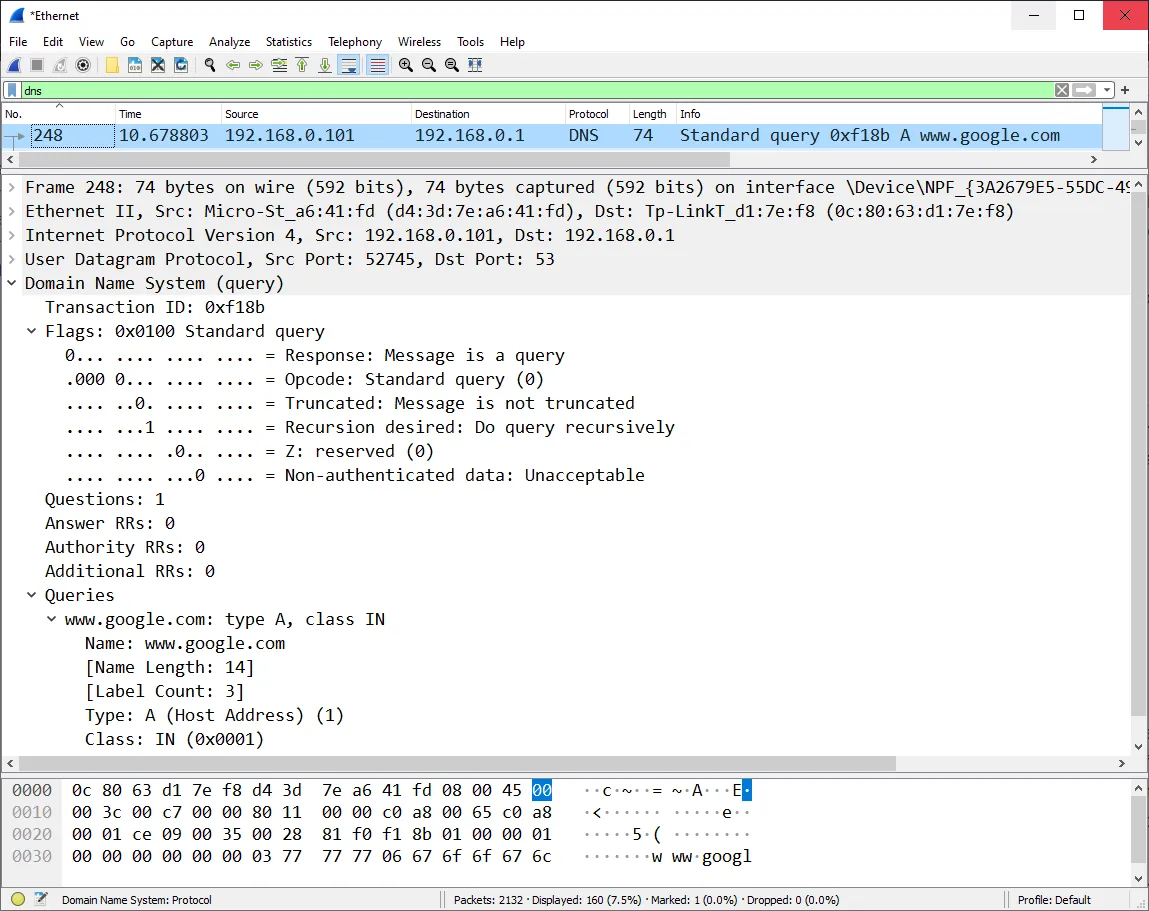
You pick a network interface, start a capture and see every packet with its decoded fields. Display filters such as http or ip.addr narrow the list, and Follow Stream rebuilds a whole TCP or HTTP conversation. Captures can be saved and opened later or shared with others.
What it does well
- Deep protocol decoding. Dissects thousands of protocols, from Ethernet and TCP to HTTP, DNS and TLS.
- Display filters. Narrow millions of packets down to exactly the traffic you need.
- Follow Stream. Reassembles a TCP, UDP or HTTP conversation into readable form.
- Statistics. Conversations, endpoints, protocol hierarchy and I/O graphs.
- Open capture formats. Reads and writes pcap and pcapng files from many other tools.
Who it is for
Good fit
Network engineers, developers and security students who need to inspect traffic in detail.
Look elsewhere
People who just want to see which app uses their bandwidth.
Pros and cons
Pros
- Decodes thousands of protocols
- Powerful display filters
- Open pcap and pcapng formats
- Open source and cross-platform
Cons
- Steep learning curve for beginners
- Encrypted traffic such as HTTPS is not readable without keys
- Needs the separate Npcap driver for live capture
How to install Wireshark
Run the 64-bit installer and keep the Npcap option checked; without it Wireshark can only open saved files. USBPcap is only needed for capturing USB traffic. Capture only on networks you own or are allowed to monitor. TLS traffic stays encrypted unless you provide session keys.
Questions about Wireshark
Is Wireshark free?
Yes. It is open source under the GNU GPL with no paid edition.
Can Wireshark see HTTPS content?
Not by default. Wireshark shows TLS packets but can only decrypt them if you provide session keys, for example from a browser key log file.
Is it legal to use Wireshark?
Using it on your own network is legal. Capturing other people's traffic without permission may break the law.


