

Our verdict: GlassWire's free plan is a clear, graphical way to see which programs talk to the internet and how much data they use. It is a monitor, not a firewall, on the free plan: blocking apps, longer history and most security alerts need a paid subscription.
About GlassWire
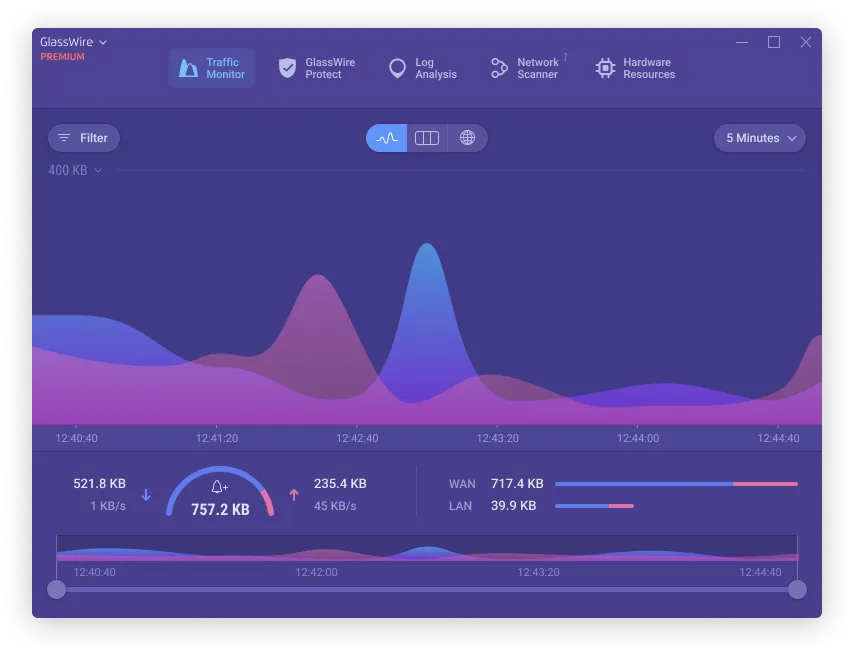
GlassWire draws live graphs of your network traffic and breaks it down by application, host and traffic type. The Network Time Machine lets you scroll back to see what was connecting at a given moment, and alerts tell you when an app goes online for the first time.
On the free plan, network history, bandwidth usage and alert logs are limited to the last 24 hours or the current day, and you can connect to one remote GlassWire instance. The free plan also includes CPU, memory, GPU and disk monitors and a network scanner. The click-to-block firewall, Ask to Connect, Lockdown mode, firewall profiles, evil twin and ARP spoofing detection need the Personal plan or higher.
What it does well
- Live traffic graphs. Shows current network activity by app, host and traffic type.
- Network Time Machine. Scroll back through the last 24 hours on the free plan.
- First network activity alerts. Notifies you when an app connects to the internet for the first time.
- Hardware monitors. Tracks CPU, memory, GPU and disk usage next to network traffic.
- Network scanner. Lists devices connected to your local network.
Who it is for
Good fit
Users who want to see which programs use their connection and spot unexpected traffic.
Look elsewhere
People who want to block apps from the internet for free; use TinyWall or Windows Firewall Control instead.
Pros and cons
Pros
- Clear graphical view of network usage per app
- First-connection alerts for new programs
- Includes CPU, memory, GPU and disk monitors
Cons
- Firewall blocking requires a paid plan
- Free plan keeps only 24 hours of history and alert logs
- Large installer of about 120 MB
How to install GlassWire
The installer is about 120 MB. After installation, GlassWire starts in the tray and begins recording traffic. Turn off alerts you find noisy in Settings. Firewall controls and longer history are Premium features, so expect upgrade offers when you try them.
Questions about GlassWire
Is GlassWire free?
Yes. GlassWire has a free plan with no time limit for basic network monitoring. The Personal plan and higher plans are paid subscriptions.
Can I block apps with the free version?
No. According to GlassWire's pricing page, the click-to-block firewall, Ask to Connect and Lockdown mode are paid features.
Does GlassWire run on ARM PCs?
Yes. GlassWire lists Windows 10 or later on x64 and ARM64.


