

Our verdict: ocenaudio is the easiest free editor for trimming, cleaning up and analyzing single audio files. Effects preview in real time and large files open quickly. It is not a multi-track editor, so it does not replace Audacity for mixing.
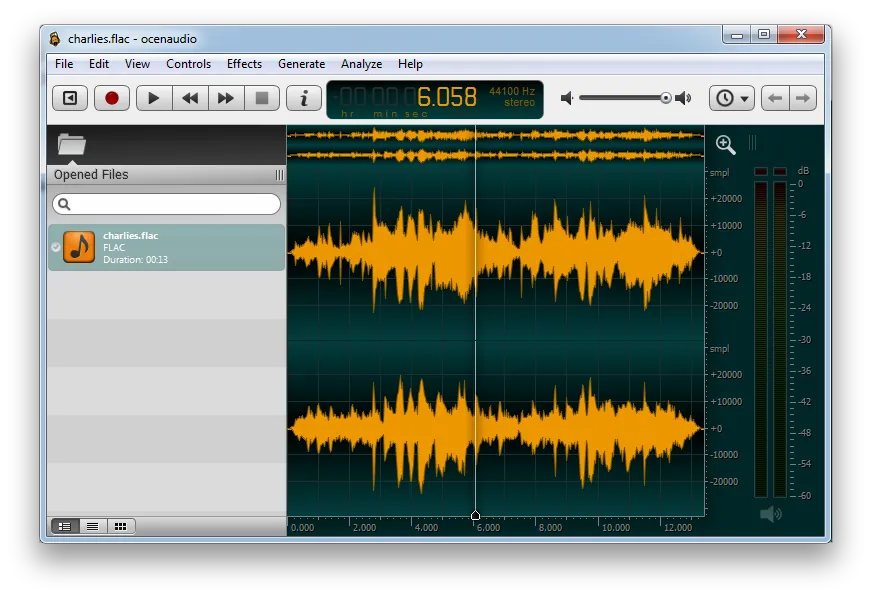
About ocenaudio
ocenaudio was created by a Brazilian research group that needed an easy audio editor with spectral analysis. It is built on their Ocen Framework and is free to use.
It focuses on editing one file at a time: cutting, applying effects and analyzing the signal. Long tasks such as saving and applying effects run in the background, so the interface stays responsive.
What it does well
- Real-time effect preview. Hear EQ, gain and filter changes while you adjust the controls.
- Multi-selection. Select several parts of a file and edit or process them at once.
- VST plugins. Use VST effects with the same real-time preview as built-in ones.
- Spectrogram. Analyze spectral content with settings that update instantly.
- Large files. Edits files several hours long without filling up memory.
Who it is for
Good fit
Podcasters, students and researchers who edit or analyze single recordings.
Look elsewhere
Musicians who need multi-track mixing or recording several tracks at once.
Pros and cons
Pros
- Very easy to learn
- Real-time effect preview
- Fast with long files
Cons
- No multi-track editing
- Closed source
How to install ocenaudio
Download the 64-bit Windows installer from ocenaudio.com; a portable ZIP is also offered. If you use VST effects, add your plugin folder in the preferences so ocenaudio can find them.
Questions about ocenaudio
Is ocenaudio free?
Yes. ocenaudio is free to download and use.
Can ocenaudio edit several tracks at once?
No. It edits one audio file at a time; for multi-track projects use Audacity or Tenacity.


