

Our verdict: Process Lasso is a tool for people who want control over how Windows schedules programs: priorities, CPU cores and power plans that stick. ProBalance keeps the system responsive when one app hogs the CPU, and that part stays free. The free version shows a startup reminder, and the CPU Limiter and Watchdog need Pro.
About Process Lasso
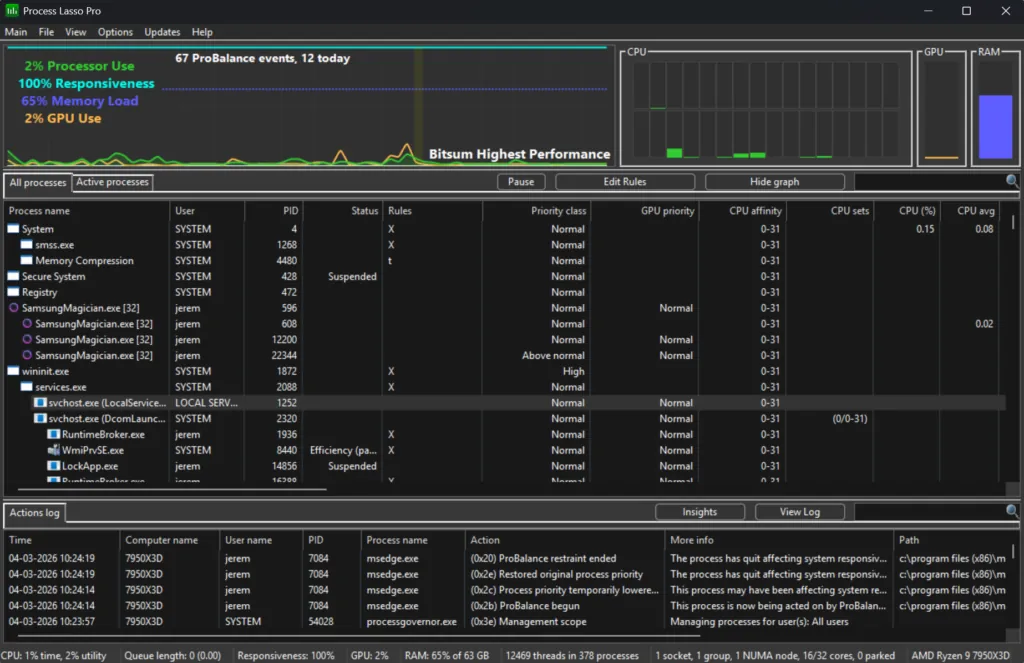
Process Lasso is developed by Bitsum Technologies, in development since 2003. Its ProBalance algorithm temporarily lowers the priority of background processes that use too much CPU, so the program you are using stays responsive. You can also save rules that always run a program with a given CPU priority, I/O priority, CPU affinity or CPU set, and switch to a high-performance power plan while games run.
After installing you get a short trial of all Pro features. Then the free version keeps ProBalance, Performance Mode and priority, affinity and CPU set rules, but shows a reminder at startup; the CPU Limiter, Watchdog, Keep Running and per-app power profiles need Pro. A Single PC Lifetime license lists at $39.95 and is often discounted. Commercial use requires a license within 30 days.
What it does well
- ProBalance. Lowers the priority of CPU-hungry background processes to keep Windows responsive.
- Persistent rules. Remembers CPU priority, I/O priority, affinity and CPU sets for each program.
- Performance Mode. Switches to a high-performance power plan for games and heavy work.
- CPU Limiter and Watchdog. Throttles or restarts processes based on your rules (Pro).
- Per-app power profiles. Changes the power plan when specific programs run (Pro).
Who it is for
Good fit
Gamers and power users who want lasting priority and CPU core rules for specific programs.
Look elsewhere
People who do not want to tweak Windows scheduling, or businesses unwilling to buy a license.
Pros and cons
Pros
- ProBalance stays free
- Rules that persist across restarts
- Lifetime Pro license with all updates
- Light background service
Cons
- Startup reminder in the free version
- CPU Limiter, Watchdog and power profiles need Pro ($39.95)
- Easy to make Windows slower with wrong rules
How to install Process Lasso
The button downloads the 64-bit installer from Bitsum's server; 32-bit, ARM64 and beta builds are on the same page. Setup asks whether Process Lasso should start with Windows and which components to install. The free version shows a short reminder at each start.
Questions about Process Lasso
Is Process Lasso free?
Partly. It is free to use indefinitely after a short Pro trial, with a startup reminder and some features turned off. The Single PC Lifetime license lists at $39.95 one-time; commercial use always needs a license.
What does ProBalance do?
It temporarily lowers the priority of background processes that use too much CPU, so the program in front of you stays responsive. It is included in the free version.
Can Process Lasso improve game performance?
It can help with responsiveness, for example by switching to a high-performance power plan and keeping background tasks from interrupting the game. It does not raise maximum frame rates on its own.


