

Our verdict: RStudio is still the default place to write R: the console, editor, environment and plots panes are laid out exactly for data analysis. The open-source desktop edition is free with no feature lock for individual work. You need to install R yourself, and Python support is basic next to Positron or VS Code.
About RStudio
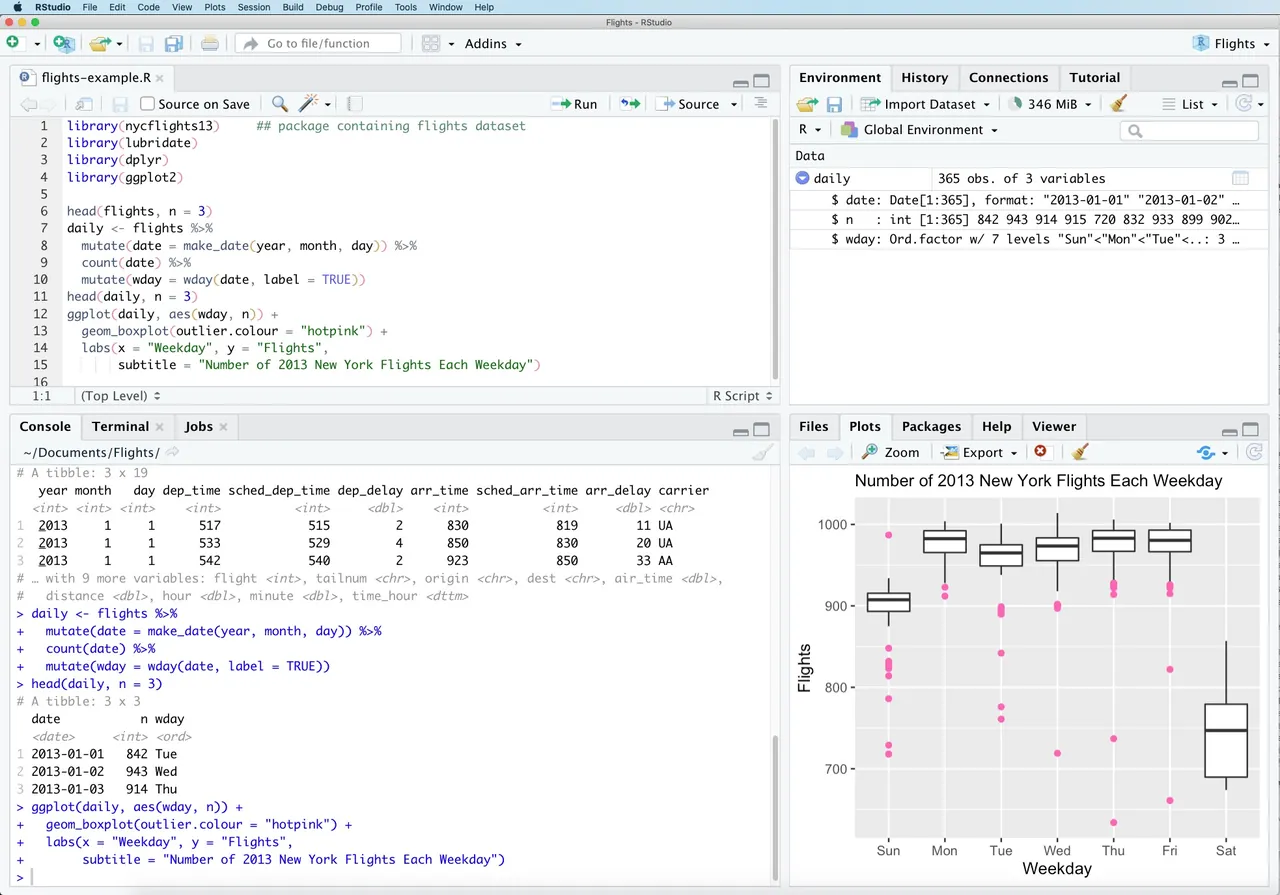
RStudio is an integrated development environment for R made by Posit, the company formerly called RStudio, PBC. The desktop edition is open source under the GNU AGPL v3. Its four-pane layout combines a source editor, the R console, an environment and history pane, and an output pane for plots, files, packages and help.
It runs R code straight from the editor, has a visual editor for R Markdown and Quarto documents, an interactive debugger and tools for package development and publishing. RStudio does not include R: install R from CRAN first. Posit sells RStudio Desktop Pro only for organizations that cannot use AGPL software or need support.
What it does well
- Four-pane layout. Editor, console, environment and plots stay visible together.
- Run code from the editor. Sends the current line or selection to the R console with Ctrl+Enter.
- Quarto and R Markdown. Visual and source editors render reports, slides and websites.
- Debugger. Breakpoints, step-through and an environment viewer for R functions.
- Projects. Each project keeps its own working directory, history and open files.
Who it is for
Good fit
Statisticians, data analysts, researchers and students who work mainly in R.
Look elsewhere
Python-first developers and people on Windows 10, which the current release no longer lists as supported.
Pros and cons
Pros
- Free and open source (AGPL v3)
- Layout designed around data analysis
- Strong Quarto and R Markdown support
- Package development tools built in
Cons
- R must be installed separately
- Python support is limited compared with Positron or VS Code
- Current releases list Windows 11 only
How to install RStudio
Install R from CRAN first, then run the RStudio installer; it detects R automatically. Under Tools > Global Options > General, turn off restoring .RData at startup for reproducible sessions. Install Rtools separately if you need to build packages from source.
Questions about RStudio
Is RStudio free?
Yes. RStudio Desktop is open source under the AGPL v3 and free for any use. The paid Pro edition is for organizations that need a commercial license or support.
Does RStudio include R?
No. Download and install R from CRAN first; RStudio finds the installed R version when it starts.
What is the difference between RStudio and Positron?
Both come from Posit. RStudio is focused on R, while Positron is a newer IDE built on Code OSS for both R and Python.


