

Our verdict: Spyder is the closest thing to MATLAB or RStudio for Python: write a script, run it cell by cell and inspect every variable in a table. The standalone installer brings its own Python, so beginners can start immediately. It is aimed at analysis scripts rather than large software projects or web development.
About Spyder
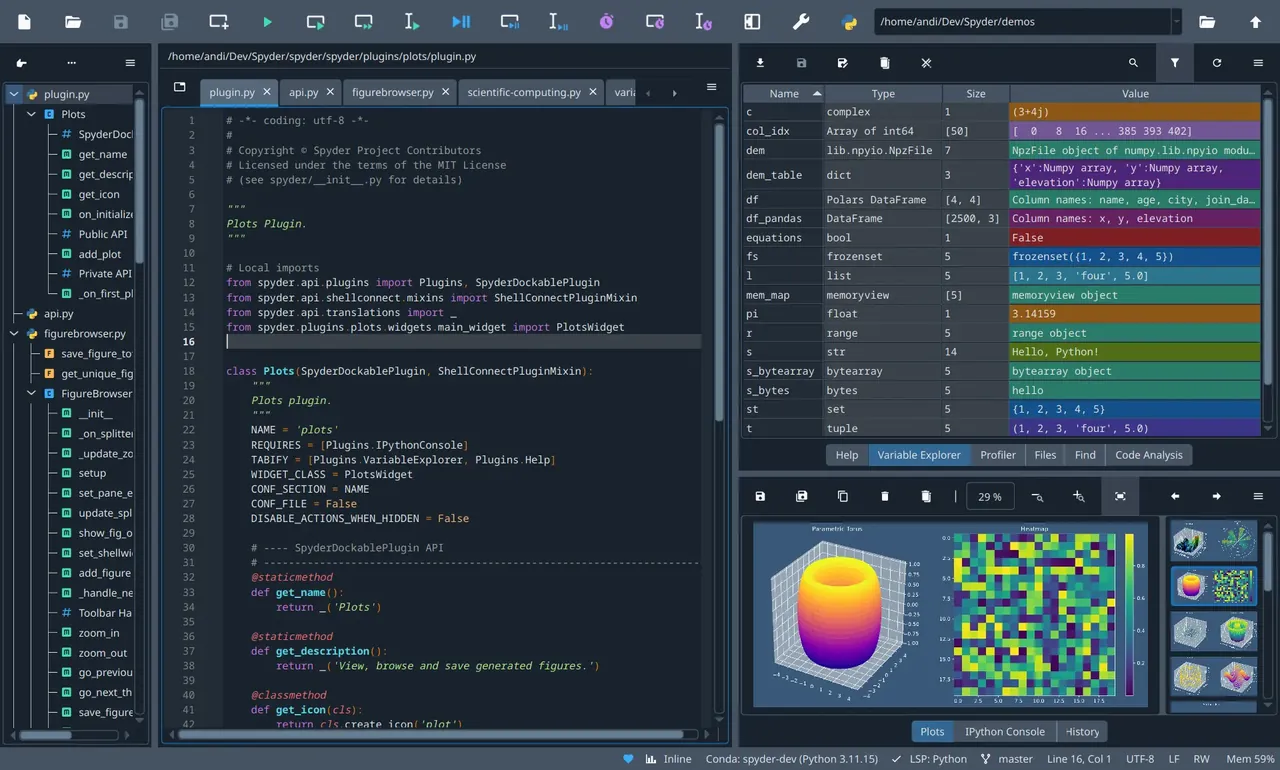
Spyder is a scientific Python development environment written in Python and released under the MIT license. It is developed by a community of contributors and is also included in Anaconda Distribution. Its layout combines an editor, an IPython console, a variable explorer, a plots pane, help and a file browser.
The official standalone Windows installer contains Spyder and a built-in Python environment with common scientific libraries such as NumPy, SciPy, pandas and Matplotlib, so basic analysis works out of the box. For other packages you connect an external Python distribution, such as Miniforge, Anaconda or Python.org, that has the spyder-kernels package installed. Third-party plugins currently need a conda-based install.
What it does well
- Variable explorer. Shows and edits arrays, data frames and lists in a spreadsheet-like view.
- IPython console. Runs scripts, selections or # %% cells interactively.
- Plots pane. Collects every figure the code produces for browsing and saving.
- Debugger. Breakpoints and step-through debugging integrated with the console.
- Code analysis. Completion, linting and go-to-definition through the Python LSP server.
Who it is for
Good fit
Scientists, engineers, students and analysts who write Python scripts to explore data.
Look elsewhere
Web and application developers who need framework tooling, and people who prefer notebooks.
Pros and cons
Pros
- Free and open source (MIT)
- Excellent variable explorer
- Standalone installer includes Python
- Familiar for MATLAB and RStudio users
Cons
- Not suited to large multi-module projects
- Using your own environment needs spyder-kernels set up
- Third-party plugins are not yet supported in the standalone installer
How to install Spyder
The link downloads the official standalone installer, which includes its own Python. If Windows SmartScreen warns you, choose More info > Run anyway. To use your own packages, create a conda or venv environment with spyder-kernels and select it under Tools > Preferences > Python interpreter. Spyder checks for updates on start and can download and install them itself.
Questions about Spyder
Is Spyder free?
Yes. Spyder is open source under the MIT license and free for any use.
Do I need to install Python for Spyder?
No. The standalone Windows installer includes a Python runtime. Install Python separately only if you want to run code in your own environments.
Is Spyder part of Anaconda?
Anaconda Distribution includes Spyder, but the standalone installer is the method the Spyder team recommends for most users.


