

Our verdict: SpeedCrunch is ideal if you prefer typing calculations to clicking buttons: results appear as you type and every line stays in the history. Version 1.0 adds tabs, matrices and units, but it does no symbolic algebra or plotting.
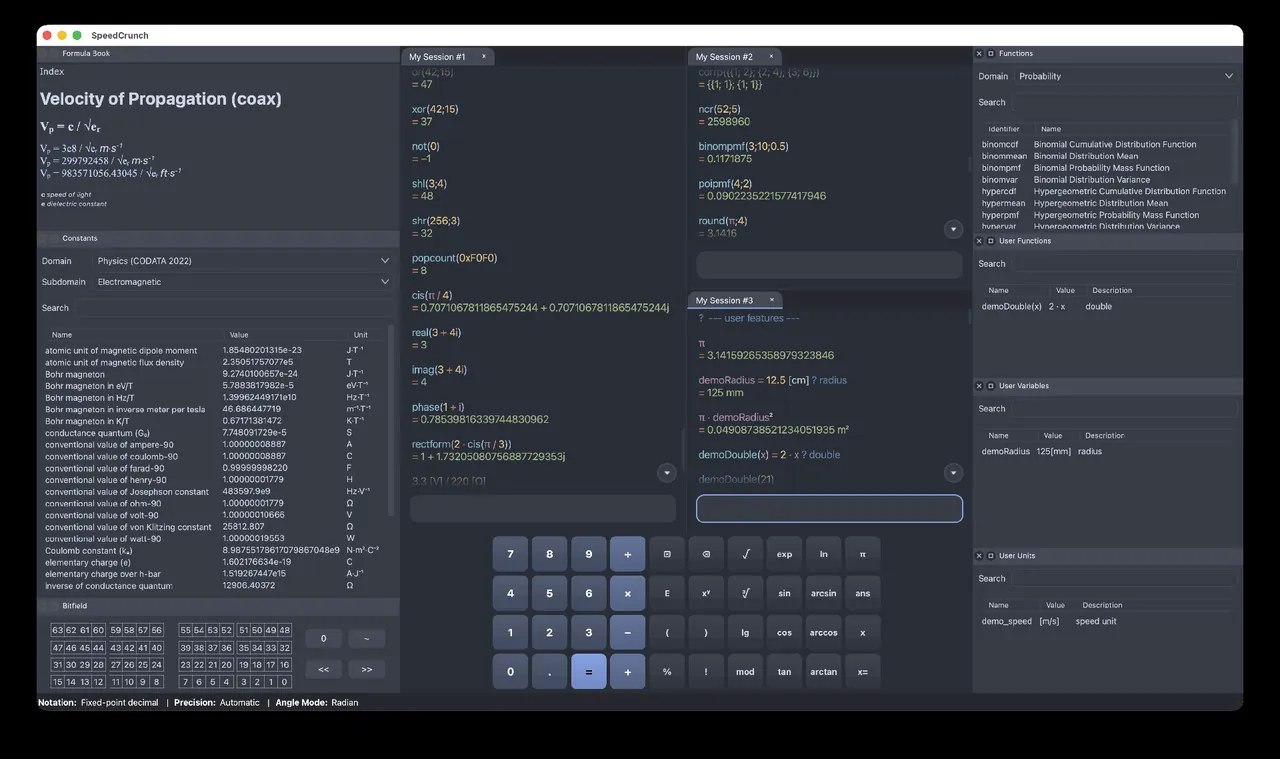
About SpeedCrunch
SpeedCrunch is a keyboard-driven scientific calculator. You type an expression, see the result while typing, and every calculation stays in a scrolling history that you can edit and recalculate. Autocomplete suggests functions, variables and constants, and a formula book and constants list insert common values with their units.
Version 1.0, the first major release since 0.12 in 2016, adds tabs and split panes, saved history, lists and matrices, units in square brackets, several result formats at once, fractions, sexagesimal angles and new functions for statistics, linear algebra, dates and chemistry. Windows users get an installer or a portable version. SpeedCrunch is open source under the GNU GPL.
What it does well
- Instant results. Shows the result while you type, with an editable history.
- Tabs and split panes. Keep several calculations side by side.
- Units. Calculate with units written in square brackets, such as [m] or [s].
- Matrices and statistics. Lists, matrices, determinants, inverses and statistical functions.
- Result formats. Show decimal, fraction, hexadecimal, binary and other formats together.
Who it is for
Good fit
Programmers, students and engineers who do many quick calculations from the keyboard.
Look elsewhere
Users who need symbolic algebra, equation solving or function plotting.
Pros and cons
Pros
- Free and open source
- Very fast keyboard workflow
- Editable, persistent history
- Portable version available
Cons
- No symbolic algebra or plotting
- Few updates between 2016 and version 1.0
- No official Linux package for 1.0 yet
How to install SpeedCrunch
The download button fetches the Windows 64-bit installer from the official SpeedCrunch GitHub release linked on speedcrunch.org; a portable version that runs without installation is offered on the same page. Choose a theme and keypad preset under Settings if you like buttons.
Questions about SpeedCrunch
Is SpeedCrunch free?
Yes. SpeedCrunch is free and open source under the GNU GPL.
Is there a portable version of SpeedCrunch?
Yes. The download page offers a portable Windows version that runs without installation.
Can SpeedCrunch solve equations?
No. It evaluates expressions numerically; use Qalculate! or GeoGebra for symbolic solving.


