

Our verdict: UltraVNC is a capable self-hosted remote control tool for Windows PCs on your own network. File transfer and chat are built in, and it talks to other VNC servers and viewers. You have to handle ports, passwords and encryption yourself, so it is not a plug-and-play replacement for TeamViewer or RustDesk.
About UltraVNC
UltraVNC contains a VNC server, which shares a Windows desktop, and a viewer, which connects to it. Because it follows the common RFB protocol, the viewer also works with most other VNC servers, such as TightVNC or RealVNC, and other viewers can connect to the UltraVNC server.
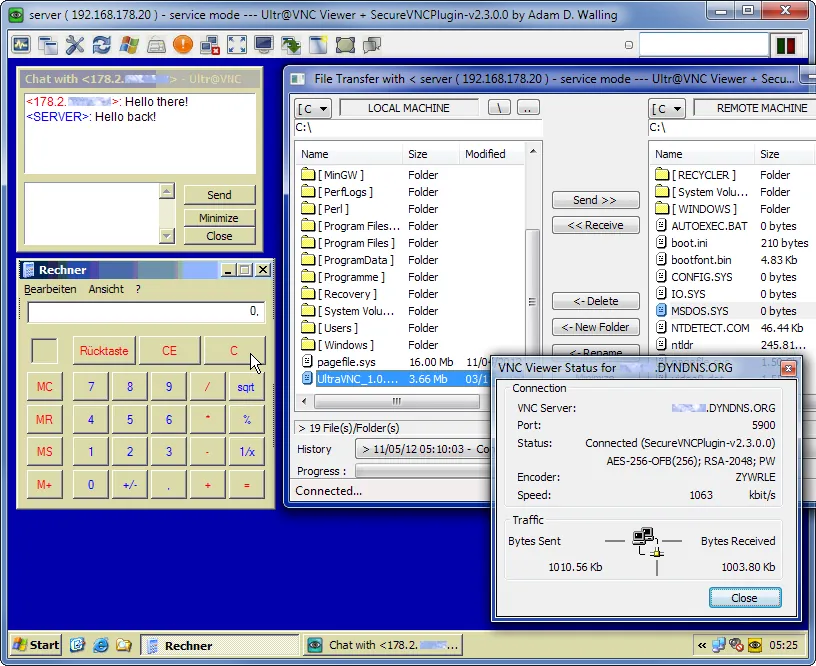
Its extras are aimed at support work: transfers of whole folders with compression, a quick text chat over the open connection and optional DSM encryption plugins that protect the session. A separate Repeater and the Single Click (SC) module help reach PCs behind routers. Everything is Windows only and released under the GPL v3.
What it does well
- Server and viewer. One installer can set up the desktop-sharing server, the viewer or both.
- File transfer. Copies files and complete folders in both directions, compressed before sending.
- Text chat. A built-in chat window for quick messages between the viewer and the remote user.
- Encryption plugins. Optional DSM plugins encrypt the connection between viewer and server.
- VNC compatibility. Works with RealVNC, TightVNC and most other VNC servers and viewers.
Who it is for
Good fit
Admins and tech-savvy users who control Windows PCs on their own network without a cloud service.
Look elsewhere
Beginners who need to reach a PC behind a router without port forwarding or extra tools.
Pros and cons
Pros
- Open source with no paid edition
- Folder transfer and chat built in
- Optional encryption plugins
- Compatible with other VNC software
Cons
- Windows only
- Reaching PCs over the internet needs port forwarding, a repeater or a VPN
- Dated interface with many technical settings
How to install UltraVNC
On the download page, open the latest release, pick the 64-bit setup and tick the license box to start the download. During setup choose whether to install the server, the viewer or both, and whether the server runs as a system service. Set a strong VNC password and enable an encryption plugin before exposing the server to the internet.
Questions about UltraVNC
Is UltraVNC free?
Yes. UltraVNC is open source under the GPL v3 and free for any use.
Can UltraVNC connect to a Mac or Linux computer?
The viewer can connect to most VNC servers on other systems, but the UltraVNC server itself runs only on Windows.
Is the UltraVNC connection encrypted?
Only if you enable one of the optional DSM encryption plugins on both the server and the viewer.


