

Our verdict: Windhawk is the most flexible free way to tweak Windows 11 without replacing whole parts of the shell. You pick small mods from a catalog, such as taskbar or Start menu changes, and turn them on or off one by one. Mods come from the community, so some break after Windows updates.
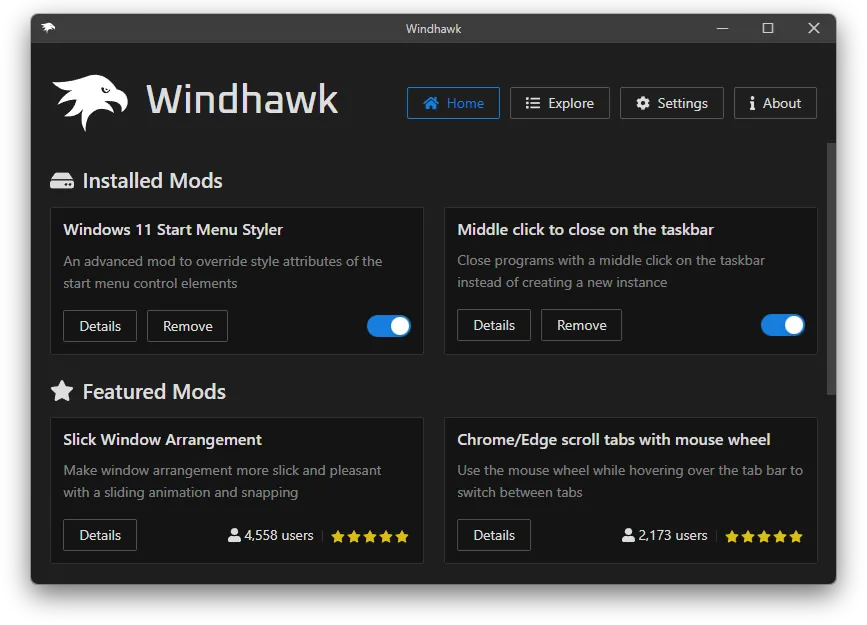
About Windhawk
Windhawk is made by Ramen Software and released as open source. It runs in the background and injects mods into Windows programs such as the taskbar, the Start menu or File Explorer. The developers designed it to run constantly without a noticeable impact on the system.
Mods are installed from a built-in catalog with a couple of clicks and configured through simple options. Each mod is a single file of source code you can read before installing, and even users without programming skills can make small edits such as changing texts. Mods are published in a separate public repository on GitHub.
What it does well
- Mod catalog. Browse and install community mods from inside the app.
- Per-mod options. Each mod has its own settings and can be disabled at any time.
- Readable source. Every mod is published as source code you can review.
- Create your own mods. Developers write mods without handling process injection or hooking themselves.
- Portable mode. The installer can also extract a portable version.
Who it is for
Good fit
Windows 10 and 11 users who want targeted tweaks to the taskbar, Start menu or other programs.
Look elsewhere
Managed work PCs where code injection is blocked, and users who want one fixed set of settings without picking mods.
Pros and cons
Pros
- Free and open source
- Mods are small, optional and reversible
- Mod source code is visible before install
- Large community catalog
Cons
- Mods are written by the community, so quality varies
- A Windows update can break a mod until its author fixes it
- Takes more disk space than single-purpose tweakers
How to install Windhawk
Download the installer from windhawk.net and choose a normal or portable installation. Open Windhawk, browse the mods catalog, read the description and source of a mod, then install it and set its options. If something breaks after a Windows update, disable that mod in Windhawk and wait for a fix.
Questions about Windhawk
Is Windhawk free?
Yes. Windhawk is open source donationware, and the developer states that no corporate license is needed in any environment.
Is Windhawk safe to use?
Every mod is published as source code that you can review before installing. Mods inject code into Windows programs, so install only mods you understand and disable any that cause problems.


