

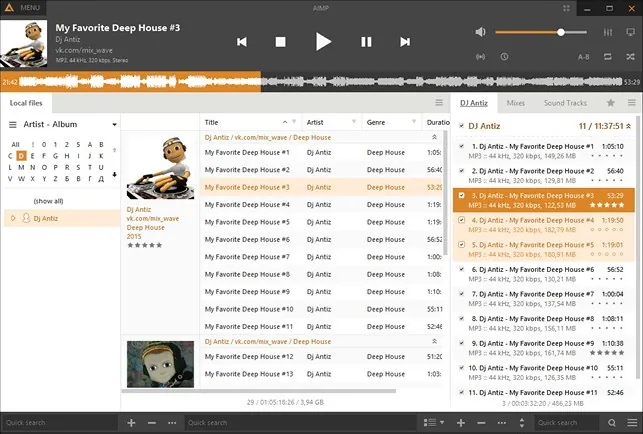
Our verdict: AIMP is a full-featured music player that also converts audio, edits tags and records internet radio. It looks modern out of the box and supports skins and plugins. The number of settings can feel overwhelming at first.
About AIMP
AIMP is developed by Artem Izmaylov in Russia and is free to use. Besides the Windows version, there are apps for Android and Linux.
The player covers almost every audio format, including FLAC, APE, Opus and tracker modules, and outputs through DirectSound, ASIO or WASAPI. Bundled tools include an audio converter with a CD grabber, a tag editor and a scheduler that can stop playback or shut down the PC.
What it does well
- Wide format support. Plays MP3, FLAC, APE, Opus, WAV, DSD files, CUE sheets and tracker modules.
- Sound effects. 20-band equalizer plus reverb, pitch, tempo, crossfade and ReplayGain normalization.
- Audio converter. Multi-threaded conversion to MP3, FLAC, Opus and other formats, with a CD grabber.
- Tag editor. Batch-edit ID3, APE and Vorbis tags, rename files by template and calculate BPM.
- Internet radio. Listen to online stations and record the stream to a file.
Who it is for
Good fit
People with a local music collection who want one app for playback, conversion and tagging.
Look elsewhere
People who mostly stream music from Spotify or YouTube Music.
Pros and cons
Pros
- Many built-in tools: converter, tag editor, scheduler
- Modern skins with High DPI support
- ASIO and WASAPI exclusive output
- Scrobbling to Last.fm and ListenBrainz
Cons
- Closed source
- Many settings make the options dialog crowded
- Old 32-bit plugins do not work in the 64-bit build
How to install AIMP
Download the 64-bit installer from aimp.ru. Plugins written for AIMP 4 do not work in the 64-bit build, so pick the 32-bit build if you depend on old plugins. Beta versions are listed on the same page; the stable release is at the top.
Questions about AIMP
Is AIMP free?
Yes. AIMP is freeware with no paid version.
Can AIMP convert audio files?
Yes. The built-in converter encodes to MP3, FLAC, Opus, OGG, WAV, WMA and other formats and can rip audio CDs.
Does AIMP support ASIO?
Yes. You can choose DirectSound, ASIO, WASAPI or WASAPI Exclusive as the output.


