

Our verdict: EmEditor is the editor to reach for when a log or CSV file is too big for Notepad++ or VS Code: it opens multi-gigabyte files quickly and stays responsive. EmEditor Free covers everyday editing at home or school at no cost. Its best tools, including CSV mode, sort, filter and the Large File Controller, are only in the paid Professional edition, and the free edition may not be used at work.
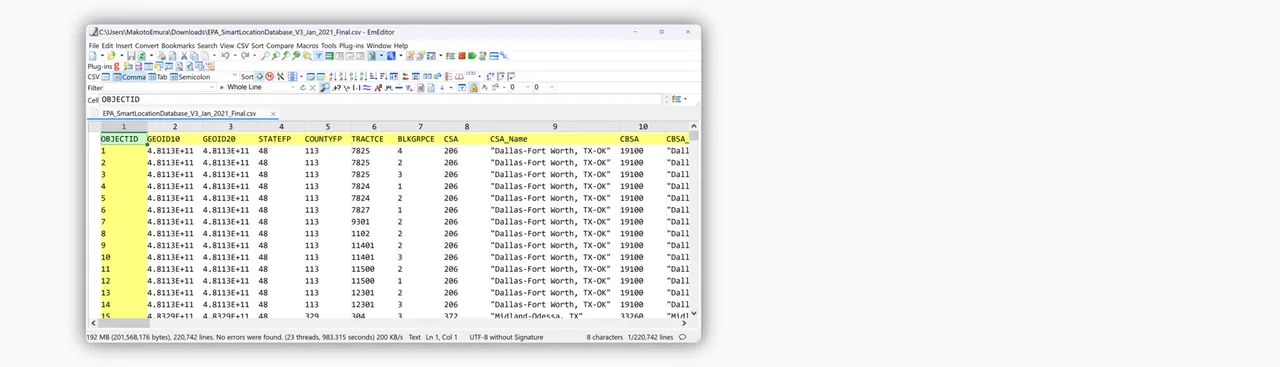
About EmEditor
EmEditor is a Windows-only text editor from Emurasoft, built for code, CSV and very large files. EmEditor Free and EmEditor Professional are the same program: after installation you get all Professional features for 7 days, and when the trial ends it switches to the Free edition automatically, with no payment details and no automatic charges. You can change editions at any time under Help > Upgrade or Downgrade.
EmEditor Free includes syntax highlighting, Find and Replace, Find in Files, Unicode support, multiple and vertical selections, bookmarks, spelling, workspaces and printing; macros are limited to record and run, and file comparison to default options. Plug-ins, scripting, the Large File Controller, CSV tools, sort, filter, delete duplicate lines, LSP and AI-assisted writing need Professional, which costs $60 for the first year and $45 a year after. The Free edition is licensed for personal use at home or school only.
What it does well
- Very large files. Opens and searches multi-gigabyte text and log files without splitting them.
- Multiple selections. Multi-caret and vertical selections for editing many lines at once.
- Find in Files. Searches and replaces across folders with regular expressions.
- Workspaces. Restores open files, positions and layout from a previous session.
- MSIX auto-updates. The recommended installer keeps EmEditor updated automatically.
Who it is for
Good fit
Home users and students who edit text, code or large logs on Windows and want a fast Notepad replacement.
Look elsewhere
Anyone using it at work, which requires Professional, and people who need CSV, sort or filter tools for free.
Pros and cons
Pros
- Free for home and school use
- Handles very large files quickly
- Professional trial needs no payment details
- Automatic updates with the MSIX installer
Cons
- Free edition is not allowed for work or organizational use
- CSV tools, sort, filter, plug-ins and scripting require Professional
- Windows only
How to install EmEditor
The link downloads a small .appinstaller file; opening it installs the signed MSIX package and enables automatic updates. The same page offers the Microsoft Store version, a portable version and a legacy MSI. All Professional features are active for 7 days, then EmEditor switches to the Free edition by itself; nothing to cancel.
Questions about EmEditor
Is EmEditor free?
Yes, EmEditor Free is free for personal use at home or school. Use at work and advanced features such as CSV tools, sort and plug-ins need EmEditor Professional, from $60 for the first year.
What happens after the 7-day trial?
EmEditor automatically switches to the Free edition. No payment information is needed and you are not charged.
Which installer should I use?
Emurasoft recommends the Microsoft Store or the MSIX installer, which update automatically. The legacy MSI stops receiving updates in March 2027.


