

Our verdict: UltraEdit is a veteran editor aimed at people who open 10 GB logs and data exports and need column editing, powerful search and remote file access in one tool. The subscription includes UltraCompare. The trial is only 7 days, the editor stops working afterwards, and for most coding work free editors such as Notepad++ or VS Code are enough.
About UltraEdit
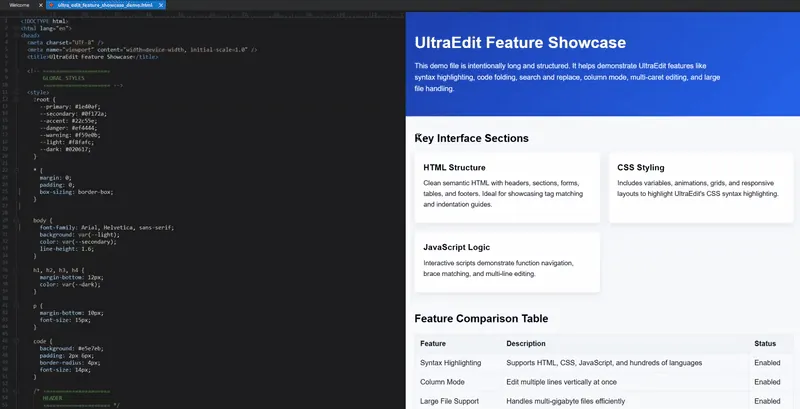
UltraEdit started in 1994 as a product of IDM Computer Solutions and has belonged to Idera, Inc. since 2021. It is built for large files and structured data: it opens and edits files larger than 10 GB, has column mode, multi-caret editing and multi-select, search and replace across files, folders and projects with regular expressions, HTML and Markdown live preview, IntelliTips completion, macros and scripting, and an integrated FTP, SSH and Telnet client. Recent versions add an AI assistant.
The Windows download includes several interface languages and starts a fully functional 7-day trial without a credit card. After the trial you must buy a license to keep using it. The official pricing page lists UltraEdit Core, which includes UltraCompare, UEStudio, UltraFinder and UltraFTP, at €84.99 for a 1-year subscription or €164.99 for two years; perpetual licenses with one year of maintenance are also offered. A personal license allows 5 activations.
What it does well
- Large file editing. Opens, searches and edits files larger than 10 GB.
- Column mode. Selects and edits text vertically across rows and columns.
- Multi-caret editing. Changes many lines or selections at the same time.
- Remote files. Built-in FTP, SSH and Telnet client for editing files on servers.
- UltraCompare included. Text, file and folder comparison comes with every UltraEdit package.
Who it is for
Good fit
Data engineers, system administrators and developers who regularly work with huge logs, CSVs and data exports.
Look elsewhere
Hobbyists and students who do not want to pay; free editors cover normal coding and text editing.
Pros and cons
Pros
- Handles files larger than 10 GB
- Strong column mode and multi-caret editing
- Built-in FTP, SSH and Telnet
- UltraCompare included
Cons
- Trial is only 7 days, then the editor stops working
- Subscription from €82.50 a year, more than many editors
- Large installer of about 460 MB
How to install UltraEdit
The link downloads the Windows EXE installer, which the developer recommends for Windows 10 and later; an MSI is offered separately for silent or bulk deployment. The 7-day trial starts on first launch without a card. Enter a license key after buying to keep using the editor.
Questions about UltraEdit
Is UltraEdit free?
No. UltraEdit has a fully functional 7-day free trial and no credit card is needed. After that you must buy a license; UltraEdit Core costs €84.99 for one year or €164.99 for two years on the official pricing page.
Is there a perpetual UltraEdit license?
Yes. Perpetual licenses include one year of maintenance; after it expires you can keep using the last version released during that period.
Does UltraEdit include UltraCompare?
Yes. UltraCompare for text, file and folder comparison is included in all UltraEdit packages.


