

Our verdict: Espanso is a capable free text expander for people who type the same phrases, signatures or code snippets every day. It works in almost any app and supports forms and scripts. Snippets are written in YAML files, so there is no graphical editor yet.
About Espanso
Espanso watches what you type and, when it sees a keyword you defined, replaces it with the matching text. Snippets can contain dates, emojis, clipboard content, form fields or the output of a shell command or script. It runs in the background and works system-wide.
Configuration lives in plain files rather than a settings window, which makes snippets easy to back up or sync but means editing YAML. Packages from the Espanso Hub add ready-made sets, such as math symbols or accented characters. Pressing Alt+Space opens a search bar to find a snippet when you forget its keyword.
What it does well
- System-wide expansion. Replaces keywords with text in most Windows apps.
- Search bar. Alt+Space opens a searchable list of all your snippets.
- Forms. Snippets can ask for values and insert them into a template.
- Shell and scripts. Inserts the output of commands or custom scripts.
- Espanso Hub packages. Install shared snippet packs with one command.
Who it is for
Good fit
Support staff, developers and writers who repeat the same replies, templates or code snippets.
Look elsewhere
Users who want a point-and-click snippet editor; Espanso is configured through text files.
Pros and cons
Pros
- Free and open source
- Works in almost any app
- Forms, dates and script output
- Snippets are plain files that are easy to sync
Cons
- No graphical snippet editor; snippets are edited in YAML
- Windows build is x64 only, no Arm version
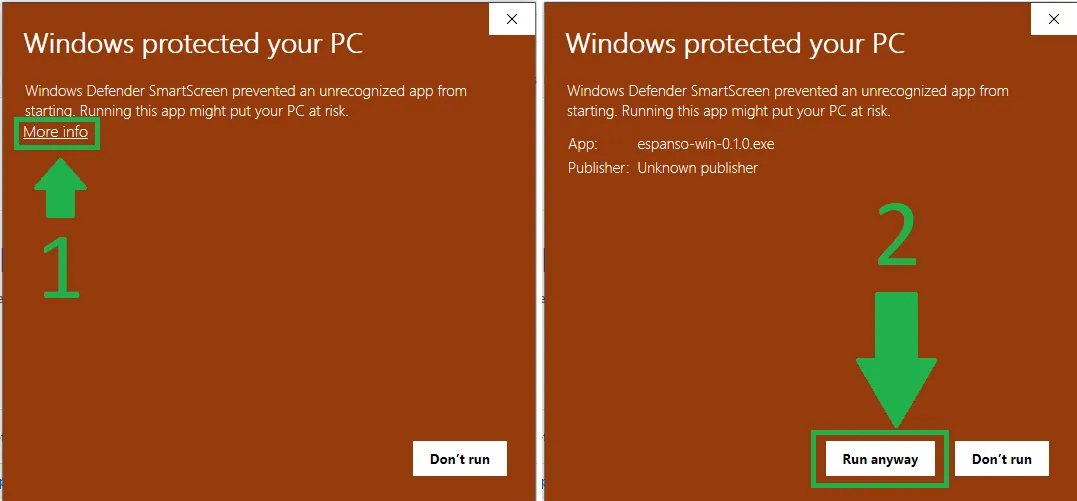
- SmartScreen may warn on first install
How to install Espanso
Run the installer; Windows SmartScreen may warn because the signature is new, so choose More info and Run anyway. After setup, open the config folder from the tray icon and edit match/base.yml to add your own snippets.
Questions about Espanso
Is Espanso free?
Yes. Espanso is free and open source under the GPL v3 license.
Where are Espanso snippets stored?
In YAML files in the Espanso config folder, which you can open from the tray icon.
Does Espanso work on Arm PCs?
Not yet. The Windows version currently supports only x64.


