

Our verdict: Git Extensions is a mature, fully free Git GUI that exposes almost every Git command without hiding it behind a simplified workflow. It suits people who already understand Git and want a visual history and quick access to everyday operations. It is Windows-only and needs Git and the .NET Desktop Runtime installed first.
About Git Extensions
Git Extensions is a standalone graphical interface for Git repositories, developed by volunteers since 2008 and published on GitHub under the GNU GPL v3. It works on top of the regular Git command-line tools, so you need Git for Windows installed, and version 7.2 also requires the .NET 10 Desktop Runtime.
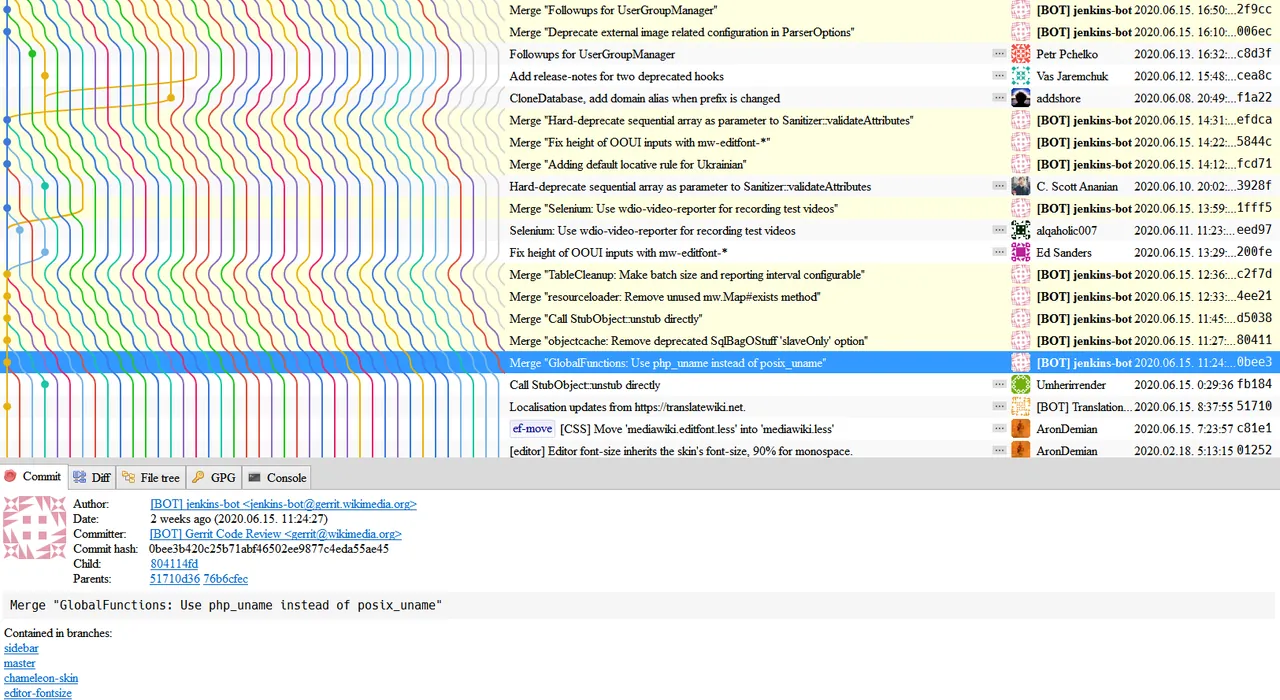
The main window shows the commit log as a branch graph, with the diff and file tree for the selected commit. From there you commit, push, pull, merge, rebase, stash, cherry-pick and resolve conflicts. A shell extension adds Git commands to the Windows Explorer context menu, and the project also offers a Visual Studio extension.
What it does well
- Commit graph. Browse the full history with a branch graph that highlights commits in the selected revision.
- File history and blame. Follow one file through renames and moves, and see who last changed each line.
- Explorer integration. Run commit, pull, push and other Git commands from the Windows Explorer right-click menu.
- Full Git workflow. Commit, merge, rebase, stash, cherry-pick, manage remotes and submodules from the GUI.
- Plugins and scripts. Add custom scripts and plugins, including integrations with GitHub and other hosts.
Who it is for
Good fit
Windows developers who know Git and want a free GUI that exposes advanced commands and history.
Look elsewhere
Mac or Linux users, and Git beginners who want a simplified, guided interface.
Pros and cons
Pros
- Completely free and open source
- Exposes advanced Git operations
- Explorer context menu integration
- Good file history and blame views
Cons
- Windows only
- Needs Git for Windows and the .NET Desktop Runtime installed separately
- Dense interface with many options can overwhelm beginners
How to install Git Extensions
Install Git for Windows and the .NET 10 Desktop Runtime first; the setup and the app warn you if either is missing. During setup you can choose whether to add the Explorer shell extension. On first start, Git Extensions checks your Git path and asks for your user name and email if they are not configured.
Questions about Git Extensions
Is Git Extensions free?
Yes. Git Extensions is free and open source under the GNU GPL v3, with no paid edition.
Does Git Extensions include Git?
No. You need to install Git for Windows separately; Git Extensions uses it to run Git commands.
Does Git Extensions work on macOS or Linux?
Current versions are Windows only. Old 2.x versions could run on other systems through Mono, but they are no longer developed.


