

Our verdict: Sourcetree gives you a full graphical view of a Git repository: history graph, staging of single lines, branches, stashes and remotes. It is free and works with any Git host. It can feel slow on large repositories, and the Windows version gets fewer updates than it used to.
About Sourcetree
Sourcetree is made by Atlassian, the company behind Bitbucket and Jira, and is free for personal and commercial use. It is available for Windows and macOS.
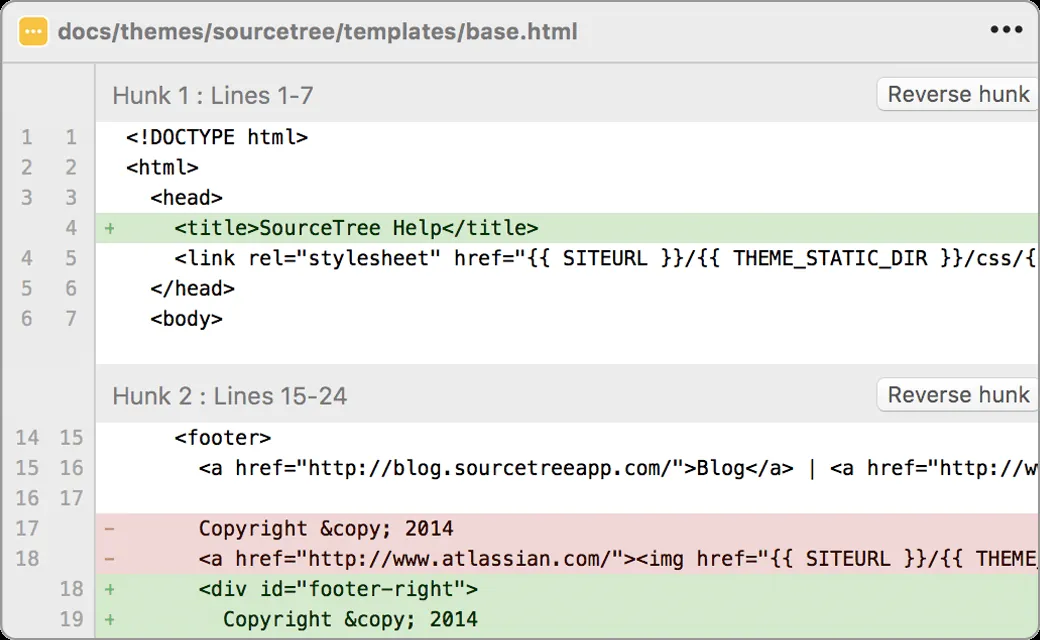
It shows commits as a branch graph and lets you stage files, hunks or single lines, create and merge branches, rebase interactively, manage stashes and work with Git LFS and Git-flow. It connects to Bitbucket, GitHub, GitLab and other Git hosts.
What it does well
- Commit graph. Visual history of branches, merges and tags.
- Line-level staging. Stage or discard individual files, hunks or lines.
- Interactive rebase. Reorder, squash and edit commits with a graphical dialog.
- Git-flow and Git LFS. Built-in support for the Git-flow branching model and large files.
- Hosting accounts. Connects to Bitbucket, GitHub and GitLab to clone and push.
Who it is for
Good fit
Developers who prefer a visual Git client and want to see branch history at a glance.
Look elsewhere
People working with very large repositories or who want an open-source Git client.
Pros and cons
Pros
- Free for commercial use
- Clear commit graph
- Line-by-line staging
- Git-flow and LFS support
Cons
- Can be slow on large repositories
- Closed source
- Windows version updates are infrequent
How to install Sourcetree
The download button gets the Windows installer from Atlassian's download server. Setup installs Sourcetree for your user account. The first-run wizard offers to connect a hosting account; you can also add one later in Tools → Options → Authentication.
Questions about Sourcetree
Is Sourcetree free?
Yes. Atlassian offers Sourcetree for free for personal and commercial use.
Does Sourcetree work with GitHub?
Yes. It works with any Git repository and can connect to GitHub, GitLab and Bitbucket accounts.
Do I need to install Git separately for Sourcetree?
No. Sourcetree can use its own embedded Git, or a system Git install if you prefer.


