

Our verdict: TortoiseGit puts Git into Windows Explorer: icons show the state of each file, and commit, pull, push and log are in the right-click menu. It is a natural fit for people coming from TortoiseSVN. It needs Git for Windows installed separately and has no single-window overview of your repositories.
About TortoiseGit
TortoiseGit is an open-source project released under the GNU GPL v2. It is modeled on TortoiseSVN and works as a Windows shell extension instead of a separate app window.
It adds overlay icons to files and folders and a right-click menu with commit, diff, log, branch, merge, rebase and stash commands. It includes TortoiseGitMerge for diffs and conflict resolution. TortoiseGit needs Git for Windows, which you install first.
What it does well
- Explorer integration. Git commands in the right-click menu of any file or folder.
- Overlay icons. Shows modified, added and conflicted files directly in Explorer.
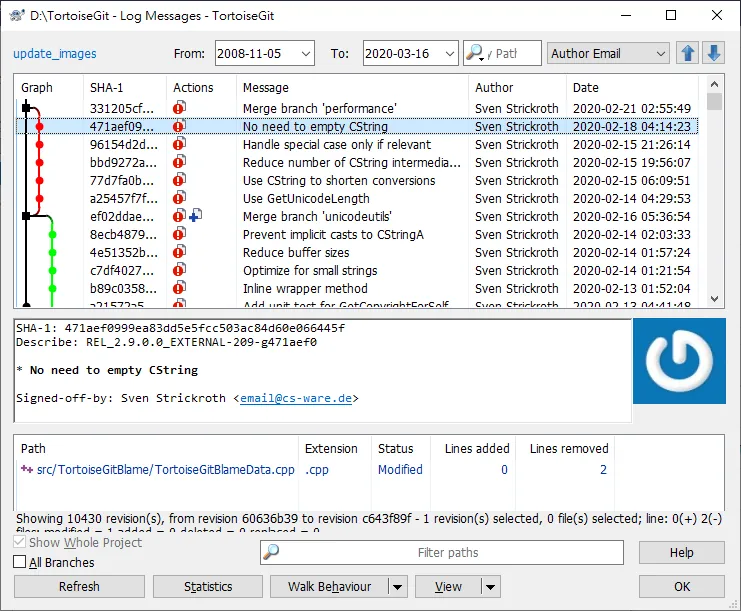
- Log dialog. Browse history with a revision graph, search and blame.
- TortoiseGitMerge. Diff viewer and three-way merge tool for resolving conflicts.
- Language packs. Separate installers translate the interface into dozens of languages.
Who it is for
Good fit
Windows users who prefer working in Explorer, and teams moving from TortoiseSVN.
Look elsewhere
People who want a standalone Git app with a dashboard, or users on macOS or Linux.
Pros and cons
Pros
- Works directly in Explorer
- Clear overlay icons
- Good merge and diff tools
- Open source
Cons
- Requires Git for Windows separately
- Windows only
- Overlay icons can slow Explorer in big folders
How to install TortoiseGit
Install Git for Windows first. The download button gets the 64-bit MSI from the official download server. Language packs are separate installers on the same page. After setup, the first-start wizard asks for the path to git.exe and your name and email.
Questions about TortoiseGit
Is TortoiseGit free?
Yes. It is open source under the GNU GPL v2 and free for commercial use.
Does TortoiseGit include Git?
No. Install Git for Windows first, then TortoiseGit.
Why are TortoiseGit overlay icons missing?
Windows only shows a limited number of overlay icon handlers, and other apps such as cloud storage clients can take the slots.


