

Our verdict: JabRef is the natural reference manager for anyone writing in LaTeX: the library is a plain .bib file that works with any TeX editor and version control. Word users and people who want cloud sync and a polished PDF reader will be happier with Zotero.
About JabRef
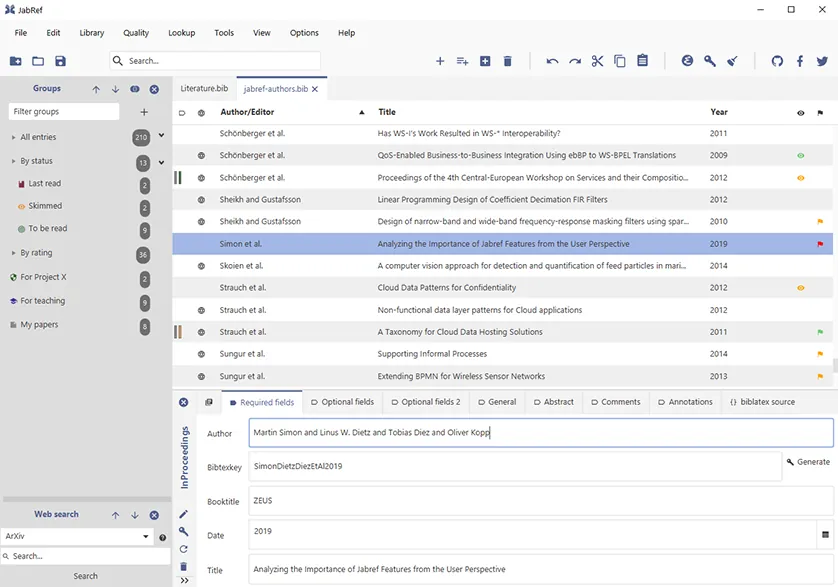
JabRef is free and open-source software under the MIT license, developed since 2003 by a volunteer team of researchers. Your library is saved as a plain-text BibTeX or biblatex file, so it can be shared through Dropbox or Git without lock-in. Teams can also sync a library through an SQL database.
New entries can be added manually, by DOI, ISBN, PubMed ID or arXiv ID, from PDF metadata, or by searching catalogs such as CrossRef, Google Scholar, IEEE Xplore, PubMed, arXiv and Springer. A browser extension imports references with one click. JabRef groups entries, finds and merges duplicates, generates citation keys, renames attached PDFs and pushes citations to LaTeX editors such as TeXstudio, LyX and Emacs, or into Word and LibreOffice.
What it does well
- Native BibTeX and biblatex. The library is a plain .bib file usable by any LaTeX setup.
- Online catalog search. Search CrossRef, Google Scholar, IEEE Xplore, PubMed, arXiv, Springer and more.
- Fetch by identifier. Complete entries from a DOI, ISBN, PubMed ID or arXiv ID.
- Cite in your editor. Push citation keys to TeXstudio, LyX, Emacs, Vim and other editors; Word and LibreOffice supported.
- Cleanup tools. Find and merge duplicates, fix common mistakes and rename attached files automatically.
Who it is for
Good fit
Students and researchers who write papers and theses in LaTeX.
Look elsewhere
People who mainly write in Word and want cloud sync and a built-in PDF annotator.
Pros and cons
Pros
- Free and open source
- Plain .bib library with no lock-in
- Strong metadata fetching by DOI, ISBN and arXiv ID
- Works with LaTeX editors and Word
Cons
- No built-in cloud sync; you share the .bib file yourself
- Interface is dense for people new to BibTeX
- Word integration is less polished than in Zotero or Mendeley
How to install JabRef
Download the Windows MSI from the latest stable release on GitHub; avoid the releases marked Pre-release. A portable ZIP is also available there. Install the JabRef browser extension from the official site to import references from web pages.
Questions about JabRef
Is JabRef free?
Yes. JabRef is free and open source under the MIT license, and the team says it always will be.
Does JabRef work with Microsoft Word?
Yes. It can insert and format citations in Word and LibreOffice, though it is designed mainly for LaTeX.
Can I share a JabRef library?
Yes. The library is a text file you can share through cloud storage or Git, or sync through an SQL database.


