

Our verdict: LaunchBox is one of the most complete ways to turn a scattered folder of emulators and PC games into a good-looking, searchable library. The free version covers importing and launching games. The TV-style Big Box mode, themes and controller automation need a paid Premium license, and the download link arrives by email.
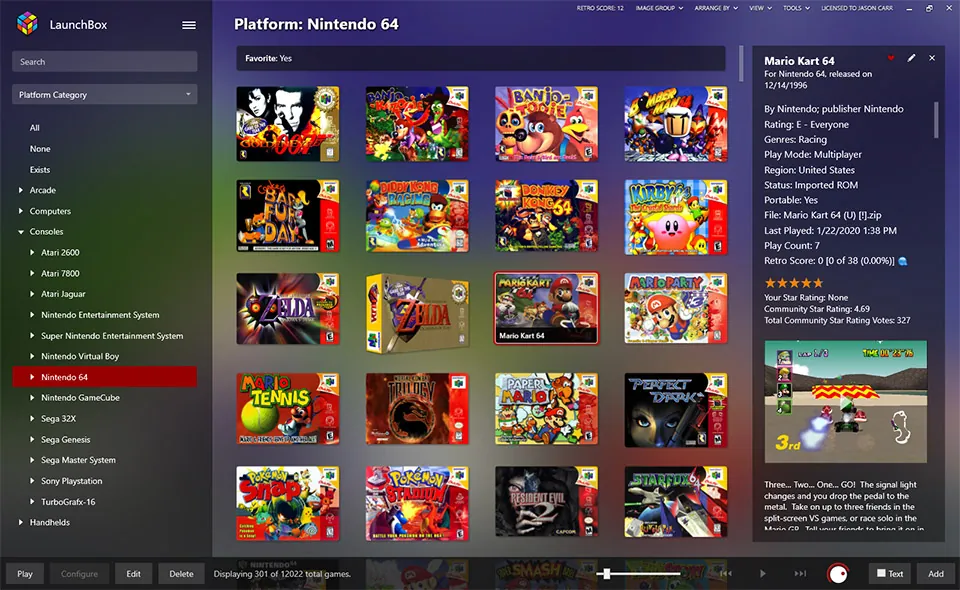
About LaunchBox
LaunchBox is a portable, box-art-based games database and launcher for DOSBox, emulators and PC games. It imports games from your own ROM folders and PC storefronts, downloads box art, screenshots and metadata from the LaunchBox Games Database, and can manage and set up emulators for you. It does not include any games, ROMs or BIOS files; you add dumps of games you own.
The free version is the core library and launcher. Premium adds Big Box, a full-screen interface designed for TVs and arcade cabinets, custom themes, startup and pause screens, controller automation and more display options. A Premium license costs $30 with one year of updates or $75 with lifetime updates, is DRM-free and can be used on all your personal devices.
What it does well
- Game importing. Imports ROM folders, DOS games and games from PC storefronts into one library.
- Media and metadata. Downloads box art, screenshots, videos and game details automatically.
- Emulator management. Sets up emulators and links each platform to the right one.
- Playlists and editing. Group games into playlists and edit metadata in bulk.
- Big Box (Premium). A TV-friendly full-screen interface controlled with a gamepad.
Who it is for
Good fit
Collectors with many emulated and PC games who want a single, visual library on a desktop PC.
Look elsewhere
Anyone looking for downloadable games, or users who want an open-source frontend; Big Box on a TV needs a paid license.
Pros and cons
Pros
- Imports emulated and PC games in one place
- Rich box art and metadata downloads
- Portable installation folder
- DRM-free Premium license
Cons
- Download link is sent by email
- Big Box, themes and controller automation need Premium
- Closed source and Windows-focused
How to install LaunchBox
The official download page asks for your email address and sends the download link there; check the spam folder if it does not arrive. The installer extracts LaunchBox into a folder you choose and may update DirectX and .NET. LaunchBox is portable, so you can later move the whole folder to another drive or PC. Add your own game folders and emulators in the import wizard.
Questions about LaunchBox
Is LaunchBox free?
Yes, the core LaunchBox app is free. Premium, which adds Big Box, themes and more, costs $30 with a year of updates or $75 with lifetime updates.
Does LaunchBox come with games or ROMs?
No. LaunchBox only organizes and launches games. You need your own game dumps and the emulators to run them.
What is Big Box?
Big Box is the full-screen, gamepad-friendly mode for TVs and arcade cabinets. It is part of LaunchBox Premium.


