

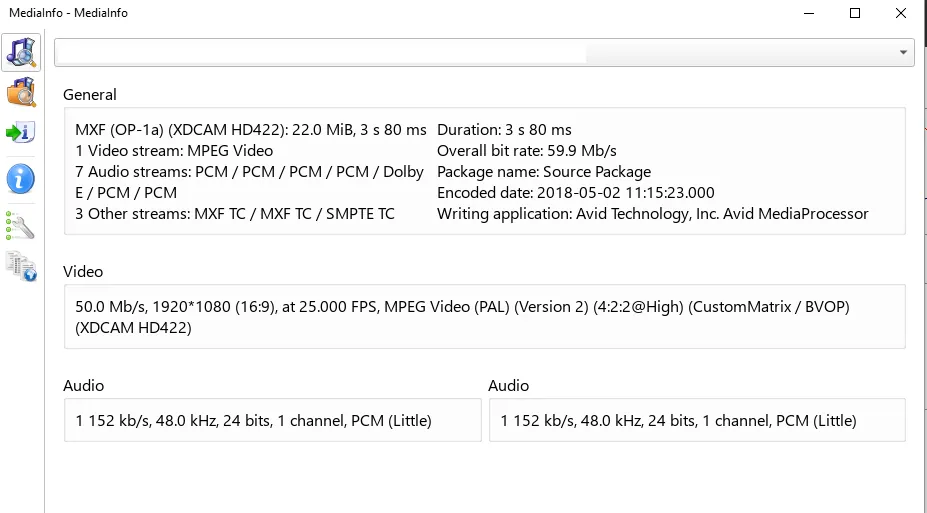
Our verdict: MediaInfo answers the question "what exactly is inside this file?" in a second. It lists the container, video and audio codecs, bitrates, HDR data, languages and subtitle tracks. It only reads files; it cannot convert or repair them.
About MediaInfo
MediaInfo is developed by MediaArea and released under a BSD-style open-source license. It comes as a graphical program, a command-line tool and a library that other programs, including many players and converters, use to read media details.
It reads MP4, MKV, AVI, MXF, MPEG-TS, unprotected DVD and Blu-ray files and many more. For each track it shows format, profile, bitrate, frame rate, colour space, bit depth, channels, language and more, and it can export the report as text, CSV or HTML.
What it does well
- Detailed track data. Codec, profile, bitrate, frame rate, resolution, HDR and colour information.
- Audio and subtitle info. Channels, sample rate, languages and subtitle formats for every track.
- Several views. Basic, sheet, tree and text views, plus custom templates.
- Export. Saves reports as text, CSV or HTML.
- Explorer integration. Opens a file's details from the right-click menu or by drag and drop.
Who it is for
Good fit
Anyone who needs to check why a file will not play, or confirm codecs and quality before converting.
Look elsewhere
People looking for a tool to convert, edit or repair media files.
Pros and cons
Pros
- Fast and very detailed
- Reads almost every format
- Exports reports
- No ads
Cons
- Read-only: cannot edit or fix files
- Technical output that beginners may find hard to read
How to install MediaInfo
Download the 64-bit installer and run it. Turn on the Explorer context-menu option if you want to check files with a right click. In the program, switch View to Tree or Text to see every field instead of the short Basic summary.
Questions about MediaInfo
Is MediaInfo free?
Yes. MediaInfo is open source under a BSD-style license and free on Windows.
How do I see all details in MediaInfo?
Open the View menu and choose Tree or Text. The default Basic view shows only a summary.
Can MediaInfo tell if a video is HDR?
Yes. It shows HDR format, colour primaries, transfer characteristics and mastering display data when present.


